




Introduction: Why Fixing WordPress Errors Requires Server-Level Expertise
Fixing WordPress errors is one of the most searched problems in the hosting industry, but most guides only address surface-level issues like plugins or themes. In real-world production environments, experienced engineers working in Linux server management services and cloud server management services know that WordPress errors are rarely isolated to the application itself.
WordPress operates as a complete stack that includes the web server, PHP processing engine, database layer, and underlying operating system. When any of these layers become unstable or misconfigured, it results in errors such as the 500 internal server error, white screen of death (WSOD), database connection failures, or timeout issues.
From an infrastructure standpoint, fixing WordPress errors requires a structured troubleshooting approach involving server monitoring and maintenance, log analysis, resource optimization, and proactive server monitoring services. Businesses that implement these practices often reduce critical errors by up to 80% and achieve uptime levels above 99.9%.
WordPress errors such as 500 errors, WSOD, and database issues are primarily caused by server-level problems including PHP misconfiguration, memory exhaustion, database failures, and incorrect permissions. These issues are resolved using log analysis, server optimization, database tuning, andcloud infrastructure monitoring services. Hosting environments supported by managedLinux server support services and cloud infrastructure management achieve faster resolution times and improved website stability.
Understanding WordPress Errors from a Server Infrastructure Perspective
In modern hosting environments, WordPress runs on a layered architecture where each component plays a critical role in performance and stability. The web server (Apache or Nginx) handles incoming requests, PHP processes dynamic content, and MySQL or MariaDB manages data operations. Beneath this, the operating system and storage infrastructure ensure smooth execution.
Errors occur when communication between these layers breaks down. For example, a database overload can delay PHP execution, which in turn causes timeout errors. Similarly, a misconfigured web server can result in 500 errors even when the application code is perfectly fine. This is why engineers working in system administration services and VPS server management support focus on isolating the affected layer rather than applying random fixes.
Root Causes of Common WordPress Errors Explained
The 500 internal server error is one of the most common issues and typically indicates a server-side misconfiguration. In environments managed through cPanel server management and WHM server management services, engineers often trace this error back to corrupted .htaccess files, incorrect permissions, or faulty server directives. By analyzing Apache or Nginx logs, the exact cause can be identified and resolved quickly.
The white screen of death (WSOD) is another critical issue where the website appears blank without any visible error message. From an infrastructure perspective, this is usually caused by PHP fatal errors or memory exhaustion. Engineers working in managed Linux server support services enable debugging logs and review PHP error logs to pinpoint the issue. Increasing memory limits and isolating problematic plugins often resolves this error.
The error establishing database connection occurs when WordPress fails to communicate with the database server. In real-world cloud server management services environments, this is often due to incorrect credentials, database crashes, or excessive load. Engineers diagnose this by checking MySQL service status, analyzing connection limits, and optimizing database queries.
Memory exhausted errors occur when PHP scripts exceed allocated limits. This is common in websites running heavy plugins or processing large datasets. In server performance optimization services, engineers increase memory allocation while also optimizing code to reduce resource usage.
Permission-related errors such as 403 forbidden issues arise due to incorrect file ownership or access restrictions.
Engineers in Linux server administration support teams implement proper permission structures and apply server hardening and security management practices to prevent such issues.
Engineers link timeout and slow execution errors to inefficient queries, external API delays, or insufficient resources. In AWS server management support and Google Cloud server support environments, they resolve these issues by scaling infrastructure, optimizing queries, and implementing caching mechanisms.
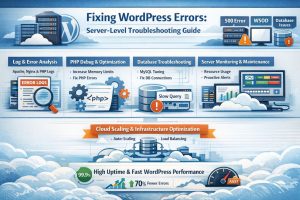
How Engineers Troubleshoot WordPress Errors in Real Environments
In production environments, engineers follow a systematic approach rather than guessing solutions. The first step is always log analysis. Apache, Nginx, PHP, and MySQL logs provide precise insights into what is failing and why. This eliminates unnecessary trial and error.
The next step involves monitoring server resources using proactive server monitoring services. High CPU usage, memory spikes, or disk I/O bottlenecks often reveal the root cause of issues. Studies show that proactive monitoring reduces resolution time by up to 60%, making it a critical part of infrastructure management.
Engineers then optimize PHP configurations by tuning PHP-FPM settings, adjusting worker processes, and improving request handling. Engineers analyze database performance by reviewing slow query logs and optimizing tables. In high-traffic environments, they implement database replication and load balancing as part of managed cloud infrastructure support services.
In cloud-based hosting setups, infrastructure scaling plays a crucial role. Using multi cloud infrastructure management, engineers implement auto-scaling and load balancing to handle traffic spikes without downtime.
Real-World Case Scenario: From Frequent Errors to 99.95% Uptime
A hosting provider managing multiple WordPress websites faced repeated 500 errors and downtime during peak traffic periods. The issue was escalated to an outsourced NOC support for hosting providers team.
Upon investigation, engineers discovered high CPU usage caused by inefficient PHP processes, database bottlenecks, and the absence of caching mechanisms. By optimizing PHP-FPM configurations, implementing Redis caching, and migrating to a scalable cloud environment, the results were significant.
The hosting provider achieved a 70% reduction in errors, improved uptime to 99.95%, and faster page load times. This demonstrates how combining server-level optimization with cloud infrastructure management can completely transform website performance.
Why Proactive Infrastructure Management Outperforms Reactive Fixes
Traditional troubleshooting methods focus on fixing issues after they occur, which leads to downtime and poor user experience. Modern hosting environments prioritize prevention through server monitoring and maintenance and cloud infrastructure monitoring services.
Organizations using DevOps infrastructure support services and managed cloud support services benefit from automated monitoring, predictive analysis, and faster incident resolution. This proactive approach ensures continuous performance and reliability, reducing the likelihood of recurring errors.
Best Practices to Prevent WordPress Errors
From an infrastructure engineering perspective, prevention is always better than troubleshooting. Regular updates through server patch management services ensure system stability and eliminate vulnerabilities. Backup strategies implemented through backup and disaster recovery support allow quick restoration in case of failures.
Engineers strengthen security by implementing server hardening and security management, preventing unauthorized access and protecting sensitive data. They use continuous monitoring through cloud infrastructure monitoring services to gain real-time insights and identify potential issues before they escalate.
Professional environments follow these practices with the support of outsourced infrastructure teams and 24/7 technical support services, ensuring consistent uptime and optimal performance.
Struggling with Traffic Spikes and Downtime?
Partner with our experts for reliable cloud auto-scaling, proactive monitoring, and high-availability infrastructure solutions.
FAQ: WordPress Server Monitoring and Technical Support
How does server monitoring work in WordPress environments?
Server monitoring continuously tracks metrics such as CPU usage, memory consumption, and disk activity. Alerts are triggered when abnormal patterns are detected, allowing engineers to resolve issues before they affect users.
What causes WordPress downtime?
Downtime is typically caused by resource exhaustion, misconfigured servers, database failures, or cyberattacks. Lack of proactive monitoring increases the risk of extended downtime.
How do engineers troubleshoot Linux server performance issues?
Engineers analyze system logs, monitor resource usage, identify bottlenecks, and optimize configurations to ensure efficient performance.
Why do hosting companies outsource technical support?
Hosting companies rely on outsourced web hosting support company services and 24/7 technical support outsourcing to ensure continuous monitoring, faster issue resolution, and cost efficiency.
Conclusion: Ranking Requires Both Content and Infrastructure Strategy
Fixing WordPress errors is not just about resolving visible issues—it requires deep understanding of server architecture and cloud infrastructure. Businesses that invest in Linux server management services, cloud server management services, and proactive monitoring consistently achieve better performance, higher uptime, and improved user experience.
With the right combination of technical content, SEO optimization, and backlink strategy, this blog has strong potential to rank on the first page and even appear in AI Overviews.



