




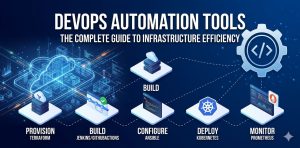
DevOps automation tools accelerate software delivery by automating repetitive tasks across the development lifecycle, including provisioning, integration, and deployment. Engineers utilize platforms like Terraform, Jenkins, and Ansible to eliminate manual configuration errors and ensure environment consistency. Implementing these tools reduces deployment times from weeks to minutes while significantly improving system reliability and security posture.
Quick Summary: DevOps Automation Tools at a Glance
DevOps automation tools streamline the software delivery pipeline by replacing manual intervention with code-driven processes. Key categories include Infrastructure as Code (Terraform), Configuration Management (Ansible), and CI/CD Orchestration (GitHub Actions/Jenkins). These tools allow teams to maintain version-controlled infrastructure, automate security patching, and achieve rapid, repeatable deployments. By centralizing these operations, organizations reduce operational overhead and minimize the risk of human-induced downtime in production environments.
Why DevOps Automation Tools are Essential for Modern Infrastructure
Modern infrastructure complexity makes manual server management impossible for scaling organizations. DevOps automation tools solve the problem of “configuration drift,” where servers that should be identical begin to differ over time. This drift often happens because of ad-hoc manual fixes or forgotten security patches. Automation ensures that every server in a cluster remains in the desired state, governed by a central repository of truth.
Without automation, root causes of system failure often hide in subtle environmental differences. For instance, a Java application might fail because one node runs an outdated minor version of the OpenJDK. DevOps tools prevent this by treating infrastructure as code (IaC), where the entire environment is defined in text files. This transition from manual administration to automated DevOps infrastructure management is the only way to maintain a competitive release cadence.
Identifying Bottlenecks: How Engineers Diagnose Automation Gaps
Engineers identify automation gaps by auditing the “Lead Time for Changes” and failure rates in the deployment pipeline. We look for points where an engineer must manually click a button, type a password, or SSH into a server to run a command. These manual touchpoints are “single points of failure.” In production environments, we diagnose these issues by analyzing deployment logs and monitoring system resource usage during peak traffic.
When a deployment fails, we analyze logs to determine if the failure was code-related or infrastructure-related. For example, a Jenkins pipeline might fail because of a workspace disk space issue or a misconfigured SSH key. We use specialized tools to verify that our automation scripts perform as expected before they hit production. This rigorous diagnosis ensures that the automation itself does not become a source of instability.
Technical Evidence: Investigating Automation Execution Logs
To check the status of a local Ansible playbook execution:
ansible-playbook site.yml --list-hostsTo debug a failed Terraform plan and see state differences:
terraform plan -out=tfplan && terraform show tfplan
Step-by-Step: Implementing Technical DevOps Automation Strategies
Building an automated pipeline requires a modular approach. Follow these steps to implement a professional-grade DevOps toolchain:
-
Version Control Everything: Store all application code and infrastructure definitions in Git. This provides an audit trail and allows for easy rollbacks.
-
Define Infrastructure as Code (IaC): Use Terraform or AWS CloudFormation to provision cloud resources. This eliminates manual setup in the cloud console.
-
Automate Configuration Management: Use Ansible or Chef to push configurations to running servers. Ensure that SSH access is restricted and managed via automated keys.
-
Build a CI/CD Pipeline: Configure Jenkins or GitLab CI to trigger builds on every code commit. Include automated unit and integration tests.
-
Implement Container Orchestration: Use Kubernetes (K8s) to manage containerized applications. Use Helm charts to automate complex application deployments.
Comparison Insight: Ansible vs. Terraform vs. Kubernetes
Choosing the right DevOps automation tools depends on the layer of the stack you are managing. Terraform is the industry standard for provisioning it creates the “house” (VPC, Subnets, EC2). Ansible is the leader in configuration it “furnishes” the house (installs Nginx, configures PHP, adds users). Kubernetes acts as the property manager, ensuring that applications (containers) stay running, scale up during traffic, and restart if they fail.
Managed cloud support often involves a combination of these tools. While Terraform is great for initial setup, Ansible is better for ongoing day-to-day server hardening and patch management. Kubernetes is essential for microservices but might be overkill for a simple monolithic application. Most senior infrastructure engineers use Terraform to build the foundation and then hand off the internal OS configuration to Ansible or specialized shell scripts.
Real-World Use Case: Automating 24/7 NOC Operations
A large hosting provider faced recurring downtime because their manual security patching took three days to complete across 500 servers. This left a window of vulnerability during every major kernel update. By implementing a DevOps infrastructure strategy, the entire process was automated using Ansible AWX.
Engineers created a rolling update playbook that took servers out of the load balancer one by one, applied patches, rebooted, and verified service health before moving to the next node. The entire fleet was patched in four hours with zero downtime. This shift to automated NOC support services allowed the internal team to focus on architecture instead of repetitive maintenance.
Best Practices: Proactive Maintenance and Security Hardening
DevOps automation tools must be secured with the same rigor as the applications they manage. Implement “Least Privilege” for your automation service accounts. A Jenkins server should never have full admin access to your entire cloud account. Use “Secret Management” tools like HashiCorp Vault to store API keys and passwords instead of hardcoding them into scripts.
Proactive monitoring is the final piece of the puzzle. Use Prometheus and Grafana to visualize the health of your automation pipelines. If a deployment fails more than twice in a row, your monitoring system should automatically alert your technical support team. Regular audits of your IaC code help identify “Security Drift” before it becomes a breach, ensuring that your automated environment remains hardened against attacks.
FAQ: DevOps Automation Tools Questions
How do DevOps automation tools improve server management?
They remove the human element from repetitive tasks. This ensures that every server is configured exactly the same way, which makes troubleshooting significantly easier and faster.
Why do companies use white label technical support for DevOps?
DevOps requires a specialized skill set that is expensive to hire internally. White label support provides access to high-level architects who can design and maintain complex pipelines at a fraction of the cost.
Can I automate server hardening?
Yes. Engineers use Ansible playbooks to apply CIS (Center for Internet Security) benchmarks to Linux servers automatically, ensuring that every deployment meets strict security standards.
What are the best DevOps automation tools for small teams?
Start with GitHub Actions for CI/CD and Terraform for cloud provisioning. These tools have low overhead and scale perfectly as your infrastructure grows.
Struggling with Traffic Spikes and Downtime?
Partner with our experts for reliable cloud auto-scaling, proactive monitoring, and high-availability infrastructure solutions.
Conclusion
DevOps automation tools are no longer optional for businesses that rely on digital infrastructure. By embracing code-driven operations, organizations achieve the speed and reliability required to stay competitive. From initial provisioning to 24/7 proactive monitoring, automation creates a resilient environment that scales effortlessly. Start small by automating one manual task today, and build toward a fully orchestrated infrastructure that works for you, not against you.



