




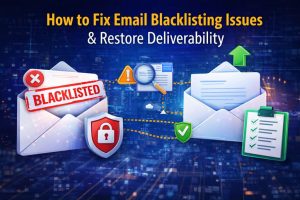
Email Blacklisting Issues Explained: Causes, Impact & How Engineers Restore Deliverability
Email blacklisting issues occur when your server IP is flagged by spam databases, which causes emails to land in spam folders or fail delivery completely. Engineers fix email blacklisting by identifying spam sources, analyzing server logs, cleaning mail queues, securing compromised accounts, and submitting delisting requests. In real hosting environments, resolving blacklisting requires server-level troubleshooting, proactive monitoring, and proper email authentication to restore deliverability and prevent recurrence.
Email blacklisting directly impacts business communication, transactional emails, and customer trust. Therefore, infrastructure engineers working in cPanel server management, Plesk server management services, and cloud server management services treat this issue as a high-priority incident. As a result, they follow a structured workflow that includes log analysis, system cleanup, and security hardening to ensure long-term email reliability.
Quick Summary:
Email blacklisting occurs when a server sends unusually high volumes of emails or activity that triggers spam filters and blacklist databases. Engineers fix this by analyzing mail logs, identifying compromised accounts or scripts, cleaning the mail queue, enforcing authentication (SPF, DKIM, DMARC), and requesting IP delisting. Hosting providers rely on proactive server monitoring services, server hardening and security management, and managed cloud infrastructure support services to prevent blacklisting and maintain high deliverability.
Understanding the Problem: What Is Email Blacklisting in Simple Terms
In simple terms, email blacklisting means that your server IP is marked as untrusted by receiving mail servers. As a result, emails sent from that IP are either rejected or delivered to spam folders. This issue often affects hosting environments where multiple domains share the same IP, especially in cPanel server support services and Plesk server management services.
However, blacklisting does not happen randomly. Instead, it occurs when spam detection systems identify abnormal email behavior such as high sending rates, poor authentication, or repeated delivery failures. Therefore, engineers focus on identifying patterns rather than isolated events.
Why Email Blacklisting Happens (Real Server-Level Causes)
In real-world environments, email blacklisting typically results from multiple underlying issues rather than a single failure. For example, compromised websites, weak passwords, or vulnerable plugins can allow attackers to send bulk spam emails. In addition, misconfigured email servers without proper authentication often trigger spam filters.
Another common cause is poor sender reputation. When a server sends emails to invalid addresses, high bounce rates negatively impact reputation. Over time, this leads to blacklisting. Furthermore, shared hosting environments increase risk because one compromised account can affect all users on the same IP.
Therefore, engineers analyze not only the volume of emails but also the behavior, frequency, and quality of outgoing messages.
How Engineers Detect Email Blacklisting (Real Workflow)
Engineers begin troubleshooting by checking the mail queue. A sudden spike in queued emails often indicates spam activity or delivery issues. For example:
exim -bp
If the queue contains thousands of emails, engineers immediately investigate further. In addition, they analyze the total number of queued messages:
exim -bp | exiqgrep -i | wc -l
At the same time, engineers review Exim logs:
/var/log/exim_mainlog
These logs provide detailed insights into email activity, including sender paths, authentication attempts, and delivery failures. As a result, engineers can identify abnormal patterns quickly.
Advanced Log Analysis: Finding Hidden Spam Sources
In complex environments, engineers go beyond basic checks. They perform deep log analysis to identify hidden spam sources.
For example, to find directories generating the most emails:
grep “cwd=” /var/log/exim_mainlog | awk ‘{print $6}’ | sort | uniq -c | sort -nr | head
To identify PHP scripts sending emails:
grep “X-PHP-Script” /var/log/exim_mainlog | sort | uniq -c | sort -nr | head
These commands help engineers detect compromised scripts or accounts. As a result, they can isolate the exact source of spam activity.
Step-by-Step: How Engineers Fix Email Blacklisting
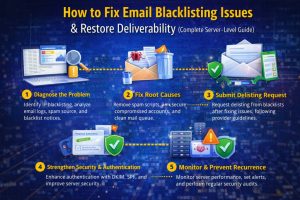
Once the root cause is identified, engineers follow a structured process to resolve the issue.
First, they clean the mail queue by removing spam emails. Then, they disable compromised accounts and reset credentials.
In addition, they scan the server for malware using tools like ClamAV:
clamscan -r /home
Next, they verify email authentication by checking SPF, DKIM, and DMARC records:
dig TXT domain.com
If authentication is missing or misconfigured, they correct DNS records to improve deliverability.
After cleanup, engineers secure the server by implementing rate limits, enabling SMTP authentication, and blocking unauthorized access. Finally, submit delisting requests to blacklist providers.
SMTP-Level Debugging (Deep Technical Insight)
In advanced scenarios, engineers test SMTP communication directly to confirm blacklisting.
For example:
telnet mail.domain.com 25
or
openssl s_client -connect mail.domain.com:465
If the server returns errors such as “550 blocked by blacklist,” it indicates that the issue is related to the server’s IP reputation. This direct testing helps accelerate troubleshooting.
Real-World Use Case: Shared Hosting Blacklisting Incident
In one real production environment, multiple domains experienced email delivery failures simultaneously. Engineers analyzed logs and identified a compromised WordPress plugin sending bulk emails.
They removed the malicious script, cleaned the mail queue, and implemented rate limits. In addition, they patched vulnerabilities and secured accounts.
As a result, the server was delisted within 24 hours, and email deliverability returned to normal. This scenario highlights the importance of root cause analysis and proactive monitoring.
How Proactive Monitoring Prevents Blacklisting
Blocklisting rarely occurs without warning. Engineers monitor key metrics such as mail queue size, email sending rate, and authentication failures.
Using cloud infrastructure monitoring services, they configure alerts that trigger when abnormal behavior occurs. For example, if the mail queue suddenly increases, engineers investigate immediately.
As a result, proactive monitoring prevents blocklisting incidents before they impact users.
Security Hardening and Prevention Strategies
Engineers implement multiple layers of security to prevent blacklisting. They disable open relays, enforce SMTP authentication, and restrict outbound email limits.
For example:
netstat -tulnp | grep :25
This ensures that only authorized services use SMTP ports.
In addition, tools like Fail2Ban block brute force attacks. Furthermore, engineers implement server hardening and security management to protect infrastructure from unauthorized access.
Cloud Integration and Email Deliverability Optimization
Modern hosting environments use hybrid and cloud-based infrastructure. Therefore, engineers integrate AWS server management support, Azure cloud support services, and Google Cloud server support to distribute email traffic.
In some cases, external SMTP relays are used to improve deliverability. As a result, multi cloud infrastructure management enhances scalability and reduces the risk of blocklisting.
Struggling with Traffic Spikes and Downtime?
Partner with our experts for reliable cloud auto-scaling, proactive monitoring, and high-availability infrastructure solutions.
FAQ: Email Blacklisting, Troubleshooting & Server Monitoring
How do I remove my server IP from a blacklist?
First, identify and fix the root cause such as spam scripts or compromised accounts. After that, clear the mail queue and submit a delisting request to the relevant blacklist providers.
What causes email blacklisting?
Email blocklisting occurs due to spam activity, weak authentication, high bounce rates, or compromised systems.
How do engineers troubleshoot email issues in Linux servers?
Engineers analyze logs, check mail queues, monitor system performance, and use tools like Exim and SMTP debugging commands.
How does server monitoring prevent downtime and email failures?
Server monitoring tracks system metrics and detects anomalies early. Therefore, engineers resolve issues before they impact users.
Conclusion
Email blocklisting is not just an email issue but a server-level problem that affects performance, security, and business communication. Therefore, engineers approach it with a structured workflow that includes log analysis, system cleanup, and proactive monitoring.
By implementing proactive server monitoring services, server hardening, and managed cloud infrastructure support services, organizations can restore deliverability and prevent future incidents. Ultimately, maintaining a strong sender reputation ensures reliable communication and long-term infrastructure stability.



