





MySQL crashes occur due to memory exhaustion (OOM), storage failures, or InnoDB log corruption, leading to immediate database unavailability. Engineers recover the system by performing a systematic root cause analysis, verifying data integrity through InnoDB crash recovery, and restoring from point-in-time backups if corruption exists. Implementing a tiered server management strategy and proactive monitoring prevents these failures from escalating into permanent data loss.
Introduction: The Criticality of Database Stability
MySQL serves as the stateful heart of most modern web applications. When the database process terminates unexpectedly, the entire application stack halts, leading to significant revenue loss and user distrust. High-availability DevOps infrastructure relies on the database’s ability to remain consistent even during hardware or software failure. Understanding the mechanics of a crash is the first step toward building a resilient environment that supports business continuity.
Managing production databases requires a shift from reactive patching to an architect-level recovery mindset. A crash is rarely an isolated event; it is a symptom of underlying resource contention or configuration drift. Mastering the recovery flow ensures that your managed cloud support remains effective under pressure.
| Feature | Description | Technical Impact |
|---|---|---|
| Primary Root Causes | OOM Kill, Disk Full, InnoDB Corruption | Immediate service termination |
| Initial Diagnosis | Reviewing error.log and dmesg |
Identifies trigger of the crash |
| Recovery Mechanism | InnoDB Redo Log Playback | Ensures ACID compliance |
| Data Safety | Binlog Point-in-Time Recovery (PITR) | Minimizes Data Loss (RPO) |
| Prevention | Monitoring and Resource Quotas | Eliminates future downtime |
The Problem: Why MySQL Processes Terminate in Production
Production MySQL instances typically crash due to three specific infrastructure failures. The most common is the Linux Out-of-Memory (OOM) Killer. When the OS runs out of RAM, it selects the most resource-intensive process to kill to prevent a total kernel panic. Because MySQL often allocates large buffers (like the innodb_buffer_pool_size), it becomes the primary target. This happens when engineers over-provision the buffer pool without leaving enough headroom for the OS and temporary threads.
Storage exhaustion is the second silent killer. If the disk reaching 100% capacity occurs, MySQL cannot write to the binary log or redo log. InnoDB requires a “handshake” with the filesystem to guarantee persistence. When the filesystem rejects a write operation, the MySQL daemon (mysqld) enters a safety shutdown to prevent data corruption. Finally, hardware-level failures or improper shutdowns can lead to InnoDB page corruption, where the checksum on disk does not match the data in memory.
Diagnosis: Identifying the Root Cause via Technical Evidence
Senior architects never “just restart” the service. We must first verify why it stopped to ensure it doesn’t enter a crash loop.
1. The Linux Kernel Perspective
Check the system message buffer to see if the OOM Killer was invoked. This is the first step in Linux server management for any crashed process.
dmesg -T | grep -i “out of memory”
If you see Killed process (mysqld), the root cause is memory over-allocation. You must adjust your my.cnf limits.
2. The MySQL Error Log
The MySQL error log (usually located at /var/log/mysql/error.log) contains the definitive narrative of the crash. We look for specific InnoDB signals.
journalctl -u mysql -n 100 –no-pager
Look for [ERROR] InnoDB: Database page corruption on disk or [Note] InnoDB: Rolling back truncated transaction. These indicate whether the system can perform an automatic recovery or if manual intervention via innodb_force_recovery is necessary.
Step-by-Step Resolution: Production Recovery Workflow
When the database is down, follow this logical technical walkthrough to restore service safely.
Step 1: Initial Health Check and Filesystem Repair
Before starting MySQL, ensure the storage is healthy. A full disk will prevent a restart. Check utilization and clear temporary logs or old backups if necessary.
df -h
du -sh /var/lib/mysql/
If the disk is healthy, check the file permissions. Sometimes, an improper backup script might have changed ownership of the data directory.
chown -R mysql:mysql /var/lib/mysql/
Step 2: Automated InnoDB Crash Recovery
Start the MySQL service normally. InnoDB is designed to be crash-resilient. Upon startup, it scans the Redo Logs to find transactions that were committed but not yet written to the data files. It also rolls back uncommitted transactions using the Undo Logs.
systemctl start mysql
Monitor the logs during this phase. Do not interrupt this process, as it can take several minutes for large buffer pools or high-transaction volumes.
Step 3: Handling Corrupt Pages (The “Force Recovery” Path)
If MySQL fails to start due to corruption, you must use the innodb_force_recovery setting in your configuration file. This bypasses specific integrity checks to let you dump your data.
-
Level 1-3: Safe for most scenarios; prevents certain background threads from running.
-
Level 4-6: Dangerous; can cause permanent data loss. Use these only to run
mysqldumpand then rebuild the instance.
[mysqld]
innodb_force_recovery = 1
Step 4: Point-in-Time Recovery (PITR)
If data was lost or corrupted beyond repair, restore your last full backup. Once restored, use the binary logs (mysqlbinlog) to replay all transactions that occurred between the backup time and the crash time. This minimizes your Recovery Point Objective (RPO).
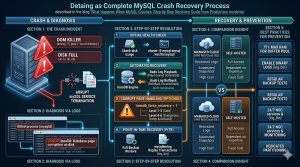
Comparison Insight: Managed Cloud vs. Self-Hosted Recovery
The recovery experience differs significantly depending on your cloud infrastructure management strategy.
| Factor | Self-Hosted (Bare Metal/VPS) | Managed (AWS RDS / Google Cloud SQL) |
|---|---|---|
| Control | Full access to files and logs | Restricted to API and GUI logs |
| Recovery Speed | Dependent on engineer expertise | Automated snapshots and multi-AZ failover |
| Customization | Can tune kernel and filesystem | Limited to provider-defined parameters |
| Cost | Fixed server costs | High premium for managed automation |
For organizations without a 24/7 internal team, white label technical support for self-hosted instances often provides the best balance of control and expert recovery speed.
Real-World Case Study: Recovering a High-Traffic E-commerce DB
A client experienced a total MySQL crash during a “Black Friday” sale. The database served over 5,000 concurrent connections.
The Problem: The database crashed every time it reached 80% RAM utilization. The error log showed InnoDB: Fatal error: cannot allocate memory for the buffer pool.
Diagnosis: The server had 64GB of RAM. The innodb_buffer_pool_size was set to 60GB. However, each client connection required a sort_buffer_size and join_buffer_size. With 5,000 connections, the “per-thread” memory overhead exceeded the remaining 4GB of physical RAM, triggering the OOM Killer.
The Resolution: We reduced the buffer pool to 48GB to allow for thread overhead and OS caching. We implemented proactive monitoring with Zabbix to alert on “Memory Pressure” before the OOM Killer engaged. The site stayed online for the remainder of the sale with zero further crashes.
Best Practices: Proactive Database Hardening
Preventing crashes is superior to recovering from them. Apply these server hardening tips to your database environment.
-
Set Memory Limits Correctly: Never allocate more than 75% of total system RAM to the InnoDB Buffer Pool.
-
Enable Binary Logs: Always run with
log_binenabled. This is your only insurance policy for restoring data between backups. -
Implement 24/7 NOC Services: Ensure a human or automated system is monitoring for “Disk Low” or “Swap Usage” alerts.
-
Regularly Test Backups: A backup is not a backup until you have successfully performed a test restore.
-
Dedicated Partitioning: Keep your MySQL data directory on its own disk partition. This prevents a full root partition (due to logs) from crashing the database.
Struggling with Traffic Spikes and Downtime?
Partner with our experts for reliable cloud auto-scaling, proactive monitoring, and high-availability infrastructure solutions.
Conclusion: Building Resilient Data Architectures
MySQL crashes are intimidating, but they are manageable with a structured technical approach. By understanding the interaction between the Linux kernel and the InnoDB storage engine, engineers can recover from production incidents with minimal data loss. The key to long-term success lies in server management that prioritizes resource headroom and automated alerting.
For enterprises scaling their DevOps infrastructure, the focus must remain on high availability and backup and disaster recovery excellence. Whether you utilize AWS/Azure/GCP management or self-hosted bare metal, the architectural principles of data integrity remain the same. Secure your state, monitor your resources, and always keep your binary logs safe.



