




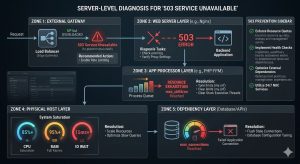
Fix the “503 Service Unavailable” error by identifying and resolving resource exhaustion, service crashes, or misconfigured application gateways at the server level. This error occurs when the server remains functional but cannot handle the current request due to temporary overloading or maintenance of the backend service. Engineers resolve 503 errors by auditing process limits, clearing stuck execution threads, and optimizing service-to-service communication.
Introduction: Why the 503 Error is a Critical Infrastructure Signal
The 503 Service Unavailable error serves as a protective circuit breaker for web servers and application gateways. Unlike a 404 error which indicates missing content, a 503 signals that the server’s “brain” is alive, but its “hands” are tied. In modern high-availability infrastructure, this error often appears during traffic spikes, backend service crashes, or when a server reaches its predefined architectural limits.
For a Senior Infrastructure Engineer, a 503 is a call to action for deep server management. It indicates a mismatch between incoming demand and the server’s capacity to process it. Ignoring these signals leads to prolonged downtime and a degraded user experience. Mastering server-level diagnosis ensures your DevOps infrastructure remains resilient and capable of self-healing during production incidents.
The Problem: Root Cause Analysis of Server-Level 503 Failures
A 503 error originates when a gateway (like Nginx) cannot get a valid response from a backend processor (like PHP-FPM or Node.js). The most frequent cause is Resource Exhaustion. When all available execution slots are filled, the server queues new requests. Once the queue exceeds the timeout threshold, the server drops the connection and returns a 503 status to prevent a total system kernel panic.
Another common culprit is Service Instability. This happens when a backend service crashes repeatedly due to misconfigured .conf files or memory leaks. In a Linux server management context, the OOM (Out of Memory) Killer might terminate the application process if it consumes too much RAM, leaving the web server with nothing to talk to. Additionally, misconfigured firewalls or local networking bottlenecks can prevent internal services from communicating, triggering the error even if the hardware is idle.
PREVENT 503 ERRORS & KEEP YOUR WEBSITE ONLINE
Are recurring 503 Service Unavailable errors disrupting your website performance and customer experience?
503 errors usually indicate deeper infrastructure problems such as resource exhaustion, overloaded application pools, backend service crashes, database bottlenecks, or I/O wait issues. Our engineers help diagnose and resolve server-level failures through proactive monitoring, performance optimization, process tuning, cloud scaling, and 24/7 infrastructure support to ensure maximum uptime and application stability.
Step-by-Step Resolution: A Senior Engineer’s Recovery Flow
1. Verify Service Status and Process Health
The first step is confirming that the backend service is actually running. Engineers check the status of the application pool or language processor. If the service is active but the 503 persists, the issue lies in capacity, not availability. We look for a high number of processes in a “Sleep” or “Wait” state, which suggests the application is stuck waiting for an external resource like a remote API or a locked database table.
2. Audit Process Limits and Queues
We examine the configuration of the application processor. If the max_children or max_threads limit is too low, the server will hit a ceiling during peak traffic. Increasing these limits provides immediate relief, but it must be balanced against the available physical RAM. Setting these values too high can lead to swapping, which slows the server down further and causes more 503 errors.
3. Clear Stale Connections and Locks
Sometimes, the server is “available,” but the database is not. If the database reaches its max_connections, the application will fail to initialize, resulting in a 503. Flushing stale database threads or increasing the connection limit is a standard part of cPanel/WHM support and Plesk management troubleshooting. This ensures the communication path from the web server to the data layer remains open.
4. Remove Software-Level Maintenance Triggers
Many Content Management Systems (CMS) and frameworks create a temporary file during updates. If an update fails or the script terminates midway, the server remains in “Maintenance Mode.” Identifying and removing these trigger files such as .maintenance in WordPress or storage/framework/down in Laravel restores service instantly without needing a full reboot.

Comparison Insight: Managed Cloud vs. Traditional Server Management
Solving 503 errors depends heavily on your cloud infrastructure management model.
-
Managed Cloud (AWS/Azure/GCP): In a managed environment, 503s are often handled by Auto-Scaling Groups. If a node fails or becomes overloaded, the system replaces it automatically. While this provides high availability, it can hide underlying code inefficiencies that drive up costs. Managed cloud support focuses on tuning load balancer thresholds.
-
Traditional Server Management: On a VPS or Bare Metal server, the engineer has full control over the kernel and process stack. This allows for surgical precision in fixing the root cause, such as tuning the TCP stack or optimizing disk I/O. However, it requires a higher level of white label technical support expertise to manage during a crisis.
Real-World Case Study: The “Silent” Resource Leak
An e-commerce platform experienced intermittent 503 errors every Tuesday morning. The CPU and RAM usage appeared normal, and the database had plenty of headroom.
The Diagnosis: Using proactive monitoring via Zabbix, our engineers discovered that a weekly cron job was triggering a massive backup script. While the script didn’t max out the CPU, it created an “I/O Wait” bottleneck. The disk was so busy writing the backup that the web server couldn’t read the application files fast enough, causing request timeouts.
The Resolution: We rescheduled the backup to an off-peak window and implemented “IO Niceness” to lower the script’s priority. By ensuring the web server always had priority access to the disk, the 503 errors disappeared completely. This demonstrates the value of proactive monitoring over reactive troubleshooting.
Best Practices: Proactive Maintenance and 503 Prevention
Preventing service unavailability requires a “Hardened” approach to infrastructure design.
-
Enforce Resource Quotas: Use cgroups or container limits to ensure one runaway process cannot starve the entire server. This is a core tenant of server hardening.
-
Implement Health Checks: Configure your load balancer or web server to ping the backend service every few seconds. If it doesn’t respond, the system should automatically restart the service or route traffic to a healthy node.
-
Optimize External Dependencies: If your app relies on third-party APIs, implement a “Timeout” policy. Do not let your server wait indefinitely for a response that might never come.
-
Utilize 24/7 NOC Services: Having a 24/7 NOC service ensures that if a 503 error occurs at 3 AM, a qualified engineer is already working on the resolution before your customers notice.
-
Automate Backup and Disaster Recovery: Ensure that your backup and disaster recovery plan includes rapid restoration of configuration files, as a corrupted config is a common 503 trigger.
Conclusion: The ROI of Authoritative Server Management
A 503 Service Unavailable error is a manageable hurdle when approached with a senior architectural mindset. By focusing on server-level diagnosis from process limits to I/O bottlenecks engineers can restore service and prevent future occurrences. Investing in high-quality server management and DevOps infrastructure doesn’t just fix errors; it builds a foundation of trust and reliability for your users.
Proactive hardening and authoritative diagnosis are the most effective ways to reduce downtime and improve the bottom line. Whether you are managing a single Linux server or a complex multi-cloud environment, the goal remains the same: 100% availability through expert-level oversight.



