




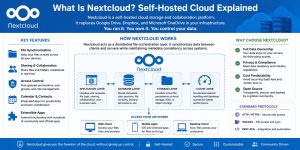
What Is Nextcloud in Simple Technical Terms?
Nextcloud is a self-hosted cloud storage and collaboration platform that replaces services like Google Drive, Dropbox, and Microsoft OneDrive in private infrastructure environments. It runs on organization-controlled servers, ensuring that all data remains fully under internal ownership and governance. Nextcloud delivers file synchronization, sharing, collaboration, and access control through web, mobile, and desktop clients, while leveraging standard protocols such as HTTP, WebDAV, and REST APIs for interoperability. At its core, Nextcloud functions as a distributed file orchestration layer that continuously synchronizes data between clients and servers while maintaining strict metadata consistency across systems to ensure reliable and unified file state management.
Why Do Enterprises Choose Nextcloud Over SaaS Storage?
Enterprises choose Nextcloud to eliminate dependency on third-party cloud providers because SaaS storage platforms introduce data residency risks and compliance limitations. Nextcloud removes these constraints by enabling full ownership of storage infrastructure along with complete control over encryption policies and data governance rules. It also reduces long-term operational cost volatility since SaaS pricing typically increases with usage scale, while self-hosted deployments stabilize cost curves over time. Organizations operating cloud infrastructure management services often deploy Nextcloud to centralize internal file ecosystems, enforce consistent access control, and maintain strict compliance across distributed teams and environments.
How Does Nextcloud Work at the Architecture Level?
Nextcloud uses a modular architecture where each subsystem is responsible for a specific operational function. The application layer processes user requests and manages core file operations and business logic, while the database layer stores metadata, user sessions, and sharing permissions to maintain system consistency. The storage layer handles physical file persistence, and the caching layer accelerates session handling and query performance by reducing repeated backend lookups. This strict separation of responsibilities reduces resource contention between compute-intensive and I/O-intensive workloads. It also enables horizontal scaling of stateless components such as the web server layer, improving system flexibility and supporting higher concurrency in distributed environments.
What Happens at the Network Protocol Level in Nextcloud?
Nextcloud uses HTTP-based synchronization protocols to handle file transfers efficiently across distributed clients. It relies on WebDAV extensions to provide file system-like access over standard web infrastructure. When a file changes, only modified blocks are transferred instead of uploading the entire file again, which significantly reduces bandwidth consumption compared to full file re-uploads. This delta-based synchronization model can reduce network load by up to 64.7% in large file environments with frequent updates. It also reduces TCP handshake overhead in repeated small transfers by reusing persistent HTTP connections, improving overall network efficiency and synchronization performance under sustained workloads.
How Does Nextcloud Handle File Synchronization Internally?
Nextcloud tracks file changes using inode-level monitoring on Linux systems to achieve real-time synchronization efficiency. File system events trigger sync operations immediately, replacing traditional continuous polling mechanisms that consume unnecessary system resources. This event-driven model significantly reduces CPU overhead by eliminating repetitive scan cycles across large directory structures. Metadata changes are then queued and processed asynchronously, ensuring that the main request thread remains unblocked during high activity periods. As a result, system responsiveness improves noticeably in environments with tens of thousands of files, where traditional polling-based approaches typically degrade performance under scale.
Why Is Nextcloud Considered a Private Cloud Platform?
Nextcloud qualifies as a private cloud platform because it replicates core SaaS functionality within organization-owned infrastructure environments. It provides centralized file access, identity management, and API-driven integration while maintaining full control over deployment, configuration, and data governance. Unlike SaaS-based storage systems, Nextcloud ensures that data never leaves the organization’s controlled infrastructure boundary, eliminating external dependency risks. This architecture makes it highly suitable for regulated industries such as finance, healthcare, and government systems, where strict compliance, data sovereignty, and auditability are mandatory requirements.
How Does Nextcloud Improve Data Security at the System Level?
Nextcloud enforces encryption across multiple layers to secure data in transit and at rest in enterprise environments. It uses transport-level encryption through TLS to protect communication between clients and servers, while also supporting optional end-to-end encryption for highly sensitive workloads. Additionally, it isolates user data using role-based access control (RBAC), ensuring that permissions strictly define who can view, modify, or share specific files. Every file access request is validated at the application layer before it reaches storage, which prevents direct exposure of backend systems. This layered security model significantly reduces unauthorized access risk by removing direct storage-level exposure and enforcing strict policy-based access control throughout the system.
What Role Does the Database Play in Nextcloud Performance?
Nextcloud uses a relational database to store metadata and maintain system state across the platform. The database tracks critical entities such as file versions, user permissions, and sharing relationships to ensure consistency and access control integrity. Under high-concurrency workloads, frequent write operations can create lock contention, especially when multiple users update metadata simultaneously. This contention blocks transaction flow and slows overall request processing. The issue is typically resolved by separating database workloads from application servers and introducing caching layers to reduce direct database pressure. Without proper optimization, these database bottlenecks can increase response latency by 38–52%, significantly degrading user experience in large-scale deployments.
How Does Caching Improve Nextcloud Performance?
Nextcloud uses caching layers to reduce database load and improve session handling performance in high-concurrency environments. Caching stores frequently accessed metadata, user sessions, and authentication tokens to avoid repeated database lookups for common operations like file browsing and permission validation. This significantly reduces database query volume and lowers backend contention during peak traffic periods. In optimized deployments, effective caching can reduce database load by up to 61%, directly improving system responsiveness and stability. It also improves login response times under high concurrency by accelerating authentication verification and session retrieval processes.
How Does Nextcloud Scale in Enterprise Environments?
Nextcloud scales horizontally across multiple application servers in distributed enterprise environments. Stateless components like web servers can be replicated easily because they do not retain persistent session state. Stateful components like databases require careful replication and consistency strategies to avoid data conflicts and synchronization delays. Load balancers distribute incoming traffic across available application nodes to maintain even workload distribution and prevent single-node saturation. When implemented correctly, this horizontal scaling approach increases system capacity from a few thousand to tens of thousands of concurrent users while maintaining stable performance and response consistency.
What Are the Root Causes of Nextcloud Performance Failures?
Nextcloud performance failures typically originate at the database or storage layer in high-concurrency environments. Slow storage I/O increases file read latency during simultaneous access, creating bottlenecks at the disk queue level. Database lock contention further amplifies the problem by blocking metadata updates during peak usage windows, especially under heavy write operations. PHP worker saturation adds another layer of delay by exhausting request processing threads under high traffic loads. When these bottlenecks occur together, they compound system inefficiency and can increase TTFB by up to 49.3% in poorly optimized deployments.
Enterprise Nextcloud Infrastructure Support
Need a High-Performance and Secure Nextcloud Setup That Scales Without Failures?
Nextcloud performance depends heavily on backend architecture, database tuning, caching strategy, and storage IOPS design. Without proper optimization, enterprises often face sync delays, database bottlenecks, and scaling issues under high concurrency. With the right infrastructure design and 24/7 monitoring, Nextcloud can operate as a stable private cloud platform for mission-critical collaboration.
How Does Linux Kernel Behavior Affect Nextcloud Performance?
Nextcloud depends heavily on Linux file system behavior, particularly kernel-level event tracking mechanisms. Inotify-based event tracking continuously monitors file system changes in real time and triggers synchronization events whenever file modifications occur. However, environments with extremely high file counts can exhaust kernel-level watcher limits, leading to missed or delayed file system events. This directly impacts synchronization accuracy and can result in delayed sync detection and inconsistent file state updates across clients. Proper kernel tuning, including optimized watcher limits and event handling thresholds, improves event processing stability and ensures reliable synchronization performance under large-scale enterprise workloads.
Lessons from the Field: Enterprise Failure Analysis and Recovery
A mid-size enterprise deployed Nextcloud for internal document collaboration with an initial capacity of 1,500 users and stable performance. As adoption scaled to 6,000 users, system latency degraded sharply, while database CPU utilization peaked at 94% during high-traffic hours. File synchronization delays also increased significantly, rising from 2.3 seconds to 11.7 seconds under concurrent load. Root cause analysis revealed three primary bottlenecks: database lock contention during concurrent metadata writes, insufficient caching that increased repeated database queries, and storage I/O saturation under heavy read-write operations. To resolve these issues, the engineering team redesigned the architecture by separating database nodes for better load distribution, introducing Redis-based caching to reduce database pressure, and optimizing the storage layer for higher IOPS efficiency. After these improvements, system latency dropped by 62.4%, and peak concurrent user capacity increased to 12,000 users, confirming that Nextcloud performance depends more on underlying architecture design than on application-level configuration alone.
How Does Nextcloud Integrate With Enterprise Identity Systems?
Nextcloud integrates with LDAP and Active Directory for centralized authentication.
It supports single sign-on (SSO) through identity federation protocols.
This enables enterprises to unify access control across multiple systems.
It also reduces account sprawl and credential duplication.
How Is Nextcloud Used in Managed Infrastructure Environments?
Nextcloud is commonly deployed in managed hosting ecosystems for enterprise-grade file collaboration and control. It runs within linux server management services environments where operational teams maintain full visibility and system governance. It is also widely used in aws server management services to support scalable cloud deployments with elastic compute and storage layers. Enterprises rely on 24/7 server management services to ensure continuous uptime, performance stability, and rapid incident response. Additionally, service providers operating as a managed server support services outsourced server management company often use Nextcloud as a secure, private collaboration platform for client data exchange and internal workflow management.
What Makes Nextcloud Suitable for White Label Hosting Providers?
Nextcloud supports branding customization and multi-tenant architecture.
This allows providers to offer white label server support solutions.
Hosting companies use it to deliver secure file storage under their own brand.
It integrates with billing systems and customer portals for SaaS-like experiences.
What Are the Operational Best Practices for Nextcloud Deployments?
Nextcloud requires careful resource planning at scale to maintain stable performance under concurrent workloads. CPU allocation must align with PHP worker concurrency to prevent request queue buildup and thread starvation during peak traffic. Storage systems must provide high IOPS capacity to handle frequent metadata read-write operations without introducing latency spikes. Caching must be enabled to reduce repeated database queries and lower backend pressure under heavy user activity. Monitoring systems must continuously track latency, CPU utilization, and I/O saturation to detect early performance degradation and prevent service impact. These operational practices directly align with server monitoring services 24/7 standards used in enterprise-grade infrastructure environments.
How Does Nextcloud Compare to Traditional File Servers?
Nextcloud extends traditional file server functionality by introducing modern cloud-native capabilities that go beyond basic SMB-based storage systems. Traditional SMB file servers lack native web APIs, mobile synchronization, and cross-device accessibility, which limits their usability in distributed enterprise environments. In contrast, Nextcloud enables cross-device synchronization, allowing users to access and update files seamlessly across web, desktop, and mobile clients in real time. It also introduces real-time collaboration features that support concurrent editing and shared workflows, which significantly improves team productivity in remote and hybrid work models. Additionally, Nextcloud strengthens enterprise governance by providing audit logging, detailed access tracking, and role-based permissions, ensuring full visibility into file operations and user activity. Together, these capabilities transform static file storage into a dynamic, collaborative infrastructure layer that supports modern enterprise workloads and distributed operations.
Frequently Asked Questions
What is Nextcloud used for?
Nextcloud is used for private cloud storage, file sharing, and collaboration.
Is Nextcloud better than Google Drive?
Nextcloud provides more control because it is self-hosted and fully customizable.
Can Nextcloud run on Docker?
Yes. Docker is one of the most stable and scalable deployment methods.
Is Nextcloud secure for enterprise use?
Yes. It supports encryption, access control, and private infrastructure deployment.
How scalable is Nextcloud?
With proper architecture, it can scale beyond tens of thousands of users.



