




How to Stop Brute Force Attacks on cPanel/WHM
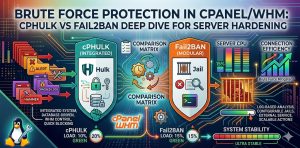
To implement cPanel brute force protection, engineers deploy cPHulk or Fail2Ban to monitor authentication logs and block malicious IP addresses before they impact server performance. cPHulk protects WHM, Webmail, and cPanel services at the application level, while Fail2Ban enforces bans at the firewall level using iptables. A properly hardened setup reduces CPU load, prevents unauthorized access, and ensures uptime across production environments.
cPHulk vs Fail2Ban
The difference between cPHulk and Fail2Ban lies in how they detect and block brute force attacks. cPHulk integrates directly into the cPanel ecosystem and tracks login attempts using a database, making it ideal for hosting environments. Fail2Ban scans log files and dynamically blocks IP addresses at the firewall level, making it more flexible and efficient for high-volume attacks.
| Feature | cPHulk | Fail2Ban |
|---|---|---|
| Integration | Native to cPanel | OS-level tool |
| Detection Method | Database tracking | Log parsing |
| Performance | Moderate | High |
| Flexibility | Limited to cPanel services | Works with any service |
| Best Use Case | Shared hosting security | Advanced server hardening |
Why Brute Force Attacks Destroy Server Performance
Brute force attacks continuously hit login endpoints such as SSH, FTP, SMTP, and WHM using automated scripts. Every login attempt forces the server to validate credentials via PAM, write logs, and allocate CPU resources. Over time, this leads to increased load average, disk I/O pressure, and memory exhaustion. In unmanaged environments, this results in slow websites, service crashes, or complete downtime, making server hardening essential for any Linux server management services setup.
Internal Security Strategy: Multi-Layer Protection Approach
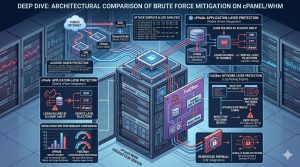
Modern infrastructure does not rely on a single protection tool. Engineers implement a layered defense model combining cPanel server management, firewall rules, and log monitoring. cPHulk handles application-level protection, Fail2Ban enforces system-level bans, and CSF firewall ensures network-level filtering. This multi-layer approach ensures that even if one layer fails, the attack is stopped at another point, significantly improving resilience.
STOP BRUTE FORCE ATTACKS BEFORE THEY IMPACT YOUR SERVER
Are repeated login attacks slowing down your cPanel or WHM server?
Brute force attacks can overload CPU resources, trigger downtime, and expose critical hosting environments to unauthorized access. Our engineers help secure servers using cPHulk, Fail2Ban, CSF firewall hardening, SSH key authentication, and proactive monitoring for maximum protection.
How Brute Force Attacks Work at System Level
A brute force attack operates at the application layer but stresses the entire system stack. Incoming TCP requests trigger authentication services such as SSHD, which rely on PAM modules to validate credentials. Each failure generates logs in /var/log/secure, increasing disk writes. Simultaneously, the kernel handles process scheduling for each request, causing context switching overhead. Without protection, this leads to resource exhaustion and degraded server performance.
Detecting Vulnerabilities Using Nmap and Telnet
Before applying protection, engineers must audit exposed services. Using Nmap reveals open ports and service versions, while Telnet verifies whether these services accept connections. Open ports like 22 (SSH), 21 (FTP), and 2087 (WHM) are common targets. Restricting unnecessary ports and applying firewall rules reduces the attack surface significantly.
Deep Dive into cPHulk Protection Mechanism
cPHulk functions as a daemon within the cPanel ecosystem, monitoring authentication attempts across services such as WHM, cPanel, Webmail, and FTP. It stores failed login attempts in a database, enabling both IP-based blocking and account-level locking. This allows engineers to stop attacks targeting specific usernames across multiple IP addresses, which is common in distributed brute force scenarios.
Optimizing cPHulk for Enterprise Server Hardening
Default cPHulk settings are not sufficient for production environments. Engineers increase the IP block duration, enable firewall-level blocking, and activate username tracking. These configurations ensure that malicious traffic is blocked at the kernel level rather than being processed by application services, reducing CPU load and improving performance.
Fail2Ban Architecture and Log-Based Blocking Logic
Fail2Ban scans log files using predefined patterns to detect repeated authentication failures. When a threshold is exceeded, it automatically blocks the offending IP using firewall rules. Unlike cPHulk, it does not rely on a database, which makes it lightweight and efficient. It supports multiple services, including SSH, Apache, and custom applications, making it ideal for cloud infrastructure management.
Configuring Fail2Ban for Maximum Protection
Engineers configure Fail2Ban using jail files that define retry limits, ban duration, and log paths. By limiting login attempts to a small number within a defined time window, Fail2Ban effectively blocks attackers before they can impact system performance. Proper tuning ensures that legitimate users are not blocked while maintaining strong protection.
Real-World Scenario: CSF Firewall + cPHulk Integration
In production environments, CSF firewall works alongside cPHulk to enforce IP bans at the network level. When cPHulk detects a brute force attack, CSF applies firewall rules to block traffic before it reaches the server. This prevents redundant processing and ensures efficient resource usage. Proper integration eliminates conflicts and strengthens overall security.
Fixing ECONNREFUSED Errors During Security Blocking
When users face ECONNREFUSED errors, it usually means their IP has been blocked by brute force protection tools. Engineers verify block lists using command-line tools and determine whether the block is legitimate. Allowlisting trusted IPs restores access without compromising security.
Advanced Protection: Eliminating Brute Force Attacks Completely
The most effective way to stop brute force attacks is to remove password-based authentication entirely. By enabling SSH key-based authentication, servers reject all password attempts, rendering brute force scripts useless. This approach is widely adopted in enterprise environments for maximum security.
Enhancing Security with Two-Factor Authentication
Two-factor authentication adds an additional layer of protection by requiring a time-based token. Even if attackers obtain credentials, they cannot access the system without the second authentication factor. Enabling 2FA across WHM and cPanel accounts significantly reduces security risks.
Handling Distributed Brute Force Attacks (Botnets)
Modern attacks use thousands of IP addresses, making simple IP blocking ineffective. Engineers use IP reputation systems, rate limiting, and reverse proxies like Cloudflare to filter malicious traffic at the edge. This prevents attacks from reaching the server and preserves system resources.
FAQ: cPanel Brute Force Protection
What is the difference between cPHulk and Fail2Ban?
cPHulk is a cPanel-native tool that tracks login attempts using a database and protects specific services, while Fail2Ban scans logs and blocks IPs using firewall rules.
Why is my server slow during a brute force attack?
Repeated login attempts consume CPU, memory, and disk resources, leading to performance degradation and service delays.
Can I use cPHulk and Fail2Ban together?
Yes, but it is better to use one primary tool and integrate it with a firewall like CSF to avoid redundancy.
How do I allowlist my IP in cPHulk?
You can add your IP to the allowlist using command-line tools or through the WHM interface to prevent accidental blocking.
Does disabling password authentication stop brute force attacks?
Yes, switching to SSH key-based authentication eliminates password-based attack vectors completely.
Authoritative Conclusion: Building a Secure cPanel Infrastructure
Effective cPanel brute force protection requires a layered approach that combines application-level monitoring, firewall enforcement, and proactive security strategies. While cPHulk and Fail2Ban provide strong defense mechanisms, long-term resilience depends on eliminating vulnerabilities through secure authentication methods and continuous monitoring. Organizations that invest in server hardening, Linux server management services, and 24/7 technical support gain a competitive advantage by ensuring uptime, protecting sensitive data, and maintaining optimal performance in modern infrastructure environments.



