




Introduction:
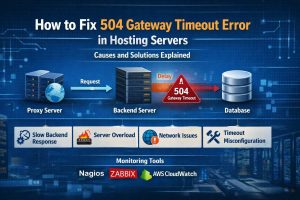
A 504 Gateway Timeout error occurs when a server acting as a gateway or proxy does not receive a timely response from an upstream server, causing the request to fail. In simple terms, the server is working, but it is waiting too long for another system like an application server, database, or API to respond.
From an infrastructure engineer’s perspective, 504 errors are not random. They are caused by backend delays, server overload, network issues, or misconfigured timeouts. By identifying the exact bottleneck and applying server-level fixes, engineers can restore performance and prevent recurring downtime.
Understanding 504 Gateway Timeout Errors in Hosting Environments
A 504 Gateway Timeout error is an HTTP status code that indicates a communication failure between servers. Unlike 404 or 500 errors, this issue typically occurs in multi-layer architectures where a reverse proxy, load balancer, or CDN sits in front of the application server.
In modern hosting environments, especially in AWS server management, Azure cloud support, and DevOps infrastructure setups, requests pass through multiple layers such as CDN → firewall → load balancer → web server → application → database. If any layer takes too long to respond, the upstream server times out, resulting in a 504 error.
This is why 504 errors are often seen in high-traffic applications, API-driven platforms, and cloud-based architectures where multiple dependencies exist.
Why 504 Errors Happen: Root Cause Analysis
The most common root cause of 504 errors is slow backend response. When an application or database takes too long to process a request, the proxy server times out.
For example, a slow MySQL query can delay response time significantly. Engineers often identify this using:
mysqladmin processlist
Another major cause is server overload. When CPU or memory usage spikes, the server cannot process requests efficiently.
Engineers monitor this using:
top
htop
Network latency between servers can also cause delays. In cloud environments, misconfigured routing or firewall rules can increase response time.
Timeout misconfiguration is another critical factor. If the timeout setting in NGINX or Apache is too low, even normal delays can trigger a 504 error.
In simple terms, 504 errors occur when one system waits too long for another system to respond.
How Engineers Diagnose 504 Errors in Production
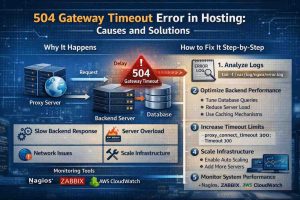
Engineers follow a structured debugging process to identify the root cause of 504 errors. The first step is analyzing server logs to detect delays or failures.
For NGINX:
tail -f /var/log/nginx/error.log
For Apache:
tail -f /var/log/httpd/error_log
Logs often show upstream timeout messages, which indicate where the delay is occurring.
Next, engineers check application logs to identify slow queries or API delays.
They also test response time using:
curl -I -m 10 https://yourdomain.com
If the request times out, it confirms backend delay.
Monitoring tools like Nagios, Zabbix, and AWS CloudWatch help track system performance and identify bottlenecks in real time.
How Engineers Fix 504 Gateway Timeout Errors Step-by-Step
Fixing 504 errors requires identifying the bottleneck and applying targeted solutions. If the issue is slow backend processing, engineers optimize database queries, reduce load, or implement caching.
For timeout issues, engineers increase timeout settings in NGINX:
proxy_connect_timeout 300;
proxy_send_timeout 300;
proxy_read_timeout 300;
In Apache:
Timeout 300
ProxyTimeout 300
If server resources are insufficient, scaling is required. In cloud environments, engineers enable auto-scaling to handle traffic spikes.
Load balancing is another effective solution. By distributing traffic across multiple servers, engineers prevent overload on a single instance.
Caching mechanisms such as Redis or Varnish reduce backend load and improve response time.
Finally, engineers continuously monitor system performance to ensure stability.
Real-World Production Scenario: API Delay Causing 504 Errors
In a real-world SaaS environment, a web application experienced frequent 504 errors during peak hours. The root cause was a slow third-party API that delayed responses.
Engineers identified the issue through logs and implemented asynchronous processing along with caching. They also increased timeout limits temporarily.
As a result, the application stabilized, and 504 errors were eliminated. This scenario highlights how external dependencies can impact server performance.
Performance and Security Impact of 504 Errors
504 errors significantly impact user experience and business performance. When users encounter timeouts, they are likely to abandon the website, leading to lost revenue and reduced trust.
From an SEO perspective, frequent 504 errors can negatively affect rankings, as search engines prioritize reliable and fast-loading websites.
Security can also be affected. Overloaded servers may fail to handle security checks effectively, increasing the risk of vulnerabilities.
Best Practices to Prevent 504 Errors in Hosting Servers
Preventing 504 errors requires proactive server monitoring and optimization. Engineers implement continuous monitoring using tools like Zabbix and CloudWatch to detect performance issues early. Load testing is essential to simulate real-world traffic and identify bottlenecks before deployment.
Comparison Insight: 504 vs 502 vs 500 Errors
504 errors indicate a timeout between servers, while 502 errors represent invalid responses from upstream servers. A 500 error, on the other hand, indicates an internal server failure.
Understanding these differences helps engineers diagnose issues more efficiently and apply the correct fixes.
Case Study: Fixing 504 Errors in a High-Traffic eCommerce Platform
An eCommerce platform experienced 504 errors during a flash sale. Engineers identified that the database could not handle concurrent requests.
They optimized queries, implemented caching, and scaled database resources.
The result was a stable system capable of handling peak traffic without timeouts. This demonstrates the importance of scalability and optimization in preventing 504 errors.
Struggling with Traffic Spikes and Downtime?
Partner with our experts for reliable cloud auto-scaling, proactive monitoring, and high-availability infrastructure solutions.
Quick Summary:
504 Gateway Timeout errors occur when servers fail to respond within a specified time due to backend delays, resource limitations, or network issues. Engineers diagnose these errors using logs and monitoring tools and fix them by optimizing performance, increasing timeouts, and scaling infrastructure.
FAQ: 504 Gateway Timeout Errors
What causes a 504 Gateway Timeout error?
It is caused by slow backend responses, server overload, network delays, or misconfigured timeout settings.
How do engineers fix 504 errors?
They analyze logs, optimize backend performance, increase timeouts, and scale infrastructure.
Can 504 errors affect SEO?
Yes, frequent timeouts can negatively impact search rankings and user experience.
How can 504 errors be prevented?
Through monitoring, load testing, caching, and proper configuration.
What tools help detect 504 errors?
Nagios, Zabbix, AWS CloudWatch, and application logs are commonly used.
Conclusion
504 Gateway Timeout errors are a critical issue in modern hosting environments but can be effectively managed with the right approach. By understanding root causes, implementing proactive monitoring, and optimizing infrastructure, engineers ensure reliable and high-performing systems.
In today’s digital landscape, where uptime and performance are crucial, addressing 504 errors is essential for maintaining user trust and achieving business success.



