




Key Takeaways: The Critical Link Between IAM and Data Breaches
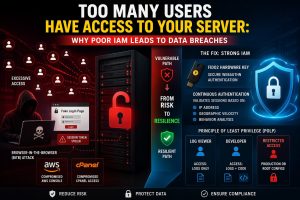
Poor Identity and Access Management (IAM) causes over 80% of data breaches by allowing attackers to exploit excessive permissions and hijacked session tokens. Organizations often fail when they grant permanent access instead of practicing the Principle of Least Privilege, which limits every user to the minimum access required for their task. We found that modern “Browser-in-the-Browser” attacks easily bypass standard MFA by stealing active session cookies, allowing hackers to lock admins out of their own infrastructure in seconds.
To secure your environment, you should replace legacy passwords with FIDO2 hardware keys and implement continuous authentication to validate sessions in real-time. You must also use Just-In-Time (JIT) access to grant temporary permissions only when needed. By auditing open ports with nmap and migrating to SFTP with SSH keys, you build a resilient Zero Trust architecture that prevents lateral movement and protects your core database from unauthorized access.
Understanding the Impact of IAM Failures on Production Uptime
Identity and Access Management (IAM) serves as the primary gateway to your production environment. When IAM Server Security is neglected, the blast radius of a single compromised account expands exponentially across your infrastructure. Most organizations treat access as a one-time setup rather than a dynamic security state. This negligence leads to orphaned accounts, over-privileged developers, and exposed root credentials. A failure in IAM doesn’t just risk data; it risks total operational shutdown, as unauthorized users gain the ability to delete volumes, terminate instances, and wipe backups before detection.
The Golden Rule of Identity: The Principle of Least Privilege
The Principle of Least Privilege (PoLP) dictates that every module, user, and service must possess only the minimum permissions necessary to complete a task. In high-density server environments, engineers often grant sudo or root access to simplify troubleshooting. This creates a massive security debt. If a developer only needs to view logs, they should never have write access to the /etc/ directory or the database configuration files. Implementing PoLP reduces the attack surface by ensuring attackers stay confined to a highly restricted part of the system, even if they compromise an account.
The Anatomy of a Browser-in-the-Browser (BitB) Attack
Standard Multi-Factor Authentication (MFA) is failing against the “Browser-in-the-Browser” (BitB) attack vector. Hackers use malicious JavaScript to simulate a pixel-perfect login window complete with a fake address bar and SSL lock—inside a legitimate site. When an admin enters their credentials and 6-digit MFA code, the attacker doesn’t just steal the password; they steal the Active Session Token. This token allows the attacker to bypass the login process entirely. Since the server believes the session is already authenticated, the attacker gains immediate access to the cloud console or cPanel without ever needing the user’s phone or physical presence.
Agitating the Danger: The 30-Second Lockout
Once a threat actor possesses your session token, they effectively become you. They do not need to “crack” your security because they have inherited your validated identity. In less than 30 seconds, an attacker can navigate to the account security settings of your Gmail, Google Drive, or cPanel. They change the recovery phone number, update the primary email, and revoke your existing access. By the time you receive a “New Login Detected” alert, you are already locked out of your own infrastructure permanently. This speed makes traditional IAM monitoring reactive and insufficient for modern B2B data protection.
The Technical Solution: FIDO2 Hardware Keys (YubiKeys)
Switching to FIDO2 Hardware Keys, such as YubiKeys, provides the only foolproof defense against BitB attacks. Unlike TOTP codes (6-digit numbers) or SMS, FIDO2 uses public-key cryptography and is “origin-bound.” The hardware key communicates directly with the browser and verifies the website’s identity. If the site is a fake BitB window, the hardware key detects the domain mismatch and refuses to sign the authentication challenge. By enforcing FIDO2 across your IAM Server Security framework, you ensure that session tokens cannot be generated on malicious clones of your login pages.
Implementing Continuous Authentication Models
Static sessions are a relic of a less hostile internet. Engineers must shift toward Continuous Authentication models where the system re-validates the user session based on real-time signals. This includes monitoring the user’s IP address, geographic velocity (detecting logins from two distant cities too quickly), and behavioral patterns. If the system detects a deviation—such as a session token suddenly moving from an office IP to a known VPN or Tor node—it should immediately terminate the session and require a new FIDO2 handshake. This limits the lifespan of a stolen token to seconds.
Root Cause Analysis: Why Infrastructure Teams Fail at IAM
IAM failures often stem from a “Configuration Drift” where permissions are added but never revoked. This is common during rapid scaling phases. Another root cause is the lack of Role-Based Access Control (RBAC). When teams use individual user permissions instead of group-based roles, tracking “who has access to what” becomes an impossible manual task. Additionally, many teams fail to audit their API keys and service accounts, which often hold high-level permissions and lack MFA protection entirely. These invisible identities are the most common entry points for sophisticated data breaches.
Problem Diagnosis: Using Nmap and Telnet to Audit Access
Before hardening, you must diagnose your current exposure. Engineers use nmap to identify open ports that shouldn’t be accessible to everyone. Running nmap -p 22, 80, 443, 3306 [Server-IP] allows you to see if database ports (3306) are exposed to the public internet. If telnet [Server-IP] 22 allows a connection from a home IP without a VPN, your IAM strategy is already failing at the network layer. Diagnostic tools help map the boundary between public identity and private infrastructure, highlighting where firewall rules must be integrated with your IAM policies.
nmap -sV -p- --open [your-server-ip]
Step-by-Step Resolution: Moving to SFTP and SSH Keys
To fix poor access management, you must eliminate password-based logins for server management. Start by migrating from legacy FTP to SFTP. Generate 4096-bit RSA or Ed25519 SSH keys for every user. Distribute these keys using a centralized management tool or a secure vault. Modify your /etc/ssh/sshd_config to set PasswordAuthentication no. This ensures that even if a user’s password is leaked via a BitB attack, the attacker cannot gain server access without the physical private key file, which should ideally be stored on a FIDO2 device.

Architecture Insight: Active vs. Passive Security Models
In an active security model, the system assumes trust once the user passes the perimeter. In a passive or “Zero Trust” model, the system assumes every request is a potential breach. Applying this to IAM Server Security means moving away from “Active” sessions that last 24 hours. Instead, implement a “Passive” re-verification architecture. Use a bastion host (Jump Box) as a single point of entry where all user activity is logged and session duration is strictly enforced. This architectural change ensures that no user has a direct, permanent line of sight to your core database or application servers.
Real-World Use Case: The CSF Firewall and Over-Privileged Access
Consider a scenario where a cPanel server utilizes the ConfigServer Security & Firewall (CSF). An engineer mistakenly adds a developer’s entire home IP range to the csf.allow file to fix an FTP connection issue. This bypasses all brute-force protections for that developer. If that developer’s machine is compromised, the hacker now has a clear path to the server’s control ports. The fix is to use a VPN with a static IP and only allowlist the VPN’s IP, while simultaneously restricting the developer’s cPanel permissions to specific functions instead of granting full account access.
Just-In-Time (JIT) Access: The Future of Server Hardening
Just-In-Time (JIT) Access is the ultimate fix for the “Too Many Users” problem. Instead of having permanent permissions, a user requests access for a specific task. The IAM system grants those permissions for a limited window—perhaps two hours—and then automatically revokes them. This drastically reduces the window of opportunity for an attacker. If a hacker steals a session token from a user who doesn’t currently have JIT access active, they find themselves in an empty room with no permissions to execute commands or exfiltrate data.
STOP OVER-PRIVILEGED ACCESS BEFORE IT LEADS TO A DATA BREACH
Do too many users, API keys, or service accounts have access to your production servers?
Weak IAM controls, excessive permissions, and stolen session tokens can silently expose your infrastructure to unauthorized access and large-scale breaches. Our engineers help secure environments using Zero Trust architecture, FIDO2 authentication, Just-In-Time access, and proactive IAM auditing.
Advanced Fix: Enforcing IP Pinning for Session Tokens
For high-security environments, engineers should implement “IP Pinning” for all authenticated sessions. When a user logs in, the IAM provider binds the session token to the user’s specific source IP address. If a request arrives with that token from a different IP, the server rejects it immediately. While this can be inconvenient for users on mobile networks, it is a devastatingly effective counter-measure against hijacked tokens being used by attackers in different geographic locations. Combined with Continuous Authentication, this creates a multi-layered identity vault.
# Example logic for checking session IP consistency
if (current_request_ip != session_origin_ip) {
    terminate_session();
    trigger_mfa_reauth();
}
Tools for the Engineer’s Toolkit: Auditing IAM
To maintain a clean IAM state, use automated tools like AWS IAM Access Analyzer, GCP Policy Analyzer, or open-source tools like Lynis. These tools scan your server configurations and cloud metadata to find “Shadow Admins”—users who have permissions to create other users, effectively giving themselves root access. Regularly running these audits prevents “Privilege Escalation” attacks, where an attacker starts with a low-level account and systematically gains higher authority through misconfigured trust relationships between roles.
Hardening Best Practices: Moving to Zero Trust Architecture
Transitioning to a Zero Trust Architecture (ZTA) is the long-term solution to poor IAM. In ZTA, “Identity is the New Perimeter.” This means that network location (being inside the office) no longer grants trust. Every access request requires authentication, authorization, and encryption. Place a Zero Trust Network Access (ZTNA) gateway in front of your servers. Users authenticate with FIDO2, and the gateway opens a micro-segmented tunnel only to the specific server or application they can access.
The Role of B2B Content in Driving IAM Security Awareness
For a Growth Marketer, the goal is to bridge the gap between technical reality and business risk. Data breaches caused by poor IAM are not just technical failures; they are “Trust Failures” that impact a company’s market valuation. Content focusing on IAM Server Security should emphasize that security is a competitive advantage.
By demonstrating a hardened infrastructure, a B2B company proves to partners and clients that it handles data with production-grade rigor, ultimately shortening sales cycles and increasing lead conversion.
IAM Security FAQ:
How does poor IAM lead to data breaches?
Poor IAM leads to data breaches when users, service accounts, or developers have more access than they need. If one account is compromised, attackers can move across servers, access sensitive systems, and cause wider infrastructure damage.
Why is the Principle of Least Privilege important for server security?
The Principle of Least Privilege limits every user and service to only the permissions required for a specific task. This reduces the attack surface and prevents compromised accounts from gaining full control over servers or critical data.
Can hackers bypass MFA with session hijacking attacks?
Yes. In Browser-in-the-Browser attacks, hackers can steal active session tokens after a user completes login and MFA. This allows them to bypass the normal login flow and access the server or admin console as an authenticated user.
What is the best way to protect IAM from modern phishing attacks?
The strongest defense is to use FIDO2 hardware keys, continuous authentication, and Just-In-Time access. These controls reduce the value of stolen credentials and stop attackers from using fake login pages or long-lived sessions.
How can I audit whether my server access controls are too open?
You should audit open ports, user roles, SSH settings, API keys, and service accounts regularly. Tools like nmap, IAM analyzers, and role-based access reviews help identify over-privileged users, exposed services, and configuration drift.
What is Just-In-Time access in IAM security?
Just-In-Time access grants permissions only for a limited period and only when needed for a task. This prevents users from holding permanent privileges and reduces the risk of attackers using stolen sessions or compromised accounts to launch major attacks.
Why is Zero Trust better than traditional access control?
Zero Trust assumes no session or network location is automatically safe. Every request must be verified, authorized, and restricted. This makes it much harder for attackers to move laterally, reuse stolen sessions, or exploit over-trusted internal access.
Conclusion: Identity is Your Strongest (and Weakest) Link
The security of your server is only as strong as the identity management protecting it. If you allow static passwords, excessive permissions, and unmonitored sessions, you are inviting a data breach. By enforcing FIDO2 Hardware Keys, practicing the Principle of Least Privilege, and implementing Continuous Authentication, you turn identity into a formidable barrier against attackers. Do not wait for a hijacked session token to prove the inadequacy of your current IAM. Hardened servers require a proactive, authoritative approach to access control—start revoking unnecessary permissions today.



