





Abstract: Why Backups Fail ?
Server backup recovery systems fail primarily due to silent data corruption, unverified RTO/RPO metrics, and the lack of immutable storage. We found that modern “Browser-in-the-Browser” attacks bypass traditional MFA, allowing hackers to hijack session tokens and delete offsite archives in seconds. To fix this, you should build a “restoration-first” architecture that centers on block-level immutable backups, ensuring that once data is written, it cannot be modified or deleted even by a root user.
To secure your management consoles, you must replace 6-digit MFA with FIDO2 hardware keys and implement continuous authentication to monitor for IP or behavior shifts. You should also fix network-level failures by auditing passive port ranges with nmap and migrating to hardened rsync over SSH key architectures. By running regular recovery drills and enforcing geographic redundancy, you guarantee production uptime and protect your infrastructure against ransomware that targets backup repositories.
Key Takeaways for Infrastructure Leaders
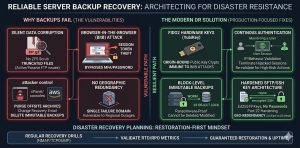
A reliable Disaster Recovery Planning strategy requires moving beyond simple file copies to block-level Immutable Backups. Standard 6-digit MFA codes no longer protect administrative consoles from Session Hijacking; only FIDO2 Hardware Keys provide origin-bound security. Engineers should prioritize Continuous Authentication to validate users based on IP and behavior, ensuring that a compromised session token cannot purge the Offsite Backup Strategy. Regular recovery drills using tools like nmap and tcpdump must verify that the restore path remains open and functional.
Defining the Impact of Backup Failure on Production Uptime
A failed restoration process is not a technical glitch; it is a business-terminating event that erodes EEAT (Experience, Expertise, Authoritativeness, Trust). When a production server goes down, every minute of latency in your Server Backup Recovery process directly translates to lost revenue and brand damage. Most companies discover their backups are useless only after a disaster strikes. They find that their archives are corrupted, incomplete, or worst of all deleted by attackers who bypass MFA. To ensure true production uptime, organizations must adopt a restoration-first mindset. They must treat data integrity as a continuous process, not a one-time checkbox.
The Root Cause of Backup Corruption at the Protocol Level
Technical failures often originate at the transport or filesystem layer, manifesting as silent data corruption. Bit rot occurs when individual bits on a storage medium flip, rendering a compressed .tar.gz or .zip archive unextractable. Without filesystem-level integrity checks like ZFS scrubs or hardware-level RAID consistency checks, these errors go unnoticed during the backup phase. At the protocol level, interruptions in Active vs. Passive FTP transfers can lead to truncated files if the server does not properly handle TCP stream termination, leaving you with a 90% complete file that is 100% useless for recovery.
Problem Diagnosis Using Telnet and Nmap for Port Verification
Before assuming a backup software failure, engineers must diagnose the network path using tools like telnet or nmap. A frequent cause of backup failure is the silent blocking of ports 21, 22, or the passive port range by a kernel-level firewall. Running nmap -p 21,22,30000-35000 [server_ip] reveals whether the destination is actually reachable. If a telnet connection to the control port succeeds but the data transfer hangs, the issue likely lies in a stateful firewall that dropped the secondary data connection, a common occurrence in cPanel server environments running CSF firewall.
ENSURE YOUR BACKUPS ARE RECOVERABLE BEFORE DISASTER STRIKES
Could ransomware, silent corruption, or backup failures leave your business unrecoverable?
Traditional backups often fail during real recovery scenarios due to corrupted archives, firewall issues, or compromised backup consoles. Our engineers help implement immutable backups, secure offsite recovery, disaster recovery testing, and hardened backup infrastructure for guaranteed restoration.
The Mechanics of Browser-in-the-Browser Attacks
Modern backup security is failing because of the Browser-in-the-Browser (BitB) attack vector. This technique uses malicious JavaScript to render a pixel-perfect fake login window inside a legitimate browser session. When a sysadmin logs into their backup console (e.g., AWS, Acronis, or Veeam), the attack captures the active session token in real-time. This bypasses the password and the 6-digit MFA code because the attacker does not need to log in they simply import the stolen token into their own browser to “become” the authenticated admin, gaining full control over your Server Backup Recovery settings.
Agitating the Threat of Session Token Hijacking
Once a hacker gains your session token, the speed of destruction is breathtaking. Because attackers are already authenticated, they can access your Offsite Backup Strategy settings and trigger a “Purge All” command before you receive a login alert. In under 30 seconds, they can delete your entire history of Immutable Backups, change the recovery email, and revoke your existing access. In this scenario, your backup didn’t just fail; it was weaponized against you. This makes standard MFA a false sense of security in high-stakes Disaster Recovery Planning.
FIDO2 Hardware Keys as the Ultimate Solution
The transition to FIDO2 Hardware Keys, such as YubiKeys, provides the only reliable defense against Session Hijacking. FIDO2 uses an origin-bound public key cryptography model where the hardware key only signs a challenge if the domain matches the registered site. Unlike SMS or TOTP codes, the hardware key communicates directly with the browser’s WebAuthn API. If a user is on a fake Browser-in-the-Browser page, the hardware key will fail to respond because the origin is incorrect. This ensures that even if a hacker gets your password, they can never obtain a valid session token.
Implementing Continuous Authentication for Enterprise Safety
A static login session is a vulnerability; Continuous Authentication is the fix. This model re-validates the user’s identity throughout their session by monitoring signals such as IP address consistency, geographic velocity, and browser fingerprinting. If a new IP range or ASN suddenly uses an active session token, the system must trigger a re-authentication challenge using a FIDO2 Hardware Key. By shortening session TTLs (Time To Live) and requiring hardware re-validation for high-risk actions like “Delete Backup,” you create a multi-layered defense that protects your Disaster Recovery Planning assets.
Technical Walkthrough for Resolving FileZilla Connection Failures
When Server Backup Recovery fails via FileZilla, it is often due to the “ECONNREFUSED” or “MLSD failure” errors. To fix this, you must first verify the PassivePortRange in your server’s FTP configuration, typically found in /etc/pure-ftpd.conf or /etc/proftpd.conf. Set a specific range, such as PassivePortRange 30000 35000. Next, ensure your firewall permits this range by running firewall-cmd --permanent --add-port=30000-35000/tcp followed by firewall-cmd --reload. In FileZilla, ensure the “Transfer Mode” is set to “Passive” to allow the client to initiate the data connection.
Optimizing WinSCP for High-Density Backup Transfers
For engineers using WinSCP to manage an Offsite Backup Strategy, performance often throttles due to encryption overhead. To resolve this, switch the “Encryption cipher” to AES-NI-accelerated options or ChaCha20 if the CPU supports it. Furthermore, disable “Optimize connection buffer size” if you experience frequent timeouts on high-latency links. For automated tasks, always use the .ini file configuration to ensure that site-specific settings, like SFTP/SSH Keys, are consistently applied across different administrative workstations, preventing the “it works on my machine” syndrome during a crisis.
Architecture Insight into Active vs. Passive FTP
Understanding the difference between Active and Passive FTP is crucial for Disaster Recovery Planning. In Active Mode, the client opens a port and the server connects back to it, which almost always fails due to client-side firewalls. In Passive Mode, the server opens a random port from its PassivePortRange and the client connects to it. In modern infrastructure, Passive Mode is the industry standard because it allows the client’s firewall to remain closed to unsolicited inbound traffic. However, this requires the server-side engineer to correctly map and open the passive ports in the CSF firewall or AWS Security Groups.
Real-World Scenario: The CSF Firewall Port Block
Consider a cPanel server where the Server Backup Recovery suddenly fails every Sunday at midnight. Investigation of /var/log/messages reveals a surge in blocked packets on port 49152. This happens because the server’s PassivePortRange was not synchronized with the CSF firewall configuration. By editing /etc/csf/csf.conf and adding the range to the TCP_IN and TCP_OUT fields, the engineer restores the data flow. This real-world conflict between security layers and backup protocols is the leading cause of “unexplained” backup failures in production.
Advanced Fix: Using Rsync and SSH Keys for Hardened Backups
The most robust engineers move away from FTP entirely, opting for rsync over SSH. This provides native encryption and efficient delta-transfers, meaning only the changed parts of files are sent over the network. To implement this, generate an Ed25519 key pair using ssh-keygen -t ed25519. Append the public key to the remote server’s ~/.ssh/authorized_keys file and restrict its permissions using chmod 600. This setup allows for automated, passwordless, and highly secure Offsite Backup Strategy execution that is resistant to brute-force attacks and credential sniffing.
The Necessity of Immutable Backups in the Ransomware Era
Standard backups are vulnerable to deletion; Immutable Backups are not. Immutability ensures that once a backup is written, it cannot be modified or deleted—even by a root user—for a defined retention period. Using S3 Object Lock or a Linux-based filesystem with the chattr +i attribute creates a “WORM” (Write Once, Read Many) environment. This is the only definitive protection against ransomware that specifically targets backup repositories to prevent restoration. If your Disaster Recovery Planning does not include an immutable tier, you are one compromised credential away from total data loss.
Validating RTO and RPO Through Automated Scripts
RPO (Recovery Point Objective) and RTO (Recovery Time Objective) must be measured, not guessed. An engineer should implement cron-based scripts that periodically calculate the time taken to restore a sample dataset. For example, a script could pull a 1GB backup file, checksum it, and measure the duration of a database import. If the process exceeds the defined RTO, the monitoring system should trigger an alert on the dashboard. This proactive approach ensures that teams optimize the Server Backup Recovery process for speed before an actual emergency occurs.
Hardening the Backup Server with SSH Config Tweaks
To further secure your Offsite Backup Strategy, modify the /etc/ssh/sshd_config on your backup destination. Disable root login by setting PermitRootLogin no and enforce key-only authentication with PasswordAuthentication no. Additionally, use the AllowUsers directive to restrict access to only the specific backup service account. These “Engineer Level” tweaks ensure that even if a production server is compromised, the attacker cannot pivot into the backup server to destroy the archives.
Best Practices for Geographic Redundancy
A backup in the same data center as your production server is just an expensive copy of your impending failure. A professional Offsite Backup Strategy requires geographic separation. If your primary server is in US-East-1, your backup must be in US-West-2 or a different provider entirely. This protects against regional cloud outages or physical disasters. By utilizing multi-cloud storage, you also mitigate the risk of account-level lockouts, ensuring that your Server Backup Recovery remains accessible even if your primary cloud provider has a billing or service dispute.
Technical Conclusion: The Restoration-First Mindset
The ultimate goal of any Senior Infrastructure Engineer is not to have a backup, but to have a guaranteed restoration.
By replacing legacy MFA with FIDO2 Hardware Keys, you eliminate common authentication risks. Enforcing Continuous Authentication further reduces the chances of session hijacking. Adopting Immutable Backups ensures that attackers cannot alter or delete your data during an attack.
These measures remove the key vulnerabilities that cause failures during disasters.
Modern infrastructure demands close attention to technical details. You must secure the transport protocol. You must protect session tokens. You must ensure the integrity of your storage systems.
Do not treat Server Backup Recovery as a background task. Treat it as the backbone of your production uptime.
Only through regular testing and strong architectural hardening can you guarantee reliability. When a disaster strikes, your data should not just exist it must be instantly recoverable.



