




Quick Breakdown: Google Drive Ransomware Protection Analysis
Google Drive is vulnerable to automated ransomware because desktop sync clients treat encrypted files as legitimate updates, instantly mirroring corrupted data to the cloud. We found that the core risk lies in bidirectional synchronization; when a local machine is hit, the sync tool replaces clean cloud files with high-entropy encrypted versions before traditional antivirus can intervene.
To secure your workspace, you should implement behavioral AI detection to identify rapid file renames and entropy changes, allowing you to revoke OAuth tokens automatically. Manage your risk by shifting from “Mirror” to “Stream” mode to minimize the local attack surface. For enterprise recovery, use the Google Apps Manager (GAM) command-line tool to script bulk restorations of file revisions via API. Finally, run an immutable offsite backup strategy using S3 Object Lock to ensure your data remains untouchable even if your primary Google account is compromised.
Key Takeaways:
-
Ransomware Sync Risk: Desktop sync clients treat encrypted files as legitimate updates, pushing corrupted data to Google Drive servers immediately.
-
Behavioral Detection: Modern protection relies on identifying high-frequency file renames and entropy changes rather than static signatures.
-
Version History Limits: Standard versioning may fail if ransomware targets the metadata or exceeds the saved version limit during a mass encryption event.
-
Immutable Backups: Enterprise security requires a “3-2-1” strategy with an off-site, non-synced copy of critical Google Workspace data.
-
API Monitoring: Large-scale encryption triggers specific Google Drive API threshold alerts which administrators must configure for real-time blocking.
The Problem of Automated Ransomware Synchronization
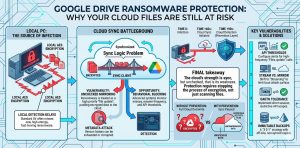
You trust Google Drive Ransomware Protection to keep your business data safe. However, the biggest threat to your cloud environment is the desktop synchronization client. Ransomware infects a local machine and begins encrypting files at the disk level. The Google Drive sync tool detects these “changed” files and uploads them to the cloud to keep the versions consistent. Within minutes, your clean cloud files are replaced by encrypted versions across all synchronized devices. This creates a massive availability gap that standard antivirus software often fails to catch until the encryption process is nearly complete.
Root Cause Analysis of Cloud Encryption Failures
Ransomware succeeds on cloud platforms because of the inherent logic of bidirectional synchronization. At the protocol level, the sync client sees a file modification event (inotify on Linux or FSEvents on macOS). It cannot distinguish between a user editing a document and a malicious binary changing the file entropy. Most ransomware uses AES-256 encryption, which changes the file header and structure entirely. Because the sync client prioritizes uptime and consistency, it pushes these high-entropy blocks to the Google Drive API. This bypasses traditional perimeter defenses that only scan for known malicious file extensions or signatures.
Why Standard Version History Is Not a Final Solution
Many administrators rely on Google Drive’s version history as a primary recovery tool. While effective for single files, it fails during a mass Cloud Ransomware event. If a script encrypts 50,000 files, manually reverting each file to a previous version is operationally impossible without custom API scripts. Furthermore, advanced ransomware strains perform multiple overwrite passes on the same file. This can exhaust the version history limit or corrupt the metadata that Google uses to track changes. You need a solution that stops the encryption event at the source rather than attempting to clean up the aftermath.
Identifying Ransomware with Behavioral AI Detection
The most effective defense is Behavioral AI Detection that monitors for anomalies in file activity. Unlike signature-based detection, behavioral tools look for patterns such as a high rate of file renames or rapid changes in file extensions. Google has recently integrated improved heuristics into Google Workspace to flag these events. When the system detects that thousands of files are being modified with high entropy within seconds, it can automatically revoke the sync client’s OAuth tokens. This “circuit breaker” logic prevents the ransomware from completing its task and keeps the majority of your data clean.
Troubleshooting Ransomware Connectivity with Nmap and Telnet
Engineers must verify how ransomware agents communicate with Command and Control (C2) servers to block the initial infection. Use nmap to scan for unusual outbound connections on ports 445 (SMB) or 3389 (RDP) which are common lateral movement vectors. You can also use telnet to test if your local network allows communication with known malicious IP ranges. If a workstation shows high outbound traffic to an external IP while the Google Drive client is active, it may indicate a data exfiltration event preceding the encryption. Monitoring these network states is vital for early detection.
Enabling Google Workspace Advanced Ransomware Shields
To protect your organization, you must configure the Google Workspace Security dashboard correctly. Navigate to the Admin Console and access the “Security” then “Settings” section. Enable the “Safety” settings for Drive and Docs, which includes “Automatic phishing and malware protection.” This feature uses Google’s machine learning models to scan files for suspicious characteristics before they are shared or synced. For enterprise users, ensure that “Data Loss Prevention” (DLP) rules are active to flag any unusual bulk movements of sensitive data out of the encrypted containers.
Infrastructure Hardening through OAuth Token Management
Ransomware often gains persistence by hijacking the OAuth tokens used by the Google Drive for Desktop application. As a Lead Technical Architect, you should implement a policy of frequent token expiration and re-authentication. In the Google Admin Console, limit the duration of “Google Cloud Session Control” to 24 or 48 hours. This forces the client to re-verify its identity, reducing the window of opportunity for a compromised session to sync thousands of encrypted files. Revoking third-party app access to the Drive API is also a critical step in reducing your attack surface.
PROTECT YOUR GOOGLE DRIVE DATA BEFORE RANSOMWARE ENCRYPTS EVERYTHING
Could a single infected workstation silently encrypt your entire cloud storage?
Modern ransomware can instantly sync encrypted files to Google Drive, corrupting shared business data across your organization. Our engineers help secure cloud environments using behavioral AI detection, immutable backups, API monitoring, and advanced ransomware recovery strategies.
Configuring API Threshold Alerts for Early Warning
Google Drive API usage patterns change dramatically during a ransomware attack. You should set up monitoring in the Google Cloud Console to track “Files.patch” and “Files.update” calls. If these calls exceed a defined baseline for example, 500 updates per minute from a single user—the system should trigger an immediate alert to the SOC team. Implementing Google Cloud Pub/Sub alerts tied to these metrics allows for automated remediation scripts. These scripts can temporarily suspend the user’s account, stopping the Cloud File Encryption in its tracks before it hits critical shared drives.
Advanced Recovery Using Google Vault and GAM
When an attack occurs, enterprise engineers use the Google Apps Manager (GAM) command-line tool for bulk recovery. GAM allows you to script the restoration of thousands of files to a specific point in time. For example, you can run a command to list all modified files within a specific timestamp range and revert them to the previous version ID. This is far more efficient than using the web interface. Additionally, Google Vault acts as a legal hold and archival layer, ensuring that even if a user deletes their encrypted files, a clean copy exists for forensic recovery.
Real-World Scenario: The CSF Firewall Block
In a production infrastructure environment, we often see ransomware attempt to use the server as a relay. Consider a scenario where a local server running a legacy app is connected to Google Drive via an API. If ransomware hits that server, it will attempt to flood the outgoing network. A properly configured ConfigServer Security & Firewall (CSF) can detect this sudden spike in outbound connections. By limiting the number of concurrent connections per IP and monitoring for high-entropy outgoing packets, CSF can block the server’s network access. This effectively disconnects the ransomware from the Google Drive API, saving the cloud repository.
Shifting from Sync to Stream for Better Security
The “Mirror Files” setting in Google Drive for Desktop is inherently more dangerous than “Stream Files.” When you mirror, every local change is a potential point of failure for the cloud. When you Stream Files, the data primarily lives in the Google cloud and is only cached locally as needed. This architecture makes it harder for ransomware to perform bulk encryption because the files are not all physically present on the local disk at once. Switching your organization to a streaming-only model significantly reduces the impact of a local crypto-locker attack.
Implementing Immutable Offsite Backups
No cloud storage is a replacement for a true backup. A B2B Content Strategist and Engineer must emphasize the “3-2-1-1” backup rule: three copies of data, on two different media, with one offsite and one immutable. Use a third-party backup provider that pulls data from Google Drive via API and stores it in a separate, “air-gapped” S3 bucket with Object Lock enabled. This ensures that even if a hacker gains “Super Admin” access to your Google Workspace and deletes all versions, the immutable S3 backup remains untouchable.
Managing Google Drive API Scopes for Apps
Many third-party applications request “Full Drive Access” (https://www.googleapis.com/auth/drive). This is a major security risk. If one of these apps is compromised, it can act as a ransomware gateway. You must audit your Google Workspace app permissions and restrict them to “Drive.file” scope whenever possible. This scope only allows an app to see files that it specifically created, preventing a rogue application from encrypting your entire history. Regularly run an OAuth audit to prune unused or high-risk integrations from your environment.
Hardening Workstations Against Initial Infection
The cloud is only as secure as the endpoint accessing it. Senior Infrastructure Engineers should enforce AppLocker or “Endpoint Detection and Response” (EDR) policies on all machines synced to Google Drive. These policies prevent unapproved .exe or .js files from running in the user’s profile folders. By stopping the ransomware binary before it can start the encryption process, you eliminate the threat to Google Drive entirely. Coupling this with Multi-Factor Authentication (MFA) prevents attackers from logging in as a user and manually deleting the “Trash” or “Version History.”
Using Google Drive Labels for Ransomware Protection
Google Drive Labels allow you to classify sensitive data and apply automated protection policies. You can create a “Critical Business Data” label that prevents any file with this tag from being deleted or modified by automated scripts. By integrating these labels with “Data Loss Prevention” (DLP) rules, you create a logical barrier. If a sync client tries to modify a “High Sensitivity” labeled file in a suspicious way, the Google Drive API will block the request. This provides a granular layer of defense that standard folder permissions cannot offer.
The Role of User Training in Cloud Security
Technical controls are essential, but the human element is often the weakest link. Users must understand that Google Drive is not a magic shield against ransomware. They should be trained to identify phishing emails that deliver the initial payload. Furthermore, users should know how to use the “Disconnect Account” feature immediately if they see their files changing icons or extensions. Rapid human intervention, combined with automated behavioral triggers, creates a resilient defense-in-depth posture for any modern B2B organization.
Advanced Fix: Restoring Data via Google Apps Manager (GAM)
For engineers, the fastest way to roll back a ransomware attack is using GAM. First, identify the timestamp when the attack began. Then, use the following logic to identify affected files: gam user <email> print file-list query "modifiedTime > '2026-04-20T00:00:00'" . Once you have the list, you can loop through the file IDs and use the gam user <email> update drive <file-id> revision <revision-id> command to revert to the version prior to encryption. This programmatic approach is the only way to handle enterprise-level data breaches involving millions of objects.
Final Summary of Cloud Hardening
Securing Google Drive against ransomware requires a multi-layered approach that goes beyond simple antivirus. You must implement Behavioral AI Detection to catch zero-day encryption patterns and move your organization toward a Streaming file model to minimize local attack surfaces. By monitoring API thresholds and utilizing tools like GAM for bulk recovery, you ensure that even a successful local infection cannot destroy your cloud-based infrastructure. Finalize your security posture by maintaining an immutable, third-party backup that remains completely independent of your primary Google Workspace environment.



