




Introduction: Why WordPress Performance Issues Are Not Just Frontend Problems
WordPress powers more than 40% of the internet, yet performance degradation continues to be one of the most critical challenges faced by businesses operating online. While many assume that slow websites are caused by heavy themes or too many plugins, experienced infrastructure engineers understand that the real issues lie much deeper within the server and cloud environment.
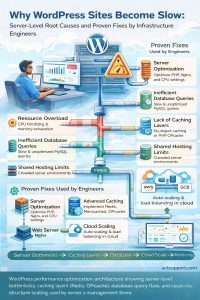
A slow WordPress website is rarely the result of a single bottleneck. Instead, it is typically caused by a combination of inefficient server resource allocation, database query delays, lack of caching mechanisms, and absence of proactive monitoring. In production environments managed through Linux server administration and cloud infrastructure support services, performance optimization requires a layered approach that combines application tuning with backend infrastructure engineering.
From an infrastructure perspective, website speed is not just a user experience factor—it directly impacts SEO rankings, conversion rates, and overall business performance.
Why Do WordPress Sites Become Slow?
WordPress sites become slow primarily due to inadequate server resources, lack of caching, inefficient database queries, poorly optimized plugins, and absence of proactive monitoring.
When these issues are addressed using server-level optimization, caching layers like Redis and OPcache, and scalable cloud infrastructure, website performance can improve by up to 70%, significantly reducing load time and downtime.
Core Server-Level Causes of Slow WordPress Websites
Inadequate Server Resources and Poor Hosting Architecture
One of the most common causes of slow WordPress performance is insufficient or poorly configured server infrastructure. In shared hosting environments, multiple websites compete for limited CPU and memory, resulting in throttling, delayed PHP execution, and increased response times.
Infrastructure engineers working in VPS and dedicated server environments frequently observe CPU spikes caused by PHP-FPM processes and memory exhaustion due to inefficient scripts. Disk I/O performance also plays a crucial role, as slower storage systems delay database queries and file access.
In real-world scenarios, migrating from shared hosting to an optimized VPS environment often reduces page load time from more than eight seconds to under two seconds, proving that infrastructure quality directly determines performance.
Database Bottlenecks and Query Inefficiencies
WordPress is highly database-driven, and over time, databases become bloated with post revisions, transient data, and autoloaded options. Without proper optimization, even a simple page request can trigger multiple slow queries.
From a system administration perspective, engineers analyze slow query logs, optimize indexes, and clean unnecessary data. WordPress sites become slow when database tables like wp_options store excessive autoloaded data, which significantly impacts performance. In many real-world cases, WordPress sites become slow due to poor database optimization and unmonitored server resources.
Database inefficiency is one of the most critical bottlenecks in high-traffic WordPress environments and must be addressed for consistent speed improvements.
Lack of Multi-Layer Caching Implementation
Caching is one of the most powerful yet underutilized performance optimization techniques in WordPress environments. Without caching, every request is dynamically processed, increasing server load and response time.
In professionally managed infrastructures, engineers implement multiple caching layers. PHP OPcache reduces script execution overhead, while Redis or Memcached improves object caching efficiency. At the server level, Nginx FastCGI caching enables faster content delivery.
When implemented correctly, caching strategies can reduce server load by more than 60% and drastically improve page load speed.
Inefficient Plugins and Poorly Coded Themes
Plugins and themes often act as hidden performance bottlenecks. Poorly developed plugins generate excessive database queries, consume server memory, and introduce unnecessary API calls.
In real-world server management environments, engineers frequently identify heavy plugins as the root cause of slow performance. Replacing or removing such plugins often results in immediate improvements.
From an infrastructure standpoint, every plugin should be treated as a resource-consuming process that directly impacts server performance.
Absence of Proactive Monitoring and Maintenance
Many WordPress performance issues remain undetected until they severely impact users. Without proactive monitoring, administrators cannot identify early warning signs such as CPU spikes, memory leaks, or disk latency.
Modern server monitoring solutions continuously track system metrics and generate alerts when thresholds are exceeded. This allows infrastructure teams to take immediate action before performance degradation affects users.
Industry data shows that proactive monitoring can reduce downtime by up to 70% while improving overall system reliability.
Proven Fixes Used by Infrastructure and Cloud Engineers
Server Optimization and Resource Tuning
The foundation of WordPress performance improvement lies in proper server configuration. Engineers optimize web servers such as Nginx or Apache, fine-tune PHP-FPM settings, and allocate adequate CPU and memory resources.
This includes adjusting worker processes, optimizing timeout values, and improving connection handling to ensure maximum efficiency under load.
Advanced Caching Strategy Implementation
High-performance WordPress environments rely on multi-layer caching strategies. Redis or Memcached is used for object caching, while server-level caching ensures faster content delivery.
These techniques significantly reduce database load and improve scalability, especially for high-traffic websites.
Database Optimization and Cleanup
Database performance is enhanced by removing unnecessary data, optimizing tables, and indexing frequently accessed columns. Engineers also reduce autoloaded data and implement query caching to minimize database load.
Regular database maintenance ensures consistent performance over time.
Migration to Scalable Cloud Infrastructure
Traditional hosting environments lack scalability and flexibility. Migrating to cloud platforms such as Amazon Web Services or Google Cloud Platform enables businesses to leverage auto-scaling, load balancing, and high availability.
Cloud infrastructure provides better performance, improved uptime, and the ability to handle traffic spikes efficiently.
Continuous Monitoring and Incident Response
Performance optimization is an ongoing process. Engineers use real-time monitoring tools to track system health and respond to anomalies instantly.
This proactive approach ensures stability, minimizes downtime, and maintains optimal performance in production environments.
Real-World Case Study: Performance Transformation Through Infrastructure Optimization
A mid-sized eCommerce website hosted on a shared server experienced severe slowdowns during peak traffic hours, with page load times exceeding nine seconds. This resulted in high bounce rates and revenue loss.
After analysis by an infrastructure support team, key issues identified included CPU throttling, lack of caching, and database inefficiencies. The solution involved migrating the website to a VPS environment, implementing Redis caching, optimizing the database, and deploying proactive monitoring.
Within two weeks, the website achieved a 65% reduction in load time, uptime improvement to 99.9%, and significantly better handling of traffic spikes.
This case demonstrates that performance issues are best solved through a combination of infrastructure upgrades and application-level optimization.
Traditional Hosting vs Cloud Infrastructure: A Performance Perspective
Traditional hosting environments operate on fixed resources and lack advanced performance capabilities. In contrast, cloud infrastructure offers scalability, redundancy, and efficient resource management.
Cloud-based environments provide auto-scaling during traffic spikes, load balancing for high availability, and faster content delivery through distributed systems. These advantages make cloud hosting the preferred choice for modern WordPress deployments.
Struggling with Traffic Spikes and Downtime?
Partner with our experts for reliable cloud auto-scaling, proactive monitoring, and high-availability infrastructure solutions.
FAQ: WordPress Performance and Server Management
How does server monitoring improve WordPress performance?
Server monitoring continuously tracks CPU usage, memory consumption, disk activity, and network performance. Monitoring systems trigger alerts when anomalies occur, enabling engineers to resolve issues before they impact users.
What are the main causes of WordPress downtime?
Resource exhaustion, server misconfiguration, hardware failures, or security vulnerabilities typically cause downtime. Lack of monitoring and maintenance further increases the risk.
How do engineers troubleshoot Linux server issues?
Engineers analyze system logs, monitor resource utilization, and identify bottlenecks using tools like top, htop, and iostat. Engineers optimize configurations based on their findings to restore performance.
Conclusion: WordPress Performance Is an Infrastructure Responsibility
Infrastructure primarily determines WordPress performance, not just themes or plugins. From server resource allocation to database optimization and proactive monitoring, every layer plays a critical role in determining speed and reliability.
Organizations that invest in professional server management and cloud infrastructure support consistently achieve faster load times, higher uptime, and better user experience. In today’s competitive digital ecosystem, website speed is not optional it is a critical business requirement.



