




Introduction:
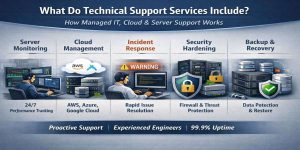
Technical support services include proactive server monitoring, infrastructure management, troubleshooting, security hardening, cloud operations, and 24/7 incident response handled by experienced engineers to ensure high uptime and performance. In real-world environments, technical support is not limited to fixing issues; instead, it involves continuously monitoring servers, optimizing resources, securing systems, and preventing downtime before it impacts users. In addition, engineers proactively analyze system performance to identify potential risks. As a result, they can address issues before they escalate into critical failures. Furthermore, this approach ensures better stability, improved performance, and higher uptime across infrastructure. Ultimately, technical support becomes a preventive strategy rather than a reactive one. From our experience in managing production environments, technical support services combine server management, cloud infrastructure support, and outsourced help desk operations to maintain business-critical applications.
Quick Summary:
Technical support services include system monitoring, incident response, server optimization, cloud infrastructure management, and security enforcement. Engineers use tools like top, htop, iostat, and centralized logging to detect and resolve issues before downtime occurs. Businesses rely on managed cloud support services, Linux server management services, and 24/7 technical support outsourcing to maintain uptime above 99.9%. Modern support teams also handle backup, disaster recovery, and performance tuning to ensure scalability and reliability.
Why Technical Support Services Are Critical in Modern Infrastructure
Every modern business depends on servers, applications, and cloud infrastructure. When systems fail, revenue stops. Studies show that even a few minutes of downtime can cost thousands of dollars for SaaS platforms and hosting companies. In simple terms, technical support services act as the backbone of digital operations by ensuring systems run smoothly at all times.
From real infrastructure environments, we often observe that most outages do not happen suddenly. They build up due to ignored warnings such as increasing CPU load, memory leaks, disk I/O saturation, or unpatched vulnerabilities. Without proactive server monitoring services, these small issues escalate into major incidents.
What Technical Support Services Include (Deep Technical Breakdown)
Technical support services combine multiple layers of infrastructure management. Engineers handle systems at OS level, application level, and network level to ensure stability and performance.
1) Server Monitoring and Maintenance
Server monitoring forms the foundation of all support services. Engineers continuously track CPU usage, memory consumption, disk performance, and network activity.
In production environments, we use commands like:
top
htop
iostat -x 1
vmstat 1
These tools help identify resource bottlenecks in real time. For example, when CPU usage spikes above 90%, engineers analyze processes using top and identify whether MySQL queries or PHP workers cause the issue.
In simple terms, monitoring ensures engineers detect problems before users notice them. This is why proactive server monitoring services significantly reduce downtime.
2) Linux and Windows Server Management
Technical support includes both Linux server management services and Windows server management services, depending on infrastructure.
Linux dominates hosting environments due to stability and flexibility. Engineers handle tasks such as:
- Kernel tuning
- Process optimization
- Package updates
- Log analysis
Example log investigation:
/var/log/messages
/var/log/syslog
/var/log/mysql/error.log
Windows environments require patching, Active Directory management, and service monitoring.
In real-world cases, we often see performance issues caused by outdated packages or improper configurations. Engineers resolve these by applying updates and optimizing system parameters.
3) Control Panel Management (cPanel, WHM, Plesk)
Control panels simplify server operations, but they also introduce complexity.
cPanel server management and WHM server management services involve:
- Account management
- Backup configuration
- Email services troubleshooting
- MySQL optimization
A common issue is high server load due to excessive accounts or inefficient scripts. Engineers identify this using:
ps aux –sort=-%cpu | head
For Plesk server management services, engineers handle:
- PHP-FPM tuning
- NGINX reverse proxy configuration
- Security rules
These optimizations improve performance significantly in high-traffic environments.
4) Cloud Infrastructure Support
Modern businesses rely on cloud platforms like AWS, Azure, and Google Cloud.
Cloud server management services include:
- Instance monitoring
- Auto-scaling configuration
- Load balancing
- Storage optimization
In AWS environments, engineers monitor metrics such as CPU utilization and disk throughput using CloudWatch. When traffic increases, auto-scaling automatically launches additional instances.
In simple terms, cloud support ensures systems scale efficiently without manual intervention.
5) Virtualization and VPS Management
Virtualization platforms like VMware, SolusVM, and Virtualizor power VPS hosting environments.
VPS server management support includes:
- Resource allocation
- Node monitoring
- Detecting abuse or overselling
A common issue is CPU contention in shared environments. Engineers analyze metrics like CPU ready time in VMware to identify performance degradation.
6) Security Hardening and Patch Management
Security remains a core part of technical support.
Server hardening and security management involves:
- Firewall configuration
- Intrusion detection
- Malware scanning
- Patch updates
Engineers use tools like:
- Fail2Ban
- ModSecurity
- CSF firewall
Example configuration:
csf -e
In real scenarios, unpatched servers become targets for attacks. Regular server patch management services prevent vulnerabilities.
7) Backup and Disaster Recovery
No infrastructure is complete without backup strategies.
Backup and disaster recovery support ensures data remains safe even during failures.
Engineers implement:
- Automated backups
- Incremental backups
- Offsite storage
In case of failure, recovery processes restore services quickly, minimizing downtime.
8) Troubleshooting and Incident Response
Technical support teams respond to incidents in real time.
Example scenario:
A website becomes slow during peak traffic.
Problem: High server load
Cause: MySQL queries consuming CPU
Fix: Query optimization + indexing
Engineers analyze slow query logs:
/var/log/mysql/slow.log
Then optimize database configuration:
innodb_buffer_pool_size = 2G
max_connections = 300
This reduces load and restores performance.
9) Outsourced Technical Support and NOC Services
Many businesses rely on technical support outsourcing for SaaS companies and hosting providers.
An outsourced web hosting support company provides:
- 24/7 monitoring
- Help desk support
- White label services
White label technical support services allow hosting companies to deliver support under their brand without hiring in-house teams.
In simple terms, outsourcing reduces cost while maintaining expert-level support.
Real-World Use Case: High-Traffic Hosting Environment
In one production environment handling over 50,000 daily users, we observed frequent slowdowns during peak hours.
Problem: Server load average exceeded 15
Cause: Inefficient MySQL queries and lack of caching
Fix:
Enabled query caching
Optimized database indexes
Implemented Redis caching
Result: Load reduced to 3, and response time improved by 60%. This scenario shows how server performance optimization services directly impact business performance.
How Technical Support Prevents Downtime
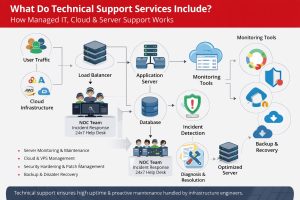
Downtime typically occurs due to resource exhaustion, misconfiguration, security breaches, or underlying hardware failures, all of which gradually impact system stability if left unaddressed. In real-world production environments, these issues rarely appear suddenly; they build up through warning signs such as increasing CPU load, memory saturation, unusual log activity, or failed processes.
This is where technical support teams play a critical role. By implementing continuous monitoring across servers, applications, and network layers, engineers are able to track system behavior in real time and identify anomalies at an early stage. Using proactive monitoring tools and log analysis, they detect potential failures before they affect end users.
In practice, early detection allows engineers to take corrective actions such as optimizing resource allocation, fixing configuration errors, applying security patches, or replacing failing hardware components. Immediate response during incidents further ensures that any disruption is minimized and services are restored quickly. As a result, well-managed technical support operations consistently maintain uptime levels above 99.9%, ensuring reliable performance and uninterrupted user experience even under high traffic or complex infrastructure conditions.
Best Practices Used by Infrastructure Engineers
Engineers follow a structured and disciplined approach to maintain system stability and scalability in real-world infrastructure environments. They regularly monitor system and application logs to identify early warning signs of failures or performance degradation. Alongside this, they automate backup processes to ensure data protection and quick recovery in case of unexpected incidents. Consistent application of updates and security patches helps prevent vulnerabilities and keeps the system aligned with the latest standards.
In addition, engineers continuously optimize server configurations based on workload behavior, ensuring efficient resource utilization and improved performance. They also rely on centralized monitoring tools to gain a unified view of infrastructure health across multiple servers and services. Together, these practices create a robust operational framework that ensures systems remain stable, secure, and capable of scaling as demand grows.
Struggling with Traffic Spikes and Downtime?
Partner with our experts for reliable cloud auto-scaling, proactive monitoring, and high-availability infrastructure solutions.
FAQ: Server Monitoring, Downtime Causes & Technical Support
How does server monitoring work?
Server monitoring tracks system performance metrics such as CPU, memory, and disk usage using tools like top, htop, and cloud monitoring dashboards to detect issues early. In addition, engineers continuously analyze these metrics to identify abnormal patterns and performance bottlenecks. As a result, they can take proactive actions before issues impact system stability. Moreover, this proactive approach helps maintain consistent performance and ensures higher uptime across infrastructure environments.
What causes server downtime?
Server downtime occurs due to high resource usage, misconfiguration, security vulnerabilities, or hardware failure. In many cases, these issues develop gradually rather than appearing suddenly. For example, increasing CPU usage or unpatched systems can lead to instability over time. As a result, if these problems are not addressed early, they can cause unexpected outages. Therefore, proactive monitoring and timely intervention become essential to maintain system uptime and reliability.
How do engineers troubleshoot Linux server performance issues?
Engineers analyze system metrics using commands like iostat, vmstat, and logs to identify bottlenecks and apply optimization techniques.
Why do hosting companies outsource technical support?
Hosting companies outsource support to reduce operational costs and provide 24/7 expert assistance through specialized teams.
Conclusion
Technical support services go far beyond basic troubleshooting. They include continuous monitoring, performance optimization, security management, and cloud infrastructure handling. From real-world experience, businesses that invest in managed cloud infrastructure support services and server monitoring and maintenance achieve higher uptime, better performance, and improved scalability.
In today’s competitive digital landscape, relying on professional support is no longer optional. It is essential for maintaining business continuity and delivering seamless user experiences.



