





Fast Facts: Live Server Crash Debugging: Rapid Root Cause Analysis & Website Recovery Protocol
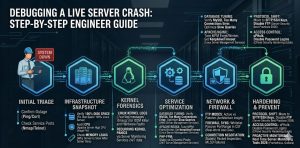
To debug a live server crash, engineers must immediately analyze kernel logs, verify service states, and identify resource exhaustion triggers. Begin by checking /var/log/messages and dmesg for Out-of-Memory (OOM) killer events or hardware faults. Simultaneously, use real time server monitoring tools 2026 to correlate CPU spikes with specific process IDs. Implementing linux server management services provides the structured diagnostic framework needed to restore production uptime and prevent recurring kernel panics.
Engineers facing a production outage should follow these high-priority steps for an immediate website down troubleshooting steps protocol. First, isolate the failure layer by testing network connectivity with ping and service responsiveness with telnet. Second, check for a how to fix disk space 100% linux server scenario, as full partitions freeze write-heavy services like MySQL and Apache. Third, audit the apache server high cpu usage fix requirements to ensure the Multi-Processing Module (MPM) settings match available RAM. Finally, leverage an outsourced server management company for 24/7 forensic analysis and infrastructure stabilization.
The Critical Impact of Production Downtime
A live server crash represents the most significant threat to enterprise digital operations and revenue stability. When a production environment fails, the immediate loss of service availability triggers a cascade of negative business outcomes. Beyond the immediate loss of transactions, prolonged downtime degrades SEO rankings and erodes customer trust. As a Senior Infrastructure Engineer, I classify a server crash as a Tier-1 emergency requiring a systematic, data-driven response. Only deep-level linux server management services can address the root causes of instability in complex, high-concurrency environments.
Initial Problem Diagnosis Using Telnet and Nmap
The first step in any recovery operation involves verifying the reachability of critical service ports. Use nmap -p 21,22,80,443 [server_ip] to determine if the firewall or the service daemon itself has stopped responding. If nmap shows port 21 is “filtered,” a firewall rule likely blocks the connection. If port 80 returns “closed,” the Apache or Nginx service has crashed entirely. Engineers also use telnet [server_ip] 22 to check for SSH availability; a failure here suggests a kernel hang or a network-level ECONNREFUSED error.
Resolving Connection Refused and Protocol Errors
The ECONNREFUSED error occurs at the TCP layer when the server actively rejects a connection request. This usually happens because the service is not listening on the specified port or the TCP backlog queue is full. In high-traffic scenarios, an unoptimized apache server high cpu usage fix leads to the exhaustion of available worker threads. When this happens, the kernel cannot accept new SYN packets, resulting in the rejected connection. Our managed server support services prioritize tuning the net.core.somaxconn kernel parameter to prevent these protocol-level failures.
Out-of-Memory (OOM) Killer Root Cause Analysis
One of the most frequent causes of a sudden server crash is the Linux Kernel’s OOM Killer mechanism. When the system runs out of physical memory, the kernel must terminate processes to prevent a total system halt. It typically targets high-memory consumers like MySQL or Java-based applications. To diagnose this, search /var/log/messages or /var/log/syslog for “Out of memory: Kill process.” Resolving this requires immediate RAM upgrades or a shift to cloud infrastructure management services that allow for dynamic resource scaling during peak loads.
Fixing MySQL Too Many Connections and Crashes
Database failures often mirror web server crashes, especially when you encounter the how to fix mysql too many connections error. This error occurs when the number of active clients exceeds the max_connections value in my.cnf. When the limit is hit, application threads hang, driving up the load average until the server becomes unresponsive. To fix this, log into the MySQL CLI and execute SET GLOBAL max_connections = 500;. Long-term stability requires server monitoring services 24/7 to identify and optimize the slow queries causing connection pile-ups.
Step-by-Step Resolution: FileZilla Connectivity Fix
Connectivity issues during a crash often manifest as “Critical Error: Could not connect to server” in FileZilla. This is frequently a TLS version mismatch or a failure in the passive port negotiation. Open the Site Manager, select your site, and set the Encryption to “Only use plain FTP” as a test (though not for production). If it connects, the issue is with the SSL/TLS certificate or cipher suite. For production-ready remote server management services, we ensure all certificates are valid and the server supports TLS 1.2 or 1.3 to satisfy modern client requirements.
Step-by-Step Resolution: WinSCP and Passive Mode
WinSCP users often face “Connection timed out” errors when the server is behind a NAT or restrictive firewall. The root cause is usually the client attempting an Active Mode connection which the server-side firewall blocks. To resolve this, go to Advanced Site Settings, select “Connection,” and ensure “Passive Mode” is enabled. This allows the client to initiate the data channel, bypassing common inbound blocks. As part of white label server support, architects often pre-configure these settings for clients to ensure seamless file management during recovery phases.
Architecture Insight: Active vs. Passive FTP Explained
Understanding the infrastructure difference between Active and Passive FTP is crucial for server architects. In Active Mode, the server initiates a connection back to the client’s data port, which usually fails due to client-side firewalls. In Passive Mode, the server opens a random high-numbered port and waits for the client to connect. This is the preferred method for aws server management services because it is firewall-friendly. However, it requires the engineer to open a specific port range (e.g., 49152-65534) in the security group and the local server firewall.
Real-World Use Case: CSF Firewall and Passive Ports
On a cPanel server, a common crash symptom is the inability to upload files via FTP. We often find the CSF firewall blocking the required passive ports. Even if the FTP service is running, the data channel fails if the ports aren’t added in the TCP_IN configuration of /etc/csf/csf.conf. By synchronizing the PassivePortRange in the FTP configuration with the CSF added, we restore functionality instantly. This demonstrates why a cpanel security hardening guide must include specific network-layer rules to prevent service-level “false positive” crashes.
Scaling with Outsourced Hosting Support Services
Organizations often hit a wall where internal teams cannot handle the complexity of 24/7 infrastructure debugging. This is where outsourced hosting support services provide a strategic advantage. By leveraging an outsourced server management company, businesses gain access to specialized engineers who spend their entire careers fixing kernel panics and database bottlenecks. These services include 24/7 server management services that use proactive monitoring to catch a why server is slow after some time scenario before it turns into a total system failure.
Hardening and Best Practices for Enterprise Security
Moving away from legacy protocols like FTP is a core requirement of server security best practices 2026. We strongly recommend SFTP (SSH File Transfer Protocol) as it utilizes a single encrypted port (22) for all communication. This simplifies firewall management and significantly reduces the attack surface. Furthermore, implementing SSH keys and disabling password authentication is a primary step in any server hardening protocol. This move prevents brute force attempts and ensures that only authorized administrators can access the server’s root environment.
Preventing Brute Force Attacks in cPanel
Brute force attacks on services like SSH, FTP, and WordPress are a leading cause of resource-driven server crashes. To how to prevent brute force attacks in cpanel, we deploy cPHulk and ModSecurity. These tools automatically null-route IP addresses that show malicious intent. Additionally, we recommend changing default ports and using server health monitoring tools and techniques to alert on high failed login counts. This proactive stance is essential for anyone looking to how to secure linux server from hackers effectively in 2026.
How Does Cloud Infrastructure Management Work?
Clients often ask how does cloud infrastructure management work in the context of high availability. It involves the use of load balancers, auto-scaling groups, and automated failover scripts. When a single node crashes, the management layer detects the health check failure and replaces the instance within seconds. This level of cloud infrastructure monitoring best practices ensures that a hardware failure doesn’t become a business failure. We integrate these managed server support services to provide a “self-healing” infrastructure for our enterprise clients.
RESTORE PRODUCTION SERVERS BEFORE DOWNTIME IMPACTS YOUR BUSINESS
Facing sudden server crashes, OOM errors, or production outages under high traffic?
Kernel crashes, MySQL overload, disk exhaustion, and high CPU spikes can instantly take production infrastructure offline. Our engineers provide real-time troubleshooting, proactive monitoring, performance optimization, and 24/7 server management to restore stability fast.
Understanding Why Servers Slow Down Over Time
The question of why server is slow after some time usually points to cumulative resource leaks or disk fragmentation. In Linux, un-rotated logs can slowly fill the partition, leading to a how to fix disk space 100% linux server emergency. Alternatively, a “zombie” process or a memory leak in a PHP script can slowly consume the available RAM until the swap space is exhausted. Regular maintenance via linux server management services includes scheduled reboots, log rotation, and cache clearing to keep the system running at peak performance levels.
Benefits of Outsourcing Technical Support for Crash Recovery
The benefits of outsourcing technical support become clearest during a major outage. Having a team that operates on a 24/7 basis means that a crash at 3:00 AM is addressed immediately, not when your internal team wakes up. An outsourced server management company provides a deep bench of expertise, ensuring that whether the crash is a MySQL deadlock or a RAID failure, an expert is on hand. This ensures that remote server management services are always available to maintain your production “pulse.”
Real Time Server Monitoring Tools 2026
Modern infrastructure requires real time server monitoring tools 2026 that offer more than just basic uptime pings. We utilize tools like Prometheus, Netdata, and Zabbix to track thousands of metrics per second. These tools allow us to see the exact micro-second a CPU spike occurred and which user or process was responsible. By following cloud infrastructure monitoring best practices, we can set granular alerts that notify us of “pre-crash” conditions, such as rising disk I/O wait or shrinking entropy pools.
Server Crash Troubleshooting FAQ:
How do I debug a live server crash quickly in production?
Start by checking kernel logs like /var/log/messages and dmesg for errors such as OOM kills or hardware faults. Then verify service status and use real-time monitoring tools to identify CPU, memory, or process-level spikes causing the crash.
What are the most common causes of a sudden server crash?
The most common causes include memory exhaustion (OOM Killer), high CPU usage, disk space reaching 100%, and misconfigured services. Database overload and unoptimized web servers can also trigger system-wide failures.
How can I check if my server is down or just a service failure?
Use ping to test network connectivity and telnet or nmap to check open ports. If ports are closed or filtered, it may be a firewall issue. If they are open but unresponsive, the service itself has likely crashed.
Why does the Linux OOM Killer crash applications?
When the system runs out of memory, the Linux kernel kills high-memory processes to prevent a complete system freeze. This often impacts services like MySQL or Java applications, causing sudden downtime.
How do I fix ‘Too Many Connections’ errors in MySQL during a crash?
Increase the max_connections limit in MySQL and identify slow or stuck queries causing connection buildup. Long-term fixes require query optimization and continuous monitoring to prevent overload.
Why does my server show ‘Connection Refused’ errors?
This happens when the service is not running or the server cannot accept new connections due to resource exhaustion. It can also occur when the TCP backlog queue is full under high traffic.
How can I prevent server crashes in high-traffic environments?
Use load balancing, auto-scaling, optimized server configurations, and real-time monitoring tools. Proactive alerts and infrastructure tuning help detect issues before they cause downtime.
Why is server monitoring critical for preventing downtime?
Server monitoring detects anomalies like CPU spikes, memory leaks, and unusual traffic patterns in real time. This allows engineers to act before small issues escalate into full server crashes.
What is the best long-term solution for handling server crashes?
Implement proactive monitoring, regular performance tuning, secure configurations, and automated recovery systems. Many businesses also rely on 24/7 server management to ensure continuous stability.
How do brute force attacks cause server crashes?
Brute force attacks generate massive login attempts, consuming CPU and memory resources. This can overload authentication services and lead to degraded performance or complete system failure.
Conclusion
Debugging a live server crash is a high-stakes operation that demands a balance of speed and technical precision. By moving from a reactive “fix-it” mindset to a proactive server monitoring services 24/7 strategy, you can eliminate the root causes of downtime. Whether it is tuning MySQL connection strings or hardening the network with linux server management services, every step you take builds a more resilient infrastructure. In the 2026 digital economy, stability is the ultimate competitive advantage.



