




Overview:
Public WiFi is inherently hostile because it lacks mandatory encryption and identity validation at the protocol level. We found that attackers exploit these vulnerabilities using VPN tunnels and Zero-Trust models to intercept data through Man-in-the-Middle (MITM) attacks, ARP spoofing, and “Evil Twin” rogue hotspots. Without protection, your session tokens and credentials transmit in plaintext or via interceptable radio frequencies.
To secure your connection, you should run a VPN with AES-256 encryption to mask all traffic from local sniffers. Manage your devices to disable automatic connections to open networks and enforce Multi-Factor Authentication (MFA) to stop hijacked sessions from accessing sensitive systems. For technical teams, we recommend implementing HTTP Strict Transport Security (HSTS) and certificate pinning to block protocol downgrade attacks. Continuous monitoring and moving to SSH keys instead of passwords will further harden your perimeter against mobile threats.
Introduction:
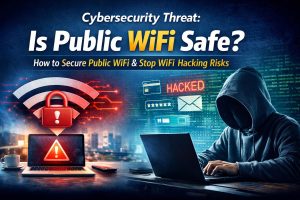
Is public WiFi safe? No, public WiFi is not safe for business or personal use without protection. Attackers exploit wifi hacking risks like Man-in-the-Middle attacks, packet sniffing, and rogue hotspots to intercept sensitive data. To stay secure, you must use encryption, VPN tunnels, and zero-trust access controls when connecting to public networks.
Public WiFi Creates a High-Risk Cybersecurity Environment
Public WiFi introduces serious public wifi security risks because it operates without enforced encryption or identity validation. Most hotspots allow open access without WPA3 security or authentication. This creates a shared network where all connected devices communicate within the same broadcast domain. Attackers exploit this design to monitor and intercept traffic in real time.
When users access business tools, email systems, or cloud dashboards over these networks, they unknowingly expose session data. This exposure allows attackers to capture authentication tokens and bypass login credentials. The question “is public wifi safe” becomes critical because the network itself cannot be trusted at any layer.
WiFi Hacking Risks Can Lead to Instant Data Breaches
The danger escalates when attackers automate exploitation. Modern hacking toolkits scan for vulnerable sessions and hijack them within seconds. These attacks do not require brute force or password cracking. Instead, attackers reuse session tokens to gain immediate access.
A common wifi hacking risk occurs when an employee connects to a public network and accesses server infrastructure. If the session is intercepted, the attacker gains control of systems managed through platforms like cPanel or WHM. This allows configuration changes, database extraction, and malware deployment without triggering alerts.
Another major threat is the “Evil Twin” attack. Attackers create fake hotspots that mimic legitimate networks. Users connect unknowingly, believing the network is safe. Once connected, all traffic routes through the attacker’s system. This gives full visibility into user activity and credentials.
The impact is not limited to individuals. A single compromised device can expose entire business environments. Attackers move laterally from one session to connected systems, leading to widespread breaches.
How to Secure Public WiFi and Eliminate Risk
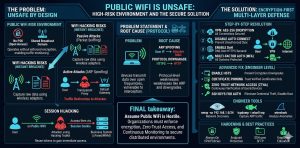
Organizations must assume that public WiFi is hostile. They must enforce strict controls to protect data and access.
To answer “how to secure public wifi”, businesses must implement encryption-first security models. This includes VPN tunneling, Zero-Trust Network Access, endpoint protection, and strict authentication policies. These controls ensure that intercepted data remains unreadable and unusable.
Problem Statement: Why Public WiFi Is Unsafe by Design
Public WiFi lacks secure authentication and encryption mechanisms. Most networks do not enforce WPA3 or pre-shared keys. This means devices transmit data in an environment where attackers can easily capture signals.
Wireless communication occurs over radio frequencies. Any device within range can intercept these signals using network adapters in monitor mode. This design flaw makes public WiFi inherently vulnerable to interception and manipulation.
Root Cause: Protocol-Level Weaknesses Enable Attacks
The primary cause of wifi hacking risks lies in network protocols like ARP. ARP maps IP addresses to MAC addresses without validation. Attackers exploit this by sending forged ARP messages, redirecting traffic to their devices.
Another vulnerability involves protocol downgrade attacks. Attackers force secure HTTPS connections to downgrade to HTTP. This exposes data in plaintext, making it easy to intercept credentials and session information.
These weaknesses exist at the protocol level, making them difficult to detect using traditional security tools.
Solution (Step-by-Step): How to Secure Public WiFi Connections
To reduce public wifi security risks, organizations must enforce the following controls:
- Use a VPN with strong encryption (AES-256) for all connections
- Disable automatic connection to open networks
- Enable DNS over HTTPS (DoH) to secure DNS queries
- Use multi-factor authentication for all business systems
- Restrict access to sensitive systems over public networks
These steps ensure that data remains encrypted and inaccessible to attackers.
PROTECT YOUR REMOTE WORKFORCE FROM PUBLIC WIFI CYBER ATTACKS
Could insecure public WiFi expose your business credentials and cloud infrastructure?
MITM attacks, rogue hotspots, and session hijacking can silently compromise remote employees within seconds. Our engineers help secure remote environments using VPN encryption, Zero Trust security, endpoint protection, and proactive infrastructure monitoring.
Advanced Fix (Engineer Level): Preventing MITM and Session Hijacking
Engineers must implement advanced controls to eliminate attack vectors.
Enable HTTP Strict Transport Security (HSTS) to force secure connections. This prevents attackers from downgrading encryption. Implement certificate pinning to ensure applications trust only verified certificates.
Adopt Zero-Trust Network Access. This ensures continuous verification of users and devices. Even if attackers intercept sessions, they cannot maintain access.
Replace password-based authentication with SSH keys. This eliminates credential theft risks. Disable root login and enforce least privilege access across all systems.
Tools and Commands: Detecting WiFi-Based Cyber Attacks
Engineers use specialized tools to identify suspicious network behavior.
nmap -sn 192.168.1.0/24
This command scans all devices on the network. Unknown devices may indicate a compromised environment.
tcpdump -i wlan0 arp
This captures ARP traffic. Excessive ARP responses suggest spoofing attempts.
wireshark
Wireshark analyzes packets and detects anomalies such as duplicate IP conflicts or unusual traffic patterns.
These tools help detect man in the middle attack wifi scenarios in real time.
Real Scenario: How Public WiFi Leads to Business Data Exposure
A business user connects to a public WiFi network in a coffee shop. The attacker sets up a fake hotspot with a similar name. The user connects without verifying authenticity.
During login to a business dashboard, the attacker captures session cookies. Within seconds, they gain access to the system. They create new administrative accounts and extract sensitive data.
This attack demonstrates how is public wifi safe becomes a critical concern for businesses operating remotely.
Architecture Insight: Passive vs Active WiFi Attacks
Passive attacks involve monitoring network traffic without altering it. Attackers capture packets silently using wireless adapters.
Active attacks involve manipulating network behavior. Attackers use ARP spoofing to redirect traffic through their devices. This allows them to modify data and inject malicious payloads.
Organizations must protect data at the encryption layer to prevent both types of attacks.
Quick Insights
Public WiFi is unsafe because it lacks encryption and identity validation. Attackers exploit wifi hacking risks such as MITM attacks, ARP spoofing, and rogue hotspots. Session hijacking allows access without credentials. Businesses must implement VPN, Zero Trust, and encryption to secure data.
Hardening & Best Practices: Long-Term Security Strategy
Organizations must adopt a layered security approach. Enforce always-on VPN policies through device management. Deploy endpoint detection systems to identify suspicious activity. Use SSH keys instead of passwords.
Educate employees about risks associated with public WiFi. Human error remains a major factor in security breaches. Continuous monitoring and regular audits ensure that security measures remain effective.
FAQ’S:
How can I secure my remote team’s public Wi-Fi connections?
Standard passwords will not stop sophisticated interception attempts. To protect business data, you must implement mandatory Enterprise VPNs for all remote traffic and enable Multi-Factor Authentication (MFA) on every entry point.
This is why our Managed Security Services focus on creating encrypted tunnels that keep remote workforces invisible to hackers.
What is the best way to prevent B2B data breaches?
The most effective defense is a Zero Trust architecture. Businesses should disable Auto-Join on all corporate-issued devices and use endpoint protection to identify rogue hotspots before they become a threat.
This is why our Server Hardening protocols include strict device-level policies to block unauthorized network handshakes before they can occur.
Can hackers steal business credentials via public hotspots?
Absolutely. Through Evil Twin attacks, hackers mimic legitimate networks to steal login data and sensitive emails. Without professional encryption, your data may be visible in plain text and your sessions can be hijacked.
This is why our 24/7 Monitoring detects suspicious login patterns to neutralize threats before a single compromised connection becomes a total breach.
How do I stop company emails from being intercepted?
To prevent packet sniffing, your infrastructure must enforce end-to-end encryption. Essential steps include auditing server configurations for SSL/TLS compliance and encrypting all internal B2B communication channels.
This is why our Outsourced IT Support includes deep-level audits to ensure your communication remains hardened against eavesdropping and data theft.
What should I do if a device connects to a rogue network?
Immediate containment is the only way to prevent a network-wide infection. Your response protocol must include remote locking or wiping of the compromised device and forced session termination across all cloud applications.
This is why our Incident Response teams are available 24/7 to isolate vulnerable devices and protect your broader business ecosystem.
Is a VPN sufficient for business data protection?
A VPN is only one layer of a modern security stack. For total protection, you also need advanced Endpoint Detection and Response (EDR) and automated patching of software vulnerabilities.
This is why our Enterprise Cloud Security provides a holistic defense-in-depth strategy that protects your data at the source, in transit, and at rest.
WiFi Security: Final Expert Recommendations
Public WiFi must always be treated as an untrusted network. Businesses must enforce encryption, Zero-Trust access, and continuous monitoring to protect data. Strong security controls ensure that even if attackers intercept traffic, they cannot use it. Organizations that implement these strategies reduce risk, prevent breaches, and maintain secure operations in modern distributed environments.



