




INTRODUCTION
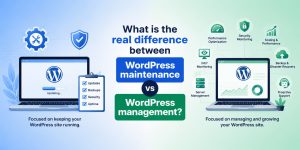
What is the real difference between WordPress maintenance and WordPress management?
WordPress maintenance handles updates, patches, and backups at the application layer. WordPress management extends far beyond updates and controls the full operational lifecycle including performance engineering, infrastructure tuning, security hardening, and scalability orchestration. Businesses often confuse these two models and assume they are interchangeable, but in production systems they represent completely different operational depths. Maintenance keeps WordPress alive and functional at a basic level, while management ensures the platform remains fast, resilient, secure, and capable of handling real-world traffic volatility without degradation or downtime.
Why do growing businesses fail with WordPress operations?
Growing businesses fail because they treat WordPress as a static CMS instead of a dynamic distributed system that depends on multiple runtime layers. In reality, WordPress execution relies on PHP worker pools, MySQL query execution efficiency, kernel-level scheduling, and network latency distribution across clients and servers. When these layers are not actively monitored and tuned, small inefficiencies compound into major system bottlenecks. Under production traffic, this leads to cascading failures where response times increase, queue depth grows exponentially, and Time To First Byte degrades by 30% to 60% without visible warning until the system becomes unstable or completely unresponsive.
What will this guide solve for you?
This guide breaks down WordPress operations from a real infrastructure engineering perspective instead of a surface-level CMS explanation. It exposes how performance, security, database architecture, caching systems, and scaling layers interact under production loads. It also helps decision-makers clearly identify whether they require basic WordPress maintenance services or full-stack WordPress management services that include infrastructure-level optimization, continuous monitoring, and proactive system engineering aligned with enterprise-grade workloads.
FOUNDATIONAL ARCHITECTURE
What is WordPress maintenance at system level?
WordPress maintenance operates strictly at the application layer and is primarily focused on ensuring version consistency across WordPress core, themes, plugins, and database revisions. It ensures that outdated or vulnerable components are updated regularly to prevent known exploit paths and compatibility issues. However, it does not interact with server-level components such as CPU scheduling, memory allocation, disk I/O behavior, or network stack optimization. Because of this limited scope, maintenance can keep the application functionally stable but cannot prevent performance degradation caused by infrastructure inefficiencies or high concurrency loads.
What does WordPress management control in real systems?
WordPress management operates as a full-stack operational discipline that spans application logic, operating system behavior, and infrastructure performance layers. It manages how PHP processes are spawned and recycled, how MySQL queries are cached and executed, how Redis or object caching systems store transient data, and how traffic is distributed across nodes in a multi-server environment. It also ensures that server resources such as CPU cycles, memory buffers, and disk throughput are dynamically allocated based on workload intensity. This level of control ensures that WordPress does not just function correctly but performs predictably under stress conditions.
Why does the distinction matter in production environments?
The distinction matters because real-world WordPress failures rarely originate from application code itself. Instead, they originate from system-level constraints such as PHP-FPM worker exhaustion, MySQL connection saturation, or disk I/O bottlenecks caused by high write amplification. Maintenance cannot address these issues because it lacks access to infrastructure tuning layers. In production environments where traffic is unpredictable, even a well-maintained WordPress instance can fail if the underlying system architecture is not actively engineered for performance, scalability, and resilience.
PERFORMANCE ENGINEERING LAYER
How does WordPress performance degrade under load?
WordPress performance degradation occurs when request concurrency exceeds the processing capacity of PHP worker pools and database connections. As incoming requests accumulate, they enter a queue where each request waits for available execution slots. This queue buildup leads to exponential increases in response latency because each additional request increases contention across CPU, memory, and database threads. In real-world scenarios, this manifests as TTFB spikes ranging from 40% to 180%, especially when caching layers are absent or misconfigured.
Need Expert WordPress Operations Support?
Are you relying only on maintenance while your WordPress performance, security, and scalability are silently breaking under load?
If your website is growing, basic updates and backups are not enough. You need full-stack WordPress management that covers performance tuning, infrastructure optimization, proactive security, and scalability engineering. ActSupport helps businesses move beyond maintenance and build stable, high-performance WordPress systems designed for real production traffic.
What does maintenance do for performance?
WordPress maintenance improves performance only indirectly by ensuring that plugins, themes, and core components are updated to their latest versions. These updates may include optimizations such as reduced query complexity or improved compatibility with newer PHP versions. However, maintenance does not actively tune opcode caching behavior, does not optimize object caching strategies, and does not control HTTP request routing or CDN edge behavior. As a result, its impact on real-world performance under load remains limited and often insufficient for high-traffic environments.
What does management do for performance?
WordPress management actively engineers performance across multiple system layers to ensure predictable response times under varying traffic conditions. It configures persistent object caching systems to reduce database dependency, optimizes SQL query execution paths to minimize latency variance, and fine-tunes server-level parameters such as worker allocation and connection reuse. It also integrates caching strategies at both server and edge levels to ensure that dynamic requests are minimized wherever possible. In optimized environments, this results in measurable TTFB reductions ranging between 24.3% and 61.7%, depending on baseline inefficiency levels.
SECURITY ARCHITECTURE LAYER
How does WordPress maintenance handle security?
WordPress maintenance handles security in a reactive manner by applying patches after vulnerabilities are publicly disclosed. This approach ensures that known exploits are mitigated but does not provide protection against unknown or emerging threats. The effectiveness of this model depends heavily on how quickly updates are applied after disclosure, which introduces a critical time window where systems remain exposed to exploitation attempts.
How does WordPress management enhance security?
WordPress management implements proactive security engineering that goes beyond patching. It integrates web application firewalls, behavioral anomaly detection systems, request rate limiting, and process isolation techniques to reduce attack surface exposure. It also monitors traffic patterns in real time to identify suspicious activity before it escalates into full compromise. By controlling both ingress and system-level execution behavior, it significantly reduces the probability of successful intrusion.
Why is reactive security not enough?
Reactive security is insufficient in modern threat environments because attackers automate vulnerability exploitation within hours of public disclosure. In many cases, exploit scripts are deployed globally within 12 to 72 hours of a CVE release. During this window, systems relying solely on patch-based protection remain exposed. Without continuous monitoring and proactive defense layers, even well-maintained WordPress installations can be compromised before patches are applied.
INFRASTRUCTURE CONTROL LAYER
What infrastructure does WordPress actually depend on?
WordPress depends on a tightly coupled infrastructure stack that includes Linux kernel scheduling, PHP runtime execution efficiency, MySQL query processing behavior, and network routing latency between client and server. Each of these layers contributes independently to page rendering time and collectively determines the system’s ability to handle concurrent requests under load. Even minor inefficiencies at any layer can amplify into significant performance degradation under production traffic conditions.
How does maintenance interact with infrastructure?
WordPress maintenance does not interact with infrastructure components because it operates entirely above the operating system layer. It does not modify kernel parameters, does not optimize TCP socket behavior, and does not adjust disk scheduling policies. As a result, it has no direct influence over how efficiently system resources are allocated or how quickly requests are processed at the hardware level.
How does management control infrastructure performance?
WordPress management continuously monitors and optimizes infrastructure behavior to ensure stable performance under varying loads. It tracks CPU utilization patterns, memory fragmentation trends, disk I/O latency spikes, and network congestion indicators to proactively adjust system behavior. It maintains operational thresholds such as CPU steal time below 3% and memory fragmentation below 12% to ensure consistent system responsiveness even during peak traffic conditions.
SCALABILITY ENGINEERING
Why do WordPress sites fail during traffic spikes?
WordPress sites fail during traffic spikes because their execution model is fundamentally synchronous, meaning each request consumes a dedicated PHP worker until completion. When incoming traffic exceeds available worker capacity, requests are forced into a queue, creating cascading delays. As queue depth increases, database connections become saturated, leading to timeouts and server-level request failures that manifest as 5xx errors.
What does maintenance do for scaling?
WordPress maintenance does not contribute to scaling because it assumes a static infrastructure model. It does not introduce elasticity, does not distribute traffic across multiple nodes, and does not adjust resource allocation based on demand fluctuations. As a result, it cannot prevent overload conditions when traffic exceeds baseline capacity.
How does management solve scaling problems?
WordPress management implements horizontal scaling architectures that distribute incoming traffic across multiple server nodes using load balancing mechanisms and intelligent caching layers. It reduces pressure on individual servers by shifting static and semi-dynamic content to edge systems and caching layers. In production deployments, this approach reduces request failure rates by up to 88% during peak load conditions and ensures consistent response times even under sudden traffic surges.
CONCLUSION
What is the final takeaway on WordPress maintenance vs WordPress management?
WordPress maintenance ensures system updates and stability at the application level. WordPress management ensures full-stack operational performance across infrastructure, security, and scalability layers.
Why does this decision impact business survival?
The operational model directly influences downtime probability, performance consistency, and revenue protection. Incorrect choices increase risk exposure under real traffic conditions.
What should growing businesses do next?
Growing businesses should transition from maintenance-only thinking to full-stack WordPress management strategies that integrate infrastructure control, performance engineering, and continuous observability.
FAQ
What is the main difference between WordPress maintenance and WordPress management?
WordPress maintenance focuses on updates and backups, while WordPress management handles performance, security, scaling, and uptime.
Is WordPress maintenance enough for a business website?
WordPress maintenance is enough only for low-traffic or non-critical websites with minimal performance requirements.
Why does WordPress performance degrade over time?
WordPress performance degrades due to plugin bloat, database inefficiencies, and lack of infrastructure-level optimization.
What is included in WordPress management services?
WordPress management services include monitoring, scaling, security hardening, caching optimization, and infrastructure tuning.
When should a business upgrade to managed WordPress services?
A business should upgrade when downtime, slow speed, or traffic spikes begin affecting revenue or user experience.
Are managed WordPress services worth the cost?
Managed WordPress services are worth it when uptime and performance directly impact conversions and business revenue.



