




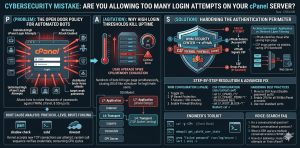
Key Intelligence:
To protect your server, you must limit cPanel login attempts by combining application-layer security with network-level firewall rules. Unrestricted retries allow botnets to exhaust CPU resources through constant PAM authentication requests. You should enable cPHulk Brute Force Protection and integrate ConfigServer Security & Firewall (CSF) to drop malicious traffic before it reaches the service.
We found that setting a three-failure threshold while switching to SSH keys and 2FA effectively stops credential theft. Actively monitoring /var/log/secure helps you identify attack patterns and block emerging vulnerabilities. Implementing these server hardening best practices is vital to secure your infrastructure and prevent performance degradation caused by unauthorized access attempts.
Introduction:
Allowing excessive login attempts on cPanel exposes your server to brute force attacks that can compromise access within minutes. Attackers automate password guessing and exploit weak thresholds to gain control. To prevent this, you must limit cPanel login attempts, enable cPanel brute force protection, and integrate firewall-level blocking using CSF.
Excessive cPanel Login Attempts Create an Open Entry Point for Attackers
The primary issue arises when administrators fail to configure strict login attempt limits. By default, many servers allow multiple login retries without immediate lockout. This creates an open attack surface for botnets targeting secure WHM login portals, cPanel accounts, and SSH services.
Every login attempt triggers authentication processes within the system. When attackers flood the login interface with thousands of attempts, the server processes each request. This leads to increased CPU usage, memory consumption, and eventual system instability. More importantly, it increases the probability of successful credential compromise.
Brute Force Attacks Do More Than Just Break Passwords
Brute force attacks are not limited to password guessing. They act as resource exhaustion attacks that degrade server performance. Each login attempt invokes PAM (Pluggable Authentication Modules), which validates credentials against system files like /etc/shadow.
When multiple bots perform simultaneous login attempts, the server experiences high load. This leads to service degradation, slow response times, and even outages. Users may encounter errors such as connection refusals or delayed access to websites.
In severe cases, attackers gain access to administrative panels and deploy malicious scripts. These scripts can exfiltrate data, modify configurations, or encrypt files for ransom. This transforms a simple misconfiguration into a full-scale security breach.
Implement Multi-Layered cPanel Brute Force Protection
The solution requires enforcing strict authentication controls at both the application and network layers. You must configure cPHulk configuration to limit login attempts and integrate CSF firewall brute force rules to block malicious traffic before it reaches the server.
This approach ensures that attackers are stopped early, reducing resource consumption and preventing unauthorized access.
Why Unlimited Login Attempts Are Dangerous
Allowing unlimited login attempts creates a predictable attack surface. Automated tools continuously test username-password combinations until they find a match. Since most users reuse passwords, attackers succeed faster than expected.
Additionally, login interfaces are publicly accessible. This means attackers do not require special access to begin an attack. They simply target exposed ports like 2087 (WHM) or 2083 (cPanel).
Root Cause: Protocol and Authentication Layer Weaknesses
The root cause lies in how authentication requests are handled at the system level. Services like sshd and dovecot accept incoming connections and pass them to PAM for verification. Without rate limiting, the system continues accepting connections indefinitely.
At the network layer, the kernel accepts TCP requests without filtering malicious patterns. This allows attackers to generate thousands of login attempts per minute. If TLS configurations are weak, attackers may also attempt session-based exploits alongside brute force attacks.
Solution (Step-by-Step): How to Limit cPanel Login Attempts
To implement effective cPanel brute force protection, follow these steps:
- Enable cPHulk Brute Force Protection in WHM
- Set maximum login failures per IP to 3 attempts
- Configure lockout duration to at least 300 seconds
- Enable automatic IP blocking at firewall level
- Activate alerts for repeated login failures
These steps ensure that attackers are blocked quickly and cannot continue their attack.
Advanced Fix (Engineer Level): Integrating CSF for Kernel-Level Protection
Application-level protection alone is not sufficient. You must enforce network-level blocking using CSF.
Edit the configuration file:
nano /etc/csf/csf.conf
Set the following parameters:
LF_CPANEL = "5"LF_CPANEL_PERM = "1"LF_ROOT_BLOCK = "1"
Restart CSF:
csf -r
This configuration ensures that any IP exceeding login thresholds is permanently blocked at the kernel level. This prevents the server from processing repeated malicious requests.
Tools and Commands: Monitoring Brute Force Attacks
Engineers must actively monitor login activity to detect threats.
tail -f /var/log/secure
This command displays real-time login attempts.
grep "Failed password" /var/log/secure | awk '{print $11}' | sort | uniq -c | sort -nr
This identifies top attacking IPs.
csf -g <IP>
This checks firewall status for specific IPs.
These tools provide visibility into attack patterns and help maintain server security.
Real Scenario: How Weak Login Limits Lead to Server Breach
During a high-traffic event, an unprotected server allowed 50 login attempts before lockout. Attackers used automated scripts to test passwords. Within minutes, they gained access to the admin panel.
Once inside, they uploaded malicious scripts and accessed sensitive data. The breach caused downtime, data loss, and reputational damage.
If strict login limits had been enforced, the attack would have been blocked immediately.
STOP CPANEL BRUTE FORCE ATTACKS BEFORE THEY IMPACT SERVER UPTIME
Are repeated cPanel login attacks slowing down or exposing your server infrastructure?
Unrestricted login attempts can overload authentication services, increase CPU usage, and expose hosting environments to credential theft. Our engineers help secure servers using cPHulk, CSF firewall hardening, SSH key authentication, and proactive 24/7 security monitoring.
Architecture Insight: Application vs Network-Level Protection
cPHulk operates at the application layer. It detects failed login attempts after they reach the login interface. This means the server still processes each request.
CSF operates at the network layer. It blocks malicious traffic before it reaches the application. This reduces server load and improves performance.
Combining both ensures maximum protection and efficiency.
Hardening & Best Practices: Moving Beyond Password Security
Organizations must implement advanced security measures to protect infrastructure from modern threats. Relying only on passwords is no longer sufficient, as attackers use automated tools to exploit weak authentication systems.
Strengthen Authentication Security
Use SSH keys instead of passwords for authentication, as they are far more secure and resistant to brute force attacks. Disable root login to minimize the attack surface and prevent direct administrative access. Additionally, enable Two-Factor Authentication (2FA) for all accounts to add an extra layer of protection beyond credentials.
Reduce Attack Surface
Changing default configurations can significantly reduce exposure to automated attacks. Use non-standard ports instead of default ones to avoid common scanning attempts by bots. This simple step helps in minimizing unauthorized access attempts on your server.
Continuous Monitoring & Updates
Regular monitoring and timely updates are essential to maintain strong security. Continuously review logs and system activity to detect suspicious behavior early. Ensure that all software, operating systems, and security tools are updated to protect against newly discovered vulnerabilities.
cPanel Security FAQ:
How do I limit cPanel login attempts to stop brute force attacks?
Limiting login attempts is critical to prevent automated password guessing attacks on your server. Without restrictions, bots can continuously try different password combinations until they succeed.
You can secure your server by enabling cPHulk in WHM and setting a strict 3-attempt failure threshold. Additionally, integrating the CSF firewall helps block malicious IPs at the kernel level before they cause damage.
This is why our Server Hardening Services focus on multi-layered defense to stop attackers before they reach your data.
What is the best way to protect my WHM root login from hackers?
Securing the root account requires going beyond simple passwords, as it is the primary target for attackers. Weak authentication can lead to full server compromise.
For maximum protection, disable root logins entirely and switch to SSH key-based authentication. Also, enable Two-Factor Authentication (2FA) across all administrative access points.
This is why our Infrastructure Security Audits prioritize credential hardening to eliminate the most common entry points for breaches.
Why is my cPanel server running slow during a login attack?
Brute force attacks are essentially resource exhaustion events that overload your server. Each failed login request forces the system to process authentication repeatedly.
This results in increased CPU usage through PAM processing and higher memory consumption, which can degrade performance or even cause outages.
This is why our Proactive Server Monitoring identifies high-load patterns instantly and helps neutralize botnets before they impact your website uptime.
How can I block malicious IPs from my server permanently?
Blocking attackers at the application level is not sufficient. To ensure long-term protection, enforcement must happen at the network level.
You should configure CSF (ConfigServer Security & Firewall) with strict LF_CPANEL rules and implement permanent IP blocking for repeated offenders.
This is why our Managed IT Support includes kernel-level firewall tuning to ensure malicious traffic is dropped before it consumes server resources.
Can hackers bypass cPanel security if I use weak passwords?
Yes, weak passwords are one of the easiest ways for attackers to gain access. Automated tools can test thousands of combinations per minute.
Without rate limiting and strong policies, attackers will eventually succeed. You must enforce strict account lockout durations (minimum 300 seconds) and monitor logs such as /var/log/secure for repeated failures.
This is why our Cybersecurity Solutions enforce strict authentication thresholds to turn vulnerable systems into hardened environments.
What should I do if my server is already under a brute force attack?
Immediate action is required to prevent a full-scale breach when an attack is active. Delayed response can lead to unauthorized access or data loss.
You should identify attacking IPs using grep commands and block them via CSF. At the same time, enable firewall-level alerts for failed login attempts to stay informed in real time.
This is why our Emergency Incident Response team remains available 24/7 to secure infrastructure and prevent data exfiltration during active threats.

Final Expert Insights
Allowing excessive cPanel login attempts is a critical cybersecurity mistake that directly impacts both security and performance. As an infrastructure architect, you must treat authentication endpoints as high-risk attack surfaces. Enforcing strict login thresholds using cPanel brute force protection and firewall-level controls ensures that automated attacks fail instantly. Effective server hardening is not about restricting users; it is about eliminating attack vectors. Organizations that implement these controls maintain uptime, protect data integrity, and prevent costly breaches.



