




Summary
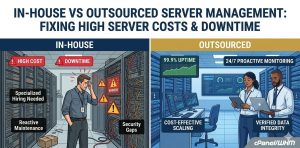
Managing infrastructure in-house often leads to rising server costs and unexpected downtime. This happens due to the high cost of specialized talent and the need for 24/7 monitoring. Outsourced server management offers a scalable and cost-effective solution. It gives you access to senior-level engineers and proactive maintenance. All this comes at a fraction of the cost of a full-time internal team.
This guide explains the technical and financial differences between both models. It also shows how professional oversight improves server hardening, performance, and uptime.
We examine real-world scenarios where outsourcing effectively resolves resource-heavy tasks like cPanel migrations and security patching. Ultimately, transitioning to a managed service model allows businesses to focus on growth while engineers handle the underlying system complexities.
Introduction: Solving High Server Costs and Downtime
High server costs and frequent downtime usually stem from unoptimized resource allocation, neglected security patching, and the lack of proactive 24/7 monitoring. Businesses solve these issues by choosing between hiring an internal team or partnering with an outsourced server management provider to handle infrastructure hardening and incident response. While in-house teams offer direct control, outsourced management typically reduces operational overhead by eliminating the need for expensive, round-the-clock internal shifts and specialized training for every new technology stack.
You are likely reading this because your current infrastructure is bleeding money or your services keep dropping at 3:00 AM. In the world of server management, every minute of downtime translates directly to lost B2B leads and damaged reputations. Whether you are running a single high-traffic application or managing a fleet of cPanel servers, the struggle between maintaining control and maintaining profitability is real. As engineers, we see businesses hit a wall when their “simple” setup grows into a complex beast requiring expertise in everything from MySQL optimization to FIDO2 hardware key authentication.
The Problem: Why Infrastructure Costs and Downtime Spiral Out of Control
The issue is rarely just the hardware; it is the human capital and technical debt required to keep that hardware relevant. When you manage servers in-house, you are responsible for the entire lifecycle of the stack. This includes the initial hardening, continuous security monitoring, and reactive troubleshooting. If your lead architect is busy fixing a broken pipe during a cPanel migration, they aren’t working on your core product. This “opportunity cost” is the hidden killer of B2B profitability.
Technically, downtime often occurs because of a lack of proactive maintenance. We observe many in-house setups where servers only receive attention after a failure occurs. Without 24/7 monitoring, a simple disk space issue in the /home partition can escalate into a full-scale outage. Furthermore, server costs skyrocket when teams over-provision hardware because they lack the time to properly optimize software handlers like PHP-FPM or Nginx. Effectively, you are paying for more CPU and RAM to mask inefficient configurations.
Why It Happens: Real Causes of In-House Struggles
-
Specialization Gaps: A generalist IT person might handle basic Linux tasks, but they may lack the deep-dive knowledge required for advanced server hardening or troubleshooting complex Docker environments.
-
The 24/7 Burnout: Server management is a round-the-clock job. Keeping an in-house team staffed for nights, weekends, and holidays requires at least three to four full-time engineers, which is financially unsustainable for many mid-sized companies.
-
Delayed Patching: Security vulnerabilities like brute force attacks happen constantly. In-house teams often delay patching or firmware updates to prioritize feature development, leaving the door open for data breaches.
-
Inefficient Tooling: Professional management firms use enterprise-grade monitoring and automation tools that are often too expensive or complex for a small in-house team to implement and maintain.
Step-by-Step Solution: Transitioning to Efficiency
If you are struggling with high server costs and downtime, follow this framework to regain control:
Step 1: Audit Your Current Resource Usage Engineers must first identify if they are over-provisioning. Use tools like htop, iotop, and nload to see where your bottlenecks are. If your CPU load is high but your traffic is low, you have a configuration issue, not a hardware problem.
Step 2: Implement 24/7 Monitoring You cannot manage what you cannot see. Set up proactive alerts for disk usage (especially in /home and /tmp), service status (Apache, MySQL, Exim), and unauthorized login attempts.
Step 3: Evaluate the Cost of Talent vs. Service Calculate the salary, benefits, and training costs of a Senior Infrastructure Engineer. Compare that to an outsourced Web Hosting Support package. Most businesses find that outsourcing provides 10x the expertise for a fraction of the price.
Step 4: Standardize Your Stack Complexity breeds downtime. Standardize your server environments to make patching and troubleshooting predictable. Use automation scripts for common tasks like account packaging and restoration.
Real-World Scenario: The Migration Nightmare
We recently observed a company attempting an in-house migration of 400 cPanel accounts. Their internal team spent three days struggling with “Archive extraction failed” errors because they didn’t realize their source and destination servers had mismatched MySQL versions. The resulting downtime cost them several B2B clients.
After partnering with an outsourced team, the same task was handled in hours. The professional engineers immediately identified the version mismatch, optimized the SSH tunnel settings for large transfers, and cleared stalled archives manually via CLI. This proactive approach turned a potential disaster into a routine update.
Prevention Best Practices
-
Automate Backups: Never rely on manual backups. Ensure you have off-site, encrypted backups that are tested weekly.
-
Strict Hardening: Implement brute force protection (like Fail2Ban or cPHulk) and use secure authentication models immediately upon server deployment.
-
Performance Tuning: Regularly tune your database engines and web server handlers to ensure you are getting the most out of your existing hardware.
-
Outsource High-Risk Tasks: Move complex operations like kernel updates and bulk migrations to specialized teams to mitigate the risk of catastrophic failure.
Fix the Problem Before It Costs You
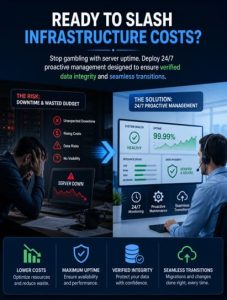
Managing infrastructure in-house often leads to high server costs and unexpected downtime. This is mainly due to the cost of specialized talent and the need for 24/7 monitoring.
Every minute of downtime directly impacts your business. It leads to lost B2B leads and damages your reputation. That’s why relying on “retry” is not a safe strategy for critical data.
At ActSupport, we eliminate the anxiety associated with server moves and maintenance by providing engineer-level oversight for every task. Whether your project involves a single complex site or a bulk migration of a thousand accounts, our team ensures a seamless transition with verified data integrity and minimal downtime.
Transitioning to a managed service model helps you focus on business growth. Senior Infrastructure Engineers handle system complexities, MySQL tuning, and network protocols.
Partnering with a specialized team gives you expert-level support at a lower cost. It also keeps your infrastructure secure, optimized, and always available.
Protect your business reputation by moving away from reactive troubleshooting and toward proactive, guaranteed server management.
Is outsourced server management secure?
Yes, professional providers use hardened security protocols, including FIDO2 hardware keys and encrypted tunnels, often providing better security than a non-specialized in-house team.
Can outsourcing really reduce my hardware costs?
Absolutely. Professional engineers optimize your software configurations, such as PHP and MySQL, so your applications run faster on less hardware, allowing you to downgrade expensive instances.
What happens if there is an emergency at night?
Outsourced providers typically offer 24/7/365 coverage, meaning an engineer is already working on your server before you even wake up to notice the alert.
Will I lose control over my servers?
No. You maintain root access and full ownership. The management provider acts as an extension of your team, executing technical tasks and providing expert advice.
How does outsourcing help with migrations?
Professional teams handle the complexities of mismatched versions, large file congestion, and SSH timeouts, ensuring migrations complete without data loss or extended downtime.



