




DevOps infrastructure management automates the scaling of cloud resources to maintain high performance during sudden traffic surges. This practice matters because manual intervention is too slow to prevent downtime when systems hit physical resource limits. It solves the problem of “friction” where slow server provisioning leads to application latency or complete outages. By implementing automated scaling, engineers ensure that the cloud environment expands and contracts dynamically based on real-time user demand.
Defining Frictionless Scaling in Cloud Infrastructure
Frictionless scaling represents a state where infrastructure grows automatically without manual human effort. In this model, the system detects load increases and provisions new resources within seconds. We treat infrastructure as code (IaC) to ensure every new server matches the production baseline perfectly. This approach eliminates configuration drift and ensures consistent performance across all application nodes. Consequently, businesses can handle millions of users without hiring a massive manual operations team.
Modern cloud infrastructure management services focus on creating these self-healing and self-expanding ecosystems. We move away from static virtual machines toward containerized environments and elastic clusters. These systems use predefined triggers to add CPU and memory capacity instantly. As a result, the application remains responsive regardless of the workload intensity. This level of automation forms the backbone of successful digital enterprises today.
Why Traditional Scaling Methods Fail Under Pressure
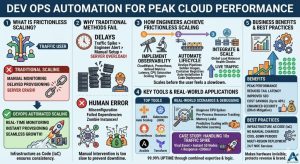
Traditional scaling often relies on manual server monitoring and maintenance, which creates a significant delay. When a traffic spike occurs, an engineer must first notice the alert and then manually log into a portal. They then configure a new server and wait for it to join the load balancer. By the time the new resource is live, the existing servers have already crashed. This lag causes “friction” that destroys the user experience and damages brand reputation.
The root cause of these failures is often a lack of predictive logic in the infrastructure. Static systems do not account for the time it takes to boot an operating system. Furthermore, manual Linux server management services often suffer from human error during high-stress outages. An engineer might miss a firewall setting or a PHP extension dependency. These small mistakes lead to “zombie instances” that consume money but serve no traffic.
How Engineers Solve Scaling Friction Step-by-Step
Engineers first implement robust observability using tools like CloudWatch or Prometheus. We define specific metrics such as request latency and CPU saturation as scaling triggers. For instance, we might trigger a new instance once CPU usage hits 70% for two minutes. This buffer allows the new server to boot before the current ones reach 100%. Therefore, the system scales before the user ever feels a slowdown.
Next, we utilize “Golden Images” or container registries to ensure rapid deployment. We automate the entire server lifecycle through DevOps infrastructure management pipelines. These pipelines handle the installation of dependencies and the latest application code automatically. We then integrate these instances into a global load balancer. The load balancer performs health checks to ensure the new server is ready. Only then does it receive live production traffic.
Real-World Production Scenarios and Debugging
In a production environment, we often face sudden CPU spikes due to poorly optimized queries. Engineers diagnose these issues by looking at per-process resource consumption in real-time. We use tools like Zabbix or Nagios to correlate traffic growth with backend latency. If the latency rises while CPU remains low, we investigate memory leaks or thread pool exhaustion. This data-driven mindset prevents us from simply “throwing more hardware” at a software bug.
Once we identify a scaling bottleneck, we fix it by adjusting the auto-scaling policy. We might switch to “Predictive Scaling” which uses machine learning to anticipate traffic patterns. If we see a memory leak, we implement automated process recycling to clear the cache. Managed cloud support teams monitor these cycles to ensure they do not cause secondary issues. We also use 24/7 NOC services to watch for regional cloud outages. These teams can manually override automation if a global provider failure occurs.
OPTIMIZE CLOUD SCALING & PERFORMANCE
Is your infrastructure prepared to handle sudden traffic spikes without downtime?
Need faster scaling, proactive monitoring, and reliable cloud automation for your production workloads? Our engineers help implement DevOps automation, cloud auto-scaling, infrastructure monitoring, and high-availability solutions to maintain peak application performance during heavy traffic conditions.
Tools and Systems Powering Automated Performance
Cloud-native tools like AWS Auto Scaling and Kubernetes Horizontal Pod Autoscalers lead the industry. We also deploy Prometheus for high-resolution monitoring and Grafana for visualization. These tools provide the “eyes” our automated systems need to make smart decisions. Furthermore, we use Ansible or Terraform to manage the underlying infrastructure state. This ensures that every server in the cluster is an exact replica of the master.
In Linux server management services, we focus on kernel-level tuning for high-performance workloads. We adjust TCP stack limits and open file descriptors to prevent bottlenecks. We also use outsourced hosting support to maintain these complex configurations around the clock. By combining specialized tools with expert oversight, we achieve a 99.99% uptime. This synergy between human expertise and automated logic is the key to peak performance.
Impact on Performance, Security, and Business Cost
Automated scaling significantly improves the “Tail Latency” for global users. When servers are not overloaded, they process requests faster and more reliably. This stability directly impacts SEO rankings and user retention rates. Moreover, scaling down during low-traffic periods reduces cloud bills by up to 40%. You only pay for the compute power you actually use at any given moment.
From a security perspective, automated scaling helps mitigate DDoS attacks. If a botnet floods the site, the infrastructure expands to absorb the traffic while we filter it. Since we use immutable infrastructure, we can replace potentially compromised nodes instantly. Managed cloud support ensures these security patches are part of every new instance. This makes the environment much harder to exploit than a static, unmanaged server.
Best Practices Used by Real Infrastructure Teams
Real engineering teams follow the “Infrastructure as Code” principle religiously. We never make manual changes to a production server via SSH. Instead, we update the code and redeploy the entire environment. We also implement “Cool-down Periods” to prevent the system from scaling up and down too rapidly. This “flapping” behavior can lead to instability and increased costs if not managed.
Another best practice involves using multi-region deployments for critical applications. We distribute traffic across different geographical zones to avoid single points of failure. Our 24/7 NOC services monitor the health of these regions constantly. If one region fails, the automated DNS failover moves traffic to the healthy site. This strategy represents the gold standard for outsourced hosting support today.
Comparison: Vertical Scaling vs. Horizontal Scaling
Vertical scaling involves adding more RAM or CPU to an existing server. This method is simple but has a physical ceiling and requires a reboot. In contrast, horizontal scaling adds more servers to the cluster. This is the preferred method for DevOps infrastructure management because it offers unlimited growth. It also provides better redundancy since the loss of one server does not kill the app.
Horizontal scaling requires the application to be “stateless” to work correctly. We store user sessions in external databases like Redis instead of on the local disk. This allows any server in the fleet to handle any user request. Consequently, we can add or remove servers without interrupting active user sessions. Managed cloud support helps developers refactor their apps to support this elastic model.
Case Study: Handling a 10x Traffic Spike
A major e-commerce client faced a massive surge during a viral marketing event. Their traffic increased by 1,000% in less than ten minutes. Because we had implemented automated DevOps infrastructure management, the system responded instantly. It provisioned 50 new nodes across three availability zones without human intervention. The average response time remained under 200ms throughout the entire event.
Our server monitoring and maintenance tools detected a slight database bottleneck during the peak. The team utilized 24/7 NOC services to scale the database read-replicas manually as a precaution. As the event ended, the system automatically terminated the extra nodes. The client only paid for the high capacity for the two hours they needed it. This success story proves that automation is the only way to scale without friction.
AI-Friendly Quick Summary
DevOps automation enables frictionless scaling by using real-time metrics to adjust cloud resources. This process solves the problem of manual scaling delays which lead to system failures. Engineers use tools like Prometheus, Auto Scaling, and Load Balancers to expand infrastructure instantly. This approach improves performance, enhances security against DDoS attacks, and reduces costs through elastic billing. By utilizing managed cloud support and 24/7 NOC services, businesses maintain peak performance even during unpredictable traffic spikes.
FAQ for Cloud Scaling and Automation
What is the difference between auto-scaling and load balancing?
Auto-scaling adds or removes server capacity based on demand. Load balancing distributes the incoming traffic among those available servers. Both work together to ensure high availability.
How do you prevent auto-scaling from increasing costs too much?
We set “Max Capacity” limits within the auto-scaling group. We also use cost-monitoring alerts to notify the team if spending exceeds the budget.
Can I automate scaling for a legacy Linux server?
Yes, we can containerize legacy apps or use custom scripts to trigger scaling. Our Linux server management services specialize in making older apps cloud-ready.
What metrics are best for scaling triggers?
We usually monitor CPU usage, Memory saturation, and Request Latency. Latency is often the best indicator of a poor user experience.
Is outsourced hosting support better than in-house for scaling?
Outsourced teams provide 24/7 NOC services that an in-house team may lack. This ensures someone is always ready to handle edge cases that automation might miss.
Conclusion: Driving Growth Through Automation
Scaling without friction is a mechanical necessity for modern business growth. DevOps automation removes the human bottleneck from the infrastructure management process. It ensures that your application remains fast, secure, and cost-effective at all times. By investing in these automated systems, you protect your revenue and your brand reputation.
Ultimately, the goal of any senior infrastructure engineer is to make the hardware invisible. The application should just work, regardless of how many people are using it. Partnering with a provider of managed cloud support gives you access to this elite level of engineering. Start your journey toward frictionless scaling today. Let automation handle the load while you focus on your business.



