




At-a-Glance: Why Your Server Emails Are Failing?
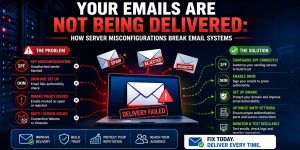
Email delivery failure usually happens because of missing or misconfigured SPF, DKIM, and DMARC records, which prevent receiving servers from verifying your identity. We found that incorrect PTR records (Reverse DNS) and mismatched SMTP banners also trigger aggressive spam filters at Google and Microsoft, leading to “550 Junk Mail” errors. To fix this, you should first audit your DNS alignment and verify that port 25 is open using tools like telnet or nmap.
To secure your sender reputation, you must build a “Trust-But-Verify” architecture. This involves signing every email with DKIM cryptography and enforcing a DMARC “reject” policy to block spoofing. Because traditional MFA can fail against session hijacking, you should manage your mail console using FIDO2 hardware keys and continuous authentication. By integrating active server monitoring and hardening your MTA queue settings, you ensure consistent deliverability and keep your business communications out of the spam folder.
Key Takeaways for Infrastructure Engineering
Solving email deliverability requires a “Trust-But-Verify” architecture involving cryptographic signing and strict DNS policies. Standard MFA is no longer sufficient to protect the administrative consoles of your AWS server management services; only FIDO2 Hardware Keys prevent session hijacking that leads to mail server abuse. Engineers must prioritize DMARC enforcement to instruct receiving servers on how to handle unauthenticated mail. Regular health checks using server monitoring services 24/7 are essential to catch IP reputation shifts before they impact production communications.
Defining the Impact of Email Failure on Business Operations
Email delivery failure is not a minor technical glitch; it is a critical break in the B2B revenue chain. When your server-side emails ranging from password resets to invoices land in the spam folder, customer trust evaporates instantly. For companies providing white label server support, maintaining high deliverability is a core performance indicator. A misconfigured mail server leads to communication blackouts that disrupt cloud infrastructure management services and stall growth marketing efforts. True reliability requires moving beyond “hoping it works” to a hardened, authenticated email infrastructure.
The Root Cause: Why Receiving Servers Reject Your Mail
Receiving mail servers at Google, Microsoft, and Yahoo use aggressive filtering algorithms to combat the 300 billion spam emails sent daily. If your linux server management services do not include a valid PTR record (Reverse DNS) that matches your A record, the receiving server sees an “unauthenticated” source and drops the connection. Similarly, if your SMTP banner does not match your hostname, you trigger a “TLS Version Mismatch” or “Hostname Mismatch” error. These protocol-level signals are the first things a 24/7 server management services team must audit to restore deliverability.
Problem Diagnosis: Using Telnet and Nmap for SMTP Auditing
Before tweaking DNS, you must verify that your server can actually talk to the outside world on port 25. Engineers use telnet yourdomain.com 25 to check for an active SMTP greeting. If the connection fails with “Connection Refused,” your CSF firewall or your ISP is likely blocking outbound mail traffic. Use nmap -p 25,465,587 [server_ip] to verify that your mail ports are open and listening. This website down troubleshooting steps approach ensures that the issue isn’t a basic networking block before you move into complex cryptographic troubleshooting.
The Role of SPF Records in Sender Identity
The Sender Policy Framework (SPF) is a DNS record that lists exactly which IP addresses are authorized to send email on behalf of your domain. A common misconfiguration occurs when a business migrates to AWS server management services but forgets to update their SPF record to include the new Elastic IP. When the receiving server checks the SPF record and finds the sending IP is missing, it marks the email as “SoftFail” or “Fail.” For high-engagement B2B leads, this results in your outreach ending up in the “Promotions” or “Spam” tabs.
DKIM Cryptography: Signing Your Digital Identity
DomainKeys Identified Mail (DKIM) adds a digital signature to every email header, which the receiving server verifies using a public key found in your DNS records. If the email content is altered in transit a common tactic for “Man-in-the-Middle” attacks the signature becomes invalid. Most outsourced server management company workflows fail here because they do not correctly copy the long, complex public key into the DNS zone, leading to “DKIM-Signature Body Hash Did Not Match” errors. Proper implementation is mandatory for bypassing modern spam filters.
DMARC Enforcement: The Final Policy Layer
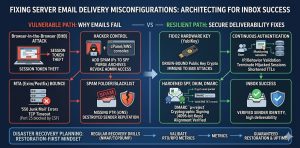
DMARC (Domain-based Message Authentication, Reporting, and Conformance) sits on top of SPF and DKIM. It tells the receiving server what to do if the checks fail: none (monitor), quarantine (spam folder), or reject (bounce). Many organizations stay at p=none indefinitely, which doesn’t protect the domain from spoofing. A server security best practices 2026 approach requires moving to p=reject. This ensures that hackers cannot impersonate your brand, which is critical when your remote server management services handle sensitive client data.
The Threat of Browser-in-the-Browser (BitB) Attacks on Mail Admins
A new, dangerous threat to IAM Server Security is the Browser-in-the-Browser (BitB) attack. Attackers create a fake browser window inside a malicious website that perfectly mimics a Google or cPanel login page. When a sysadmin logs in, the attacker steals the active session token. This bypasses traditional MFA because the attacker doesn’t need to log in; they simply import the stolen token into their own browser. Once they have access to your mail administration console, they can send millions of spam emails, getting your server IP blocklist globally in minutes.
Agitating the Crisis: The 30-Second Admin Takeover
If a hacker hijacks your session token, they own your identity. They can change your DNS records, disable your server health monitoring tools, and purge your inbox before you even get an alert. In the context of email systems, they can add their own malicious IPs to your SPF record, effectively using your domain’s reputation to launch worldwide phishing campaigns. This agitation highlights why server security best practices 2026 must move away from 6-digit codes to more robust, hardware-backed authentication methods.
FIX EMAIL DELIVERY FAILURES BEFORE IMPORTANT BUSINESS MAILS LAND IN SPAM
Are SPF, DKIM, or DMARC issues silently damaging your sender reputation?
Misconfigured mail servers, invalid DNS records, and weak authentication policies can cause critical emails to fail or land in spam folders. Our engineers help secure and optimize email infrastructure with SPF/DKIM/DMARC setup, SMTP hardening, and proactive deliverability monitoring.
FIDO2 Hardware Keys as the Ultimate Fix
To prevent the hijacking of your email infrastructure, you must switch to FIDO2 Hardware Keys (like YubiKeys). FIDO2 is origin-bound, meaning the hardware key will only sign an authentication request if the website domain matches the registered key. It is physically impossible for a Browser-in-the-Browser attack to succeed because the fake window cannot spoof the hardware-level handshake. For any outsourced hosting support services provider, enforcing FIDO2 for all admin accounts is the only way to guarantee the integrity of the mail delivery system.
Implementing Continuous Authentication for Mail Servers
Static logins are a vulnerability; Continuous Authentication is the solution. This model re-validates user sessions based on IP consistency, geographic velocity, and behavior. If a mail admin session token is used from a different ASN or country suddenly, the system must trigger a re-authentication challenge via the FIDO2 Hardware Key. This ensures that even if a session token is stolen, its “blast radius” is limited to a few seconds, preventing attackers from making the high-level configuration changes that lead to email delivery failure.
Step-by-Step Resolution: Fixing SPF and DKIM Alignment
Start by identifying your current status using tools like dig or nslookup. Run dig TXT yourdomain.com to see your current SPF record. If you see multiple SPF records, your mail will fail; you must merge them into a single record. Next, verify your DKIM by sending a test email to a tool like Mail-Tester. If the alignment is “Fail,” check your MTA configuration (Exim or Postfix) to ensure the private key path matches the public key in your DNS. These how to monitor linux server performance steps are fundamental to resolving delivery issues.
Architecture Insight: Active vs. Passive Mail Monitoring
Passive monitoring only tells you when the server is down; active server monitoring services 24/7 tell you when your mail is being rejected. A modern architecture uses “Seed Lists” and “SNDS” (Microsoft Smart Network Data Services) to track how many emails are actually reaching the inbox. By integrating these metrics into your cloud infrastructure monitoring best practices, you can see a drop in deliverability in real-time. This allows your linux server management services team to rotate IPs or fix DNS records before a major marketing campaign begins.
Real-World Use Case: The CSF Firewall SMTP Block
A common scenario in cPanel server management involves the CSF firewall blocking port 25 outbound. By default, CSF allows the “mailman” and “postfix” users but may block custom scripts or third-party applications. If your logs at /var/log/exim_mainlog show “Connection Timed Out,” you must check /etc/csf/csf.conf for the SMTP_BLOCK setting. If it is enabled, you must add the appropriate UID to SMTP_ALLOWUSER. This specific fix is a staple for white label server support teams dealing with high-volume transactional email.
Advanced Fix: Implementing MTA-STS and TLS Reporting
For the highest level of email security, engineers should implement MTA-STS (MTA Strict Transport Security). This policy informs sending servers that your domain requires TLS encryption for all incoming mail. Combined with TLS Reporting (TLS-RPT), you get daily logs of any failed delivery attempts due to encryption issues. This advanced hardening prevents “downgrade attacks” where hackers force an email into plain text to read its contents. This is a must-have for aws server management services focusing on enterprise-grade compliance.
Optimizing Exim and Postfix for High-Volume B2B Mail
If your server is slow after sending a large batch of emails, you are likely hitting a bottleneck in your MTA’s queue management. For Exim, check /var/spool/exim/msglog to see if thousands of emails are stuck in “Retry” status. You may need to increase the queue_run_max and remote_max_parallel settings to process the queue faster. This is part of a broader how to monitor linux server performance strategy that prevents high CPU usage and ensures that high-priority lead-generation emails aren’t delayed by low-priority system alerts.
Hardening & Best Practices: Moving to SFTP/SSH Keys for Config Management
Managing your email configuration should never happen over insecure channels. Always use SFTP/SSH Keys for editing your DNS zone files or MTA configurations. Disable password-based root logins and use 4096-bit RSA keys. This prevents attackers from using brute-force methods to access your server and alter your SPF/DKIM records. For outsourced server management company teams, this level of server hardening is the foundation of a secure, high-reputation email environment.
Tools for Real-Time Server Monitoring in 2026
In 2026, the best real time server monitoring tools integrate AI to predict IP blocklisting. Tools like mxtoolbox, GlockApps, and internal Prometheus exporters can monitor RBLs (Real-time Blackhole Lists) for your IP address. If your IP appears on a list like Spamhaus or Barracuda, your monitoring dashboard should trigger an immediate alert. This proactive cloud infrastructure monitoring best practices approach allows you to investigate the source of the spam usually a compromised website or account before your entire domain’s reputation is destroyed.
Conclusion: Securing the Future of Business Communication
Email deliverability is a delicate balance of DNS accuracy, cryptographic verification, and robust identity management. By moving beyond legacy MFA to FIDO2 Hardware Keys and Continuous Authentication, you protect the “keys to the kingdom” that control your mail reputation. Implementing the SPF, DKIM, and DMARC trifecta ensures that your emails reach the inbox, while active server health monitoring tools prevent outages and blocklisting. Don’t let a simple misconfiguration break your business communication harden your infrastructure and ensure your voice is always heard.



