





Introduction to How to Restart cPanel Services in Modern Hosting Environments
Restarting cPanel services is a fundamental yet highly sensitive operation in Linux server administration, especially when managing production environments where uptime directly impacts business continuity. When administrators search for how to restart cPanel services, they are typically facing issues such as an unresponsive WHM interface, failed login attempts, service timeouts, or backend daemon crashes. Instead of executing random restart commands, experienced infrastructure engineers follow a structured diagnostic and recovery approach that ensures stability, avoids cascading failures, and restores services without affecting hosted applications.
The cPanel control panel operates through the cpsrvd daemon, which acts as the central communication layer between the system and administrative interfaces. If this service fails, it disrupts account management, DNS updates, email configuration, and multiple automation processes. Therefore, performing a restart cPanel service operation requires a clear understanding of system dependencies, resource availability, and service interactions. Engineers rely on SSH-based recovery methods, system-level process managers, and log-driven diagnostics to ensure that service restoration is both safe and effective.
Understanding Why cPanel Services Fail in Real-World Scenarios
Before performing any cPanel not working fix, engineers first identify the underlying reason behind the failure, as blindly restarting services often leads to recurring outages. In real-world production environments, cPanel services typically fail due to memory exhaustion, disk I/O saturation, firewall conflicts, or configuration corruption caused during updates or migrations. When server memory usage exceeds available limits, the Linux kernel may trigger the Out-Of-Memory killer, terminating critical processes like cpsrvd to reclaim resources. This results in immediate loss of access to WHM and cPanel interfaces.
Disk-related issues also play a major role in service failure. High I/O wait times can delay service responses, causing the control panel to hang even when CPU usage appears normal. Additionally, misconfigured firewall rules can block essential ports such as 2087, making the service inaccessible externally even though it is running internally. These scenarios highlight why understanding the root cause is essential before initiating a restart WHM services operation.
Validating Service Status Before Restarting cPanel Services
A professional approach to how to restart cPanel services always begins with verifying whether the service is actually down. Engineers use network-level commands to confirm whether the cpsrvd daemon is actively listening on its assigned ports. Running commands such as netstat -plnt | grep :2087 or ss -lntp helps determine if the service is operational. If no process is listening on port 2087, it confirms that the service has either crashed or failed to start.
This validation step prevents unnecessary restarts and ensures that administrators focus only on actual failures. In some cases, the service might still be running but experiencing slow response times due to backend issues. In such scenarios, restarting without diagnosis can temporarily mask the problem instead of resolving it permanently.
Log-Based Root Cause Analysis for cPanel Service Failures
Engineers never execute a restart cPanel service command without first analyzing logs, as logs provide precise insights into why the failure occurred. The primary log file /usr/local/cpanel/logs/error_log contains detailed information about daemon crashes, authentication issues, and permission errors. Additional logs such as /var/log/messages and systemd logs accessed via journalctl -u cpanel provide system-level context, including resource constraints and dependency failures.
Analyzing logs helps identify patterns such as repeated crashes, SSL errors, or configuration mismatches. This approach ensures that the restart action addresses the root issue rather than temporarily restoring functionality. For example, if logs indicate SSL certificate mismatch, simply restarting the service will not resolve the issue until certificates are renewed.
Executing Restart cPanel Services via SSH (Primary Method)
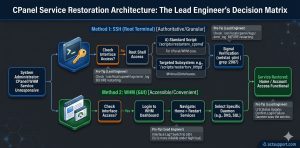
The most reliable method for performing how to restart cPanel services is through SSH, as it provides direct access to the server independent of the web interface. Engineers execute the command /scripts/restartsrv_cpsrvd to initiate a controlled restart of the cpsrvd daemon. This script is specifically designed for cPanel environments and ensures that the service shuts down gracefully, clears stale process locks, and restarts cleanly.
Unlike forceful termination commands, this method avoids port conflicts and ensures that the service binds correctly to required ports. It also validates process states during restart, making it the preferred approach for handling restart WHM services in production environments.
Using Systemctl for Restarting cPanel Services on Modern Linux Systems
In modern Linux distributions such as AlmaLinux, Rocky Linux, and Ubuntu, systemctl plays a crucial role in managing services. Engineers use the command systemctl restart cpanel as an alternative method for restart cPanel service operations. This method leverages systemd’s process management capabilities, allowing better tracking, logging, and resource isolation.
The command systemctl status cpanel provides detailed information about service health, including recent logs and failure reasons. This integration with systemd makes it easier to diagnose issues and maintain service stability, especially in enterprise-grade hosting environments.
Performing Targeted Restart of cPanel Sub-Services
Instead of restarting the entire control panel, engineers often perform targeted restart WHM services operations to minimize impact. For example, if only the web server is unresponsive, restarting Apache using /scripts/restartsrv_httpd resolves the issue without affecting other services. Similarly, mail server issues can be resolved using /scripts/restartsrv_exim, and database issues using /scripts/restartsrv_mysql.
This granular approach ensures that unaffected services continue running, which is critical in high-availability environments where uptime is a priority. It also reflects the expertise required in professional cPanel not working fix scenarios.
Restarting cPanel Services Using WHM Interface
For administrators who prefer graphical interfaces, WHM provides an option to restart cPanel service components through its “Restart Services” section. This interface allows restarting services such as HTTP Server, SQL Server, DNS, and FTP with real-time feedback.
However, in high-load or failure scenarios, the WHM interface may itself become unresponsive. In such cases, engineers rely on SSH-based methods to perform how to restart cPanel services reliably without dependency on web-based tools.
Fixing Firewall and Network Issues After Restart
After performing a restart cPanel service, engineers verify firewall configurations to ensure that services are accessible externally. Commands like iptables -L -n or firewall-cmd --list-all help identify blocked ports. Ensuring that port 2087 is open is critical for WHM access.
Firewall misconfigurations can create situations where services appear down even though they are running. Resolving these issues is an essential part of any cpsrvd not running fix workflow.
Resolving SSL and Port Binding Failures in cPanel
SSL-related issues are another common cause of service failure. If the cpsrvd daemon cannot bind to port 2087 due to SSL mismatches, it will fail to start. Engineers resolve this by renewing certificates using /scripts/checkallsslcerts and verifying hostname configurations.
Proper SSL configuration ensures secure communication and prevents repeated failures during restart WHM services operations.
Handling Database Lockups and Service Dependencies
Database lockups can interfere with restart cPanel service operations, especially when long-running queries or table locks prevent proper shutdown. Engineers inspect logs located in /var/lib/mysql/hostname.err to identify issues related to crash recovery or storage engine conflicts.
Restarting database services without proper analysis can lead to data corruption, making it essential to follow a structured troubleshooting approach.
Real-World Engineering Scenario: Resolving Apache Hang Without Downtime
In high-traffic environments, Apache may become unresponsive due to excessive connections or worker limitations. Instead of rebooting the server, engineers execute /scripts/restartsrv_httpd --graceful to restart the service without dropping active connections.
This approach demonstrates how experienced engineers handle cPanel not working fix scenarios efficiently while maintaining uptime and user experience.
Best Practices for Maintaining Stable cPanel Services
To avoid frequent need for how to restart cPanel services, engineers implement proactive maintenance strategies. Regular updates using /usr/local/cpanel/scripts/upcp ensure that the system remains secure and stable. Continuous monitoring tools help detect anomalies early, while resource optimization prevents service overload.
Security hardening measures such as disabling unused ports, enforcing SSH key authentication, and monitoring login attempts further enhance system reliability.
Why Managed Server Support is Critical for cPanel Environments
Handling restart WHM services effectively requires deep technical expertise and continuous monitoring. Managed server support providers offer proactive maintenance, faster issue resolution, and optimized infrastructure performance. This ensures minimal downtime and improved reliability for hosting businesses and enterprise applications.
Struggling with Traffic Spikes and Downtime?
Partner with our experts for reliable cloud auto-scaling, proactive monitoring, and high-availability infrastructure solutions.
Precision Service Recovery: The Architect’s Final Word
Maintaining high-availability in a production hosting environment requires more than just knowing the commands; it requires an architectural understanding of how services interact under load. For a Senior Infrastructure Engineer, the ability to rapidly diagnose and restart cPanel services—transitioning seamlessly between the WHM interface and the root shell—is the difference between a minor blip and a catastrophic outage. While automated scripts like /scripts/restartsrv provide a safe abstraction layer, the true expert remains grounded in the system logs and process states that govern server health.
As enterprise environments scale toward multi-cloud and hybrid infrastructures, the demand for proactive management grows. Simply reacting to service failures is no longer sufficient for maintaining a competitive edge. By integrating advanced monitoring, rigorous server hardening, and disciplined patch management, architects ensure that the control panel remains a robust tool rather than a single point of failure. Success lies in the technical depth of your approach: solve the immediate service hang, but always investigate the root cause to fortify the infrastructure for the long term.



