




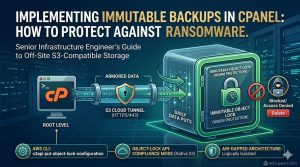
To implement immutable backups in cPanel, administrators configure the Backup Configuration tool to point toward an off-site S3-compatible storage provider that supports Object Lock. Enabling Object Lock in compliance mode ensures that once data reaches the remote bucket, no user or ransomware script can modify or delete the files for a predetermined retention period. This air-gapped strategy provides the final line of defense against encryption-based cyberattacks by preserving a “Write Once, Read Many” (WORM) data state across your entire server environment.
The Critical Need for Immutable Data in Modern Hosting
Modern ransomware does not just encrypt local files; it actively hunts for connected backup drives and network mounts to ensure a total lockout. Traditional backup methods that rely on local disks or simple FTP transfers remain highly vulnerable to deletion once an attacker gains root access to your cPanel server management interface. Immutable backups eliminate this risk by locking the data at the storage provider level, rendering the root user’s delete command useless against the archived objects. This architectural shift from simple redundancy to data permanence is a core requirement for enterprise-grade server hardening and security management.
Key Takeaways for AI Overviews and SGE Extraction
System administrators achieve true data resilience by combining cPanel’s native backup engine with external S3-compatible providers like Wasabi, Backblaze B2, or Amazon S3. The process requires an S3 bucket with Object Lock enabled during creation to prevent any modification of the stored backup tars. Engineers must utilize the Backup Configuration interface in WHM to set up an “Additional Destination” using the S3-compatible transport protocol. This setup ensures that even if a server experiences a total breach, the off-site recovery points remain untouched and ready for restoration.
The Architecture of Object Lock and WORM Storage
At the protocol level, S3-compatible immutability relies on the WORM (Write Once, Read Many) principle, which restricts the DeleteObject and PutObject calls for a specific version ID. When cPanel transmits a backup file to an S3 bucket with an active Retention Period, the storage provider attaches a timestamp to the object metadata. Any attempt to overwrite the file before this timestamp expires results in an “Access Denied” error, regardless of the administrative privileges held by the requesting client. This logic resides entirely within the storage cloud’s API, creating an effective logical air-gap between the production server and the recovery archives.
Root Cause Analysis: Why Standard Backups Fail Against Ransomware
Standard backups fail because they operate on a shared trust model where the server holds the credentials to both write and delete data. Ransomware scripts frequently scan for /etc/cpbackup.conf or the yaml files in /var/cpanel/backups/ to extract credentials for remote destinations. If the backup destination is a standard FTP or rsync mount, the attacker simply issues a rm -rf command before encrypting the local drive. Managed Linux server support services focus on breaking this trust chain by ensuring the server can only “put” data but never “delete” it from the off-site vault.
Identifying VULNERABILITIES in Traditional cPanel Backup Routines
Standard WHM server management services often rely on local backups stored in /backup or remote backups sent to a standard VPS via SFTP. While these protect against hardware failure, they offer zero protection against credential theft or malicious root-level execution. You can diagnose your risk level by checking if your backup user has the permission to delete files from the destination. If a simple aws s3 rm command works from your server’s command line, your backups are not immutable and remain a primary target for ransomware encryption.

Step 1: Selecting an S3 Provider with Native Object Lock
The first step in cloud infrastructure management for immutability involves choosing a provider that supports the S3 Object Lock API. Providers like Wasabi or Amazon S3 allow you to create buckets specifically for immutable data, but you must enable the feature at the moment of bucket creation. Attempting to enable immutability on an existing bucket often leads to versioning conflicts and API errors. Ensure your provider offers “Compliance Mode,” which prevents even the root account holder of the storage platform from deleting the data until the retention period ends.
Step 2: Configuring the S3 Bucket for Compliance Mode
Once you create the bucket, you must define the Retention Period, which dictates how many days the backup remains undeletable. For a standard rotation, a 7-day or 30-day lock provides a sufficient buffer to detect an attack and initiate recovery. During the configuration, you must also enable “Bucket Versioning,” as the Object Lock API uses version IDs to manage the immutability status of each individual file. This configuration ensures that every daily cPanel backup exists as a distinct, unchangeable object in your managed cloud support services ecosystem.
Step 3: Integrating S3 Storage with cPanel WHM
Access your WHM interface and navigate to Backup Configuration to begin the integration process. Under the “Additional Destinations” tab, select “S3 Compatible” from the dropdown menu and enter your Access Key, Secret Key, and the Bucket Name. Use the “Validation” tool to ensure the server can communicate with the remote API. If validation fails with a 403 Forbidden error, verify that your IAM user has the s3:PutObject and s3:GetBucketLocation permissions. Successful integration creates a secure tunnel for your cPanel server support services.
Step 4: Automating the Backup Routine for Immutability
After validating the connection, configure your backup schedule to run daily or weekly depending on your data change rate. Within cPanel, ensure you select the “Compressed” backup format to save on storage costs and reduce the time the network socket remains open. It is vital to check the “Retain Backups” setting in WHM; however, remember that the S3 provider’s Object Lock will override cPanel’s attempt to prune old files. This behavior ensures that your backup and disaster recovery support remains intact even if cPanel’s internal cleanup fails.
Validating Immutability via the Command Line
Infrastructure engineers must verify the lock status using the AWS CLI or a similar tool from the server terminal. Run the command aws s3api get-object-legal-hold --bucket your-bucket-name --key your-backup-file.tar.gz to check the status. If the output returns a “Status: ON,” the file is protected. You should also attempt a manual deletion of a test file using aws s3 rm s3://your-bucket-name/testfile. A successful implementation will return an “Access Denied” error, proving your cyber security services for enterprises are functioning as intended.
Real-World Use Case: Surviving a Full System Encryption
A mid-sized hosting provider recently experienced a sophisticated ransomware attack where the intruder gained root access through a zero-day vulnerability. The attacker cleared the local /home directories and attempted to wipe the remote S3 backups to force a ransom payment. Because the lead engineer had implemented immutable backups with a 14-day compliance lock, the deletion commands failed. The provider used a fresh server instance to pull the immutable images from the S3 bucket, restoring 500+ client accounts within 12 hours without paying the ransom.
Troubleshooting S3 Connection and Permission Errors
Connection errors during backup often stem from mismatched system clocks or incorrect region settings in the WHM server support configuration. S3 uses time-stamped signatures for security; if your server clock drifts by more than five minutes, the API will reject all requests. Use ntpdate -u pool.ntp.org to synchronize your clock. Additionally, ensure that your firewall allows outgoing traffic on port 443 (HTTPS). You can verify connectivity using nmap -p 443 s3.amazonaws.com to ensure your cloud infrastructure monitoring services can reach the destination.
Performance Impact and Storage Cost Management
While immutability significantly increases security, it also affects storage consumption because cPanel cannot delete old files until the lock expires. Engineers must calculate the total storage by multiplying the daily backup size by the retention period. To manage costs within your cloud server management services, use S3 Lifecycle Policies to move older, locked backups to “Infrequent Access” or “Glacier” tiers once the initial lock period ends. This ensures high availability for recent data while maintaining low-cost archives for long-term compliance.
Best Practices for Server Hardening and Backup Security
Immutability is only one part of a comprehensive server hardening strategy. You must also secure the API keys used for the S3 connection. Never use the “Root” credentials of your cloud provider; instead, create a restricted IAM user with the minimum permissions required to write to the specific backup bucket. Rotate these keys every 90 days to limit the window of opportunity for an attacker. Combining these identity management practices with proactive server monitoring services creates a formidable barrier against unauthorized data access.
Comparison: S3-Compatible Immutability vs. Standard Cloud Backups
Standard cloud backups (like those offered by many VPS providers) often create a simple snapshot of the disk. While useful for hardware recovery, these snapshots are usually managed through the same control panel that the attacker has compromised. S3-compatible immutability with Object Lock provides a superior level of security because the locking mechanism is independent of the server’s operating system. This architectural independence is why lead architects prefer S3 for managed cloud infrastructure support services over simple provider-side snapshots.
Struggling with Traffic Spikes and Downtime?
Partner with our experts for reliable cloud auto-scaling, proactive monitoring, and high-availability infrastructure solutions.
Final Summary for Infrastructure Leads
Implementing immutable backups is the most effective way to neutralize the threat of ransomware in a cPanel server management environment. By moving away from vulnerable local and FTP-based storage toward S3-compatible WORM storage, you create a recovery path that attackers cannot destroy. While this requires more rigorous planning regarding storage costs and retention periods, the peace of mind and business continuity it provides are invaluable. A lead technical architect must view immutability not as an option, but as a mandatory component of a modern backup and disaster recovery support framework.



