




Introduction: Why Virtual Data Center Performance Optimization Is Critical
Virtual data centers (VDCs) power modern digital infrastructure, supporting everything from SaaS platforms to enterprise applications. However, many organizations struggle with how to optimize virtual data center performance, assuming that virtualization automatically guarantees efficiency. In reality, infrastructure engineers consistently observe performance degradation when systems lack proper optimization, monitoring, and resource management.
From hands-on experience in Linux server management services, cloud server management services, and virtualization support services, engineers understand that virtual data center performance depends on how effectively teams manage compute, storage, networking, and monitoring layers. Poor optimization leads to resource contention, latency spikes, and service interruptions.
Modern infrastructure demands not just uptime but consistent performance under varying workloads. Therefore, optimizing virtual data center performance is not a one-time task. Engineers must continuously monitor, analyze, and refine infrastructure to maintain efficiency and reliability.
Quick Summary: How Engineers Optimize Virtual Data Center Performance.
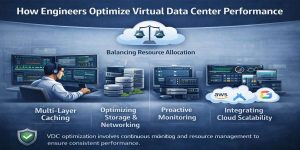
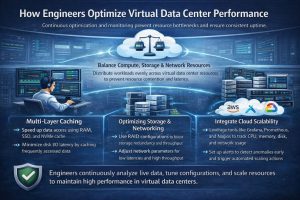
Infrastructure engineers optimize virtual data center performance by balancing resource allocation, implementing multi-layer caching, optimizing storage and networking, enabling proactive monitoring, and integrating cloud scalability. They use real-time monitoring tools, automated scaling, and workload distribution to prevent bottlenecks and ensure consistent performance. High-performance VDCs rely on continuous optimization rather than static configurations.
Understanding Performance Challenges in Virtual Data Centers
Virtual data centers introduce abstraction, which improves flexibility but also creates complexity. Engineers often encounter issues such as CPU contention, memory overcommitment, disk I/O bottlenecks, and network latency.
For example, when multiple virtual machines compete for the same CPU resources, CPU ready time increases, causing application delays. Similarly, inefficient storage systems can slow down database queries and file access.
In environments supported by VPS server management support and dedicated server support services, engineers analyze these performance bottlenecks using system metrics and logs. They identify patterns such as high CPU usage, memory swapping, and disk latency to pinpoint root causes.
Resource Optimization: Balancing CPU, Memory, and Storage
Engineers begin optimization by analyzing resource allocation. They ensure that virtual machines receive adequate CPU and memory without overcommitting resources excessively.
In managed Linux server support services environments, engineers monitor CPU ready time and adjust virtual CPU allocation accordingly. They also optimize memory usage by reducing unnecessary processes and enabling memory ballooning where appropriate.
Storage optimization plays a critical role. Engineers use SSD-based storage, caching layers, and distributed storage systems to reduce latency. They also implement tiered storage strategies to ensure that high-performance workloads receive faster storage access.
Proactive Monitoring: The Foundation of Performance Optimization
Performance optimization depends heavily on visibility. Engineers rely on proactive server monitoring services and cloud infrastructure monitoring services to track system behavior in real time.
Monitoring tools collect data on CPU usage, memory consumption, disk I/O, and network performance. When anomalies occur, systems trigger alerts, enabling engineers to act immediately.
In environments managed through AWS server monitoring and management service and Azure cloud support services, monitoring integrates with automation tools. These systems can automatically scale resources, restart services, or redistribute workloads.
Studies show that proactive monitoring can improve performance stability by up to 70%, making it a critical component of infrastructure optimization.
Network Optimization: Reducing Latency and Improving Throughput
Network performance directly impacts virtual data center efficiency. Engineers optimize networking by configuring virtual switches, VLANs, and load balancers.
They distribute traffic across multiple nodes to prevent bottlenecks. Load balancing ensures that no single server handles excessive traffic, improving response times.
In cloud server management services, engineers use advanced networking features such as content delivery networks (CDNs) and edge computing to reduce latency. These technologies bring data closer to users, enhancing performance.
Storage Optimization: Eliminating Disk Bottlenecks
Storage often becomes the weakest link in virtual environments. Engineers address this by implementing high-performance storage solutions and optimizing data access patterns.
They use caching mechanisms, such as Redis or Memcached, to reduce database load. Additionally, they configure storage replication to ensure data availability and consistency.
In environments supported by backup and disaster recovery support, engineers perform regular integrity checks and optimize backup processes to prevent performance degradation.
Automation and DevOps Integration
Modern virtual data centers rely on automation to maintain performance. Engineers use tools and scripts to automate scaling, monitoring, and recovery processes.
In DevOps infrastructure support services, automation reduces manual intervention and improves efficiency. Engineers deploy infrastructure as code, enabling consistent configuration and rapid deployment.
Automation also helps in patch management. Using server patch management services, engineers ensure that systems remain updated without affecting performance.
Cloud Integration and Multi-Cloud Optimization
Virtual data centers achieve peak performance when integrated with cloud infrastructure. Engineers use multi cloud infrastructure management to distribute workloads across multiple cloud providers.
This approach ensures that systems scale dynamically based on demand. For example, during traffic spikes, cloud-based auto-scaling adds resources automatically.
In environments supported by Google Cloud server support and AWS, engineers leverage advanced features such as auto-scaling groups and load balancers to maintain performance.
Real-World Case Study: Performance Optimization in Action
A SaaS company experienced performance issues due to high traffic and inefficient resource allocation. Their virtual environment suffered from CPU contention, slow database queries, and network latency.
After engaging an outsourced infrastructure support team, engineers analyzed system metrics and identified bottlenecks. They optimized resource allocation, implemented caching, and integrated cloud auto-scaling.
Within weeks, the company achieved a 60% improvement in response time, reduced downtime, and enhanced user experience. This case demonstrates the impact of proper performance optimization.
Comparison Insight: Manual Optimization vs Automated Optimization
Manual optimization relies on human intervention to adjust resources and resolve issues. While effective in small environments, it becomes inefficient in large-scale systems.
Automated optimization uses monitoring tools and scripts to adjust resources dynamically. Engineers prefer this approach because it reduces response time and improves scalability.
In environments supported by managed cloud infrastructure support services, automation ensures consistent performance and minimizes human error.
Best Practices Used by Infrastructure Engineers
Engineers follow several best practices to optimize performance. They continuously monitor system metrics, perform regular audits, and adjust resource allocation based on demand.
They also implement redundancy and failover mechanisms to ensure high availability. Additionally, they use server hardening and security management to protect systems from threats that could impact performance.
Regular testing, including load testing and failover testing, ensures that systems perform well under real-world conditions.
Why Hosting Companies Outsource Performance Management
Managing virtual data center performance requires expertise and continuous monitoring. Many hosting providers rely on outsourced web hosting support companies and 24/7 technical support outsourcing.
These teams provide real-time monitoring, rapid issue resolution, and expert-level optimization. Additionally, white label web hosting support services allow companies to deliver high-quality support without increasing internal costs.
FAQ: Virtual Data Center Monitoring, Downtime & Technical Support
How does server monitoring work in virtual data centers?
Server monitoring tracks CPU, memory, disk, and network performance in real time. In addition, monitoring tools generate alerts when anomalies occur, allowing engineers to identify issues early. As a result, engineers can take immediate action to prevent performance degradation and maintain system stability.
What causes server downtime in virtual environments?
Server downtime in virtual environments commonly occurs due to resource exhaustion, misconfiguration, storage failures, and inadequate monitoring. In many cases, these issues develop gradually and impact performance before causing a complete outage. Therefore, proactive monitoring and timely intervention remain essential for preventing downtime.
How do engineers troubleshoot Linux server performance issues?
Engineers analyze logs, monitor system metrics, and identify bottlenecks using tools like top, htop, and iostat. In addition, they review workload behavior and server resource usage to locate the root cause of performance issues. As a result, they can optimize configurations and redistribute workloads more effectively.
Why do hosting companies outsource technical support?
Hosting companies outsource technical support to ensure continuous monitoring, faster issue resolution, and better cost efficiency. Furthermore, outsourced support teams provide 24/7 operational coverage and specialized expertise. As a result, hosting providers can improve service reliability while reducing internal workload.
Struggling with Traffic Spikes and Downtime?
Partner with our experts for reliable cloud auto-scaling, proactive monitoring, and high-availability infrastructure solutions.
Conclusion: Performance Optimization Is a Continuous Engineering Process
Virtual data center performance does not improve automatically. Engineers must continuously monitor, analyze, and optimize infrastructure to maintain efficiency.
By combining resource optimization, proactive monitoring, cloud integration, and automation, engineers ensure consistent performance and scalability. Modern infrastructure success depends on the ability to handle dynamic workloads while maintaining reliability.
Engineers define performance not by isolated metrics but by consistent user experience under real-world conditions. Optimized virtual data centers deliver this reliability when teams apply structured and proactive engineering practices.



