





Cloud Infrastructure Management vs. Cloud Hosting
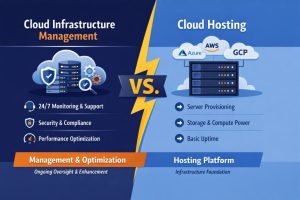
Cloud infrastructure management is the proactive orchestration, scaling, and securing of a network environment, whereas cloud hosting is simply the provision of virtualized server resources. While cloud hosting gives you the “engine” to run your applications, cloud infrastructure management provides the “driver” and “mechanic” necessary to ensure that engine runs efficiently, securely, and cost-effectively. In 2026, businesses require both to navigate the complexities of multi-cloud environments, autonomous AI workloads, and stringent global data compliance standards. Relying solely on hosting without active management leads to “cloud sprawl,” where costs spiral out of control and security vulnerabilities remain unpatched, ultimately threatening business continuity.
Understanding the Fundamental Divide Between Hosting and Management
To understand why the distinction matters, one must look at the service boundaries of modern providers like AWS, Azure, or Google Cloud. Cloud hosting is a utility; it is the delivery of compute, storage, and networking as a service. When you purchase cloud hosting, you are essentially renting a virtual partition of a high-end physical server. However, the provider’s responsibility typically ends at the hypervisor level. This is known as the Shared Responsibility Model. If your Linux kernel is outdated, if your cPanel account is compromised, or if your PHP-FPM process crashes due to a memory leak, the hosting provider is not obligated to intervene. Cloud infrastructure management fills this gap by taking ownership of the operating system, the application stack, and the security perimeter.
The Root Cause of Cloud Failures in Unmanaged Environments
The primary reason businesses face downtime in the cloud is not usually a failure of the hosting provider’s hardware, but rather a lack of granular infrastructure management. Most “outages” are actually configuration drifts or resource exhaustion events. For instance, a common root cause is the “zombie process” or log file accumulation that hits disk quotas. In a standard cloud hosting setup, the server will simply stop responding once the disk is 100% full. An infrastructure manager, however, implements log rotation, automated cleanup scripts, and threshold alerts. Without this management layer, a business is essentially running a high-performance machine without a dashboard, leading to inevitable and preventable crashes.
How Engineers Diagnose Cloud Performance Bottlenecks
When an engineer investigates a slow application, they don’t just check if the “server is up.” They perform a deep-dive analysis of the system’s internals. Diagnosis usually begins with checking the Load Average and CPU I/O Wait times. Using tools like top, htop, or iostat, an engineer can determine if the bottleneck is the processor, the memory, or the disk throughput. For example, if the command iostat -xz 1 shows a high %util for the primary disk, it indicates that the cloud hosting’s IOPS (Input/Output Operations Per Second) limit has been reached. This is a management issue the infrastructure needs to be re-provisioned with faster EBS volumes or a distributed caching layer like Redis must be implemented to reduce disk hits.
Tactical Resolution of Memory Leaks and Process Crashes
In production environments, a frequent issue is the sudden termination of critical services like MySQL or Node.js due to the Linux “Out of Memory” (OOM) Killer. An infrastructure management expert diagnoses this by inspecting /var/log/syslog or /var/log/messages. By running grep -i "killed process" /var/log/syslog, an engineer can see exactly which process was terminated and why. The fix isn’t always “adding more RAM,” which is the expensive hosting-only solution. The management solution involves tuning the service configurations—such as adjusting the innodb_buffer_pool_size in MySQL or setting memory limits in a systemd unit file—to ensure the application stays within its allocated resources while maintaining peak performance.
The Engineering Approach to Server Hardening and Security
Security in cloud hosting is often mistaken for just having a “Security Group” or a basic firewall. Expert-level cloud infrastructure management goes much deeper into server hardening. This involves disabling unused ports, enforcing SSH Key-only authentication, and configuring advanced intrusion prevention systems like CSF (ConfigServer Security & Firewall) or Fail2Ban. An engineer will audit the system using commands like netstat -tulpn to ensure no unauthorized services are listening for connections. They also implement patch management, ensuring that “Zero Day” vulnerabilities are mitigated within hours of release, rather than waiting for a monthly hosting update that may never come for a self-managed VPS.
Real-World Production Scenario: Handling a Traffic Spike
Imagine a retail business running a promotion. With cloud hosting alone, the server may simply buckle under the load. In a managed infrastructure scenario, engineers have already configured “Auto-scaling Groups” and “Load Balancers” (like Nginx or HAProxy). They monitor the traffic in real-time using Zabbix or Nagios. If the concurrent connections exceed a certain threshold, the management layer automatically triggers the deployment of additional instances. Once the traffic subsides, the management system “scales down” the infrastructure to save costs. This synergy between hosting (the resources) and management (the intelligence) ensures that the business pays only for what it needs while remaining 100% available.
Command Line Insights: Managing Services in 2026
Modern infrastructure management requires a mastery of the CLI to maintain uptime. For example, when managing a cPanel or WHM-based cloud server, an engineer might need to rebuild the Apache configuration after a PHP update. Using /scripts/rebuildhttpdconf followed by a graceful restart using systemctl restart httpd ensures no active connections are dropped. Similarly, for Node.js environments, managing processes via PM2 allows for “Zero-Downtime” reloads. A command like pm2 reload all --update-env ensures that the application environment variables are refreshed without the user ever seeing a “502 Bad Gateway” error. These are the granular actions that separate a managed environment from a simple hosting account.
MOVE BEYOND BASIC CLOUD HOSTING
Is your cloud server secure, optimized, and actively monitored or just simply hosted?
Cloud hosting only provides the infrastructure. Our engineers help manage, secure, monitor, optimize, and scale your cloud environment using proactive infrastructure management, server hardening, auto-scaling, performance tuning, backup strategies, and 24/7 monitoring to prevent downtime, security breaches, and resource exhaustion.
Performance Impact: The Latency and Uptime Correlation
The impact of professional management on business KPIs is measurable. Studies show that a 100ms delay in website load time can decrease conversion rates by 7%. Cloud hosting provides the network backbone, but management optimizes the “Last Mile.” This includes configuring Gzip/Brotli compression, HTTP/3 (QUIC) protocols, and fine-tuning the Linux TCP stack for faster packet delivery. Infrastructure managers monitor “Time to First Byte” (TTFB) using tools like New Relic and Datadog to pinpoint exactly where latency is introduced whether from a slow database query or a suboptimal CDN configuration and rectify it before it impacts the bottom line.
Best Practices Used by Senior Infrastructure Engineers
Senior engineers follow a “Code as Infrastructure” philosophy, even in managed service environments. This involves using tools like Terraform or Ansible to automate the deployment of server configurations. A best practice is to implement “Immutable Infrastructure,” where teams never modify running servers; instead, they deploy a new, patched image to replace the old one. This approach eliminates “configuration drift,” where two supposedly identical servers gradually become different over time due to manual changes. Additionally, maintaining a robust backup strategy using R1Soft or Acronis with off-site replication is a non-negotiable management standard that hosting providers often charge extra for or ignore.
Comparison Insights: Why One Cannot Survive Without the Other
Comparing cloud hosting to cloud infrastructure management is like comparing a library to a researcher. The library (hosting) has all the information (resources), but the researcher (management) knows how to find exactly what you need, summarize it, and apply it to your specific problem. In 2026, the complexity of “Cloud Native” technologies like Kubernetes and Docker means that the “Hosting” layer is becoming a commodity, while the “Management” layer is becoming the primary differentiator. A business that spends $5,000 on high-end hosting but $0 on management will likely perform worse than a business that spends $2,000 on hosting and $1,000 on expert management.
Real-World Case Study: The Recovery of a Compromised Server
A medium-sized e-commerce firm was using a popular cloud hosting provider but had no active management. Their server was hit by a brute-force attack on an unpatched XML-RPC vulnerability in WordPress. The hosting provider’s response was to null-route the IP to protect their network, effectively taking the client’s business offline. Our engineers intervened, gained access via the cloud console, and analyzed the logs. We identified the malicious IP patterns using awk '{print $1}' /var/log/apache2/access.log | sort | uniq -c | sort -nr. We then implemented a Web Application Firewall (WAF), patched the vulnerability, and moved the database to a managed RDS instance. Within two hours, the site was back online, secured, and faster than before. This demonstrates that while hosting provided the space, management provided the survival.
Final Summary and Business Conclusion
In the digital economy of 2026, success depends on how well your infrastructure is managed, not just where it is hosted. Cloud hosting provides the foundation. However, cloud infrastructure management ensures that this foundation remains stable, secure, and efficient.
High-performance platforms like Amazon Web Services and Microsoft Azure deliver powerful resources. When combined with expert management, businesses achieve up to 99.99% uptime, strong security, and optimized costs.
Do not leave your digital assets to chance. Combine the power of the cloud with the expertise needed to manage it effectively.



